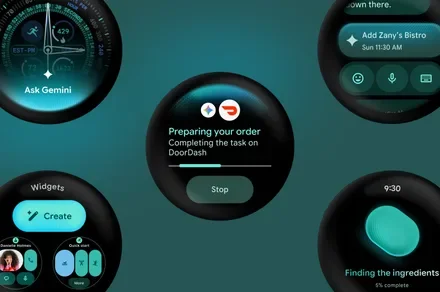
The new Gemini look for Wear OS that was revealed with Wear OS 7, is finally rolling out, and it borrows straight from your phone’s playbook. The assistant is getting a new overlay design based on Neural Expressive, the same visual language Gemini already uses on Android phones and tablets, and it is all in the name of making the assistant feel consistent no matter which screen you are tapping.
What was wrong with the old Gemini look?
Until now, activating Gemini on your Pixel Watch meant opening the full app, which took over your entire screen. It worked fine, but it never quite matched the smoother, more integrated feel you get when you summon Gemini on your phone. This update closes that gap.
How does the new overlay actually work?
Instead of launching a separate app, Gemini now appears as an overlay right on top of your current watch face, just like it does on Android phones and tablets. You get the same Neural Expressive background, along with the familiar spark icon and greeting Gemini uses everywhere else.
Play Store screenshots also show off a couple of nice touches. You will see a live transcript of whatever you ask Gemini, plus confirmations once it finishes an action for you. It is a small change, but it makes the whole exchange feel less like a black box and more like an actual conversation.
Why this matters
Cross-device consistency sounds like a boring phrase, but it genuinely changes how an assistant feels to use. When Gemini looks and behaves the same whether you are tapping your watch or your phone, it stops feeling like three separate assistants stitched together and starts feeling like one smart helper that just follows you around.
If you own a Pixel Watch 4, keep an eye on your Play Store updates. This overlay looks like it is already making its way to some watches, and yours could be next.