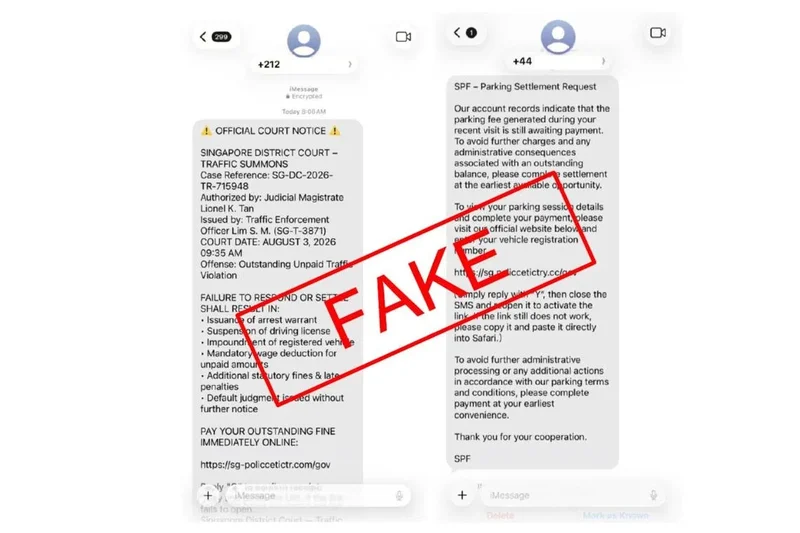
Be on alert for iMessages from scammers posing as the police and Singapore courts
AI generated
SINGAPORE - Those using Apple’s iMessage should be wary of scammers attempting to obtain personal details and banking information via the instant messaging platform, amid a rise in phishing scams impersonating the country’s police and courts.
In a statement on Aug 8, the police said that while no financial losses to such ruses have been reported, the scam pattern has been observed across several channels.
Most victims of this scam received unsolicited iMessages from foreign numbers or e-mail addresses purportedly from the police or a district court, claiming that the recipient had committed a traffic offence, incurred an unpaid parking fee or failed to settle a court summons.
The messages threatened consequences such as an arrest warrant or vehicle impoundment, and directed the victims to click a link or reply with a code to “acknowledge” the notice.
They directed the victims to click a link or reply with a code to “acknowledge” the notice.
Upon clicking the link, they would be redirected to a spoofed government portal, where they would be prompted to enter their card details, online banking credentials or a one-time password to “process” the “outstanding payment”.
The victims would realise they had been scammed only when unauthorised transactions appeared on their bank accounts.
“Members of the public should note that the Singapore Police Force, Traffic Police and the Singapore Courts will never request payment via unsolicited links or text message replies,” said the police.
Anyone who receives notice of a traffic offence or court summons should verify it through the official portals at www.police.gov.sg or www.courts.gov.sg, or by contacting the relevant authority directly on their official contact numbers.
iMessage users are advised to enable their Filter Unknown Senders and Filter Spam functions in their app settings, and report suspicious messages via the in-app reporting function.
The police advise the public to install the ScamShield app and enable security features such as two-factor authentication for bank accounts and e-wallets, and set transaction limits for internet banking and PayNow.
For more information on scams, visit www.scamshield.gov.sg or call the ScamShield Helpline on 1799.