TechRadar Verdict
The Logitech Mobi Fold is a product that seems better in concept than it is in reality. It suffers from underwhelming ergonomics, finicky scrolling, and slightly stiff buttons. And even though it offers impressive battery life and it's nice and compact for travel, I’d argue that for the price you pay, you’re getting little back in terms of value.
Pros
- +Phenomenally compact and portable build
- +Silicone material is pleasant to the touch
- +Strong battery life
Cons
- -A little awkward to grip
- -Scrolling doesn’t feel great
- -Left and right clicks feel stiff
- -Overall poor value for money
Why you can trust TechRadar
Logitech Mobi Fold review
The Logitech Mobi Fold is, without question, the weirdest mouse I have ever used in my life.
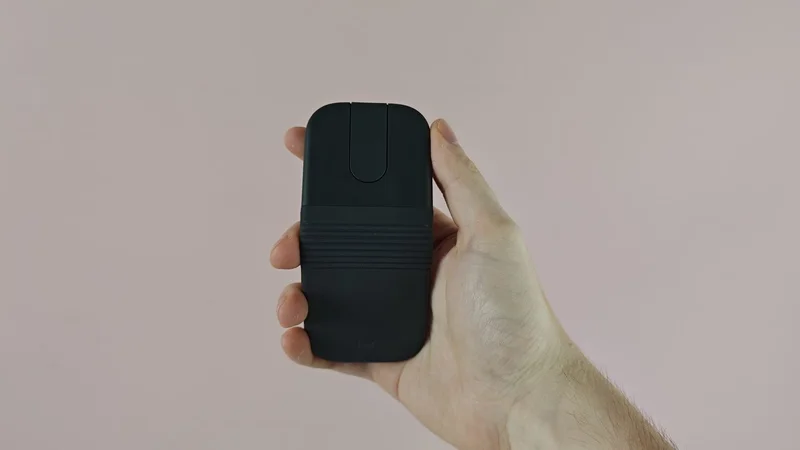
This tiny, foldable travel mouse is focused on one thing above all: portability. Just like a clamshell phone from the noughties, it can fold in half, allowing you to easily slip it into your pocket if you’re working on the go. But even though the Logitech Mobi Fold’s exceptional portability is its clear USP, I have to ask… is it actually that necessary?
After all, a lot of mice are already highly compact, and if you’re working on the go, you’ve probably got a bag to hold your laptop or tablet, right? I’d bet that your bag can fit a laptop and a mouse, so arguably, the thing that makes this mouse so special isn’t actually that game-changing.
Still, the Mobi Fold has a few interesting features to run through, and you’re surely curious as to how such a strange model feels in use. So, after using the Logitech Mobi Fold as my main mouse for a few days, here’s how I’d rate it — and whether I think it can compete with the best mice around.
First things first, the Mobi Fold is incredibly easy to get set up. There’s a sync button on it that makes linking up to a windows laptop, Mac, or Android device incredibly seamless. There’s also an easy switch feature, making it incredibly speedy to flick between a range of devices.
But after I got set up with the Mobi Fold, and started using it to get some work done I have to say… it wasn’t amazing.
The Mobi Fold exhibits a few key issues that make it feel inferior to a standard compact or productivity mouse. First of all, it has a slightly bizarre build. Its V-shape form makes it feel awkward to grip, and when using it for extended periods, this caused me to feel some discomfort in my hand. It lacks the ergonomics of my everyday mouse, the Razer Viper V3 Pro, and even lacked its fluidity, meaning moving it across my desk felt clunky.
Sign up for breaking news, reviews, opinion, top tech deals, and more.
In addition, the touch-controlled scrolling is a bit inconsistent. It doesn’t provide the same tight control of a traditional mechanical scroll wheel, and again feels a bit lacking in terms of fluidity. Don’t get me wrong: it’s totally functional, but if you want the smooth, precise scrolling of a traditional mouse, the Mobi Fold may leave you wanting more.
My final critique is on the feel of the left and right buttons. While these are serviceable, they felt more stiff than I expected them to, especially towards the back and middle of the model. I did appreciate the muted sound of clicking the left and right buttons, but I wish they felt a bit more sensitive.
Despite all of this, there are some clear positives worth pointing out. First of all, the mouse offers great battery life. It supplies about 22 hours of continuous use, which easily got me through the work week, meaning I didn’t need to charge it at all during the testing period. Having said that, Logitech says that you can get an extra three hours of use from just one minute of charging, making it exceptionally practical for someone like me who often forgets to juice up their devices.
In addition, the Mobi Fold features customizable button controls through the Logi Options+ app. This enables you to adapt pointer speed, set the central touch panel to different functions (like paste, volume controls, or a keyboard shortcut), and more.
In terms of design, I’m also a fan of the rubbery texture of the mouse, which is very pleasant to the touch. It’s also worth noting that 36% of the plastics used in the Graphite colorway of the mouse I used are made from recycled materials. It’s 29% for the Lilac and Off-White variants, which look pretty stylish in my opinion.
Look, the Logitech Mobi Fold does well to stand out from the crowd. Its lightweight and foldable design undoubtedly makes it easy to travel with — even though I’d argue that standard mice are probably portable enough as they are. In addition, the customizable buttons, long battery life, and satisfying feel of the mouse are clear positives.
But for $79.99 / £69.99 / AU$129.95, the Mobi Fold ends up feeling like a relatively poor value for money option. Really, that comes down to one thing: its lackluster performance. With underwhelming ergonomics, as well as slightly stiff scrolling and buttons, the Mobi Fold feels like an idea that’s far more impressive in concept than it is in practice.
Logitech Mobi Fold review: price & release date
- $79.99 / £69.99 / AU$129.95
- Released in June 2026
- Available in four colors
The Logitech Mobi Fold released in June 2026, carrying a list price of $79.99 / £69.99 / AU$129.95. That price means it’s competing in the same price bracket as great models we’ve tested, such as the Keychron M6 8K, but a lot more than our favorite ultra-compact mouse, the Logitech Pop Mouse. It's available in four colors, including Graphite, Off-White, Lilac, and Sand.
Logitech Mobi Fold review: specs
| Interface | Bluetooth 5.1 LE |
| Battery life | 22 hours (continuous use) |
| Buttons | 4 |
| DPI | 4,000 |
| Switches | Not stated |
| Weight | 2.8oz / 79g |
Should I buy the Logitech Mobi Fold?
|
|
|
|
|---|---|---|
| Design | Lightweight and foldable for travel, nice material and color options, but poor ergonomics. | 3/5 |
| Performance | Functional, though clicking feels a bit stiff, touch scroll panel isn’t most precise, and uncomfortable for longer usage sessions. | 2.5/5 |
| Value | Simply too expensive for the quality on offer. | 2.5/5 |
Buy it if…
You want something ultra-portable
Perhaps the main attraction of the Mobi Fold is its ultra-compact form factor. If you want something you can slide into your pocket for on-the-go use, it doesn’t get much more convenient than this.
You want a stylish mouse
One thing I won’t deny about the Mobi Fold is that it's pretty stylish. Its foldable design, its enticing color options, and its appealing silicone exterior all work in its favor.
Don’t buy it if…
You want top-tier ergonomics
The slightly odd shape of the Mobi Fold can make it a little awkward to grip and use for longer periods, meaning it's not the best option if you value great ergonomics and comfort.
You’re looking for precise performance
The Mobi Fold uses a touch sensor for scrolling, and it just doesn’t feel as precise as a typical mechanical scroll wheel. Pair that with slightly stiff left and right buttons and its unorthodox feel, and it falls short of some major competitors in its price range.
Logitech Mobi Fold review: also consider
Logitech Pop Mouse
Logitech knocked it out of the park with the Pop Mouse, which is one of our favorite compact models you can buy. With satisfying clicks, good customization options, and easy switching, it's a certified hit — especially when you consider its modest asking price.
Keychron M6 8K
This one’s a little different, but if you have the budget to grab the Mobi Fold, then you may want to consider a model like the Keychron M6 8K instead. It boasts a lightweight feel, 8K polling, fantastic ergonomics, and a feature-rich companion app, making it a brilliant all-rounder.
How I tested the Logitech Mobi Fold
- Spent days using it as my main mouse
- Tried out its various features
- Took on the go to test its travel credentials
I spent multiple days testing the Logitech Mobi Fold, using it as my main mouse in the office and when working from home.
During my time with the Mobi Fold, I used it for general productivity, exhausted its various features, and even took it on the go to assess its on-the-go credentials. I typically had the mouse connected to my Windows PC, but I also tried it out with an Android phone.
More generally, I’ve spent years testing gadgets here at TechRadar, where I serve as an in-house Senior Reviews Writer. I’ve tried out a wide array of computing accessories, such as the Turtle Beach Command Series KB7 keyboard, as well as gaming gear, premium wireless headphones, power banks, and more.
- Read TechRadar’s reviews guarantee
- First reviewed: August 2026
Harry is a Senior Reviews Writer for TechRadar. He reviews everything from party speakers to wall chargers and has a particular interest in the worlds of audio and gaming. Harry has a background in business tech journalism, particularly around the telecoms industry.