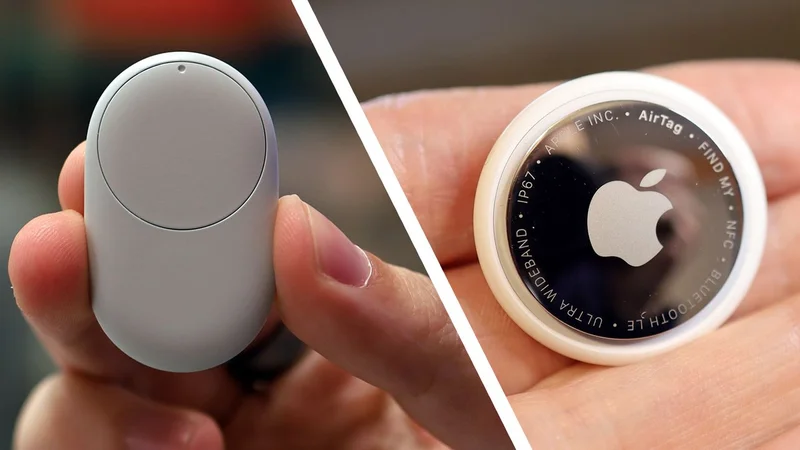
After the Apple AirTag, and the Samsung Galaxy Smart Tag, we finally have the Google Pixel Tag too — and at first glance, without having tested it, it seems like a decent device. There's water resistance, ultra-wideband (UWB) support for more precise location reporting, and a replaceable CR2032 battery that should last over a year.
Obviously, the Pixel Tag will work with Google's Find Hub, which already lets you track people and devices (including phones, tablets, smartwatches, and earbuds) from a web browser or an Android app.
But it's that Find Hub that might end up holding the Pixel Tag back, for now at least. In some areas it's not quite as slick and as comprehensive as the equivalent Find My service that Apple offers for its various devices. Here are five improvements I think Google could make to Find Hub, which would really help the Pixel Tag take off.
1. Notify when left behind
This is something that Apple's Find My does really well, and something that's genuinely useful: you can set up warnings to appear whenever your iPhone gets separated from your Mac, iPad, AirPods, or a specific AirTag. The idea is it can save you from walking out of the door at home or the office and leaving behind a particular gadget that you'll need.
There's no such feature on Google Find Hub — you can get alerts when specific people leave or arrive at places, but there's not an equivalent option for your devices. If you set off in the morning without your Android tablet or your Pixel Buds, then you're going to have to do without them until you return. It's something I think I'd use in Google Find Hub a lot.
2. See location tracking over time
Google Find Hub is fine for seeing where devices are now, but what about where they used to be? Seeing a breadcrumb trail of a missing camera or phone can be very useful in terms of tracking it down — and the same feature can be used to map out a walking trail, for example, or to keep an eye on the kids. It's something Samsung SmartThings does well.
Clearly this brings up concerns about potential stalking, but I think Google could build in enough safeguards and enough explicit permissions to make sure the devices you're tracking really do belong to you (specific confirmations could be regularly requested for example). It's another upgrade that would make Find Hub significantly more useful.
Sign up for breaking news, reviews, opinion, top tech deals, and more.
3. Reverse tracker ringing
Through the Google Find Hub you can get any of your tracked devices to make a sound so they're easier to locate, but there's no option to make your phone ring from a connected Bluetooth tracker — such as, say, a Pixel Tag. It's the kind of reverse tracking that might come in handy if you've still got your tracker but your phone has disappeared somewhere.
What makes the feature omission more frustrating is that you can do this with trackers from the likes of Pebblebee and Motorola, but only if you use them through their own companion apps rather than Google Find Hub. It means owners of these other trackers are more likely to end up not using Find Hub, which makes it less useful for everyone else.
4. Too many tracking options
If you delve into the settings screen for Find Hub on most Android devices, you'll see four options for controlling how those devices are found by, and contribute to, the network crowdsourcing that's needed for locating lost gadgets. For example, you can opt to get a ping when one other Android device sees your lost item, or wait for multiple reports.
To Google's credit, this is designed to give you more control over your devices and how they contribute anonymously to the Find Hub network. What's more, the four options are reduced to two on newer Android devices starting from the Pixel 10. Even so, it's still a bit of overly onerous configuration that is more difficult to understand than it should be.
5. You can't revert to Bluetooth-only operation
The Find Hub app on your Android phone requires both an internet connection and Bluetooth in order to locate your trackers, and while most of the time that's all well and good, there may be occasions when you don't have the Wi-Fi or cellular signal you need — and on those occasions you can't simply switch to Bluetooth-only operation for tracking.
So if you're traveling on trains and planes with a spotty connection, or just arrived in a foreign country and haven't been able to get online yet, or you're hiking in the wilderness with no signal, you're pretty much cut off from your Bluetooth trackers even though they might be nearby and detectable — another missing function I'd like to see Google add in.
Dave is a freelance tech journalist who has been writing about gadgets, apps and the web for more than two decades. Based out of Stockport, England, on TechRadar you'll find him covering news, features and reviews, particularly for phones, tablets and wearables. Working to ensure our breaking news coverage is the best in the business over weekends, David also has bylines at Gizmodo, T3, PopSci and a few other places besides, as well as being many years editing the likes of PC Explorer and The Hardware Handbook.