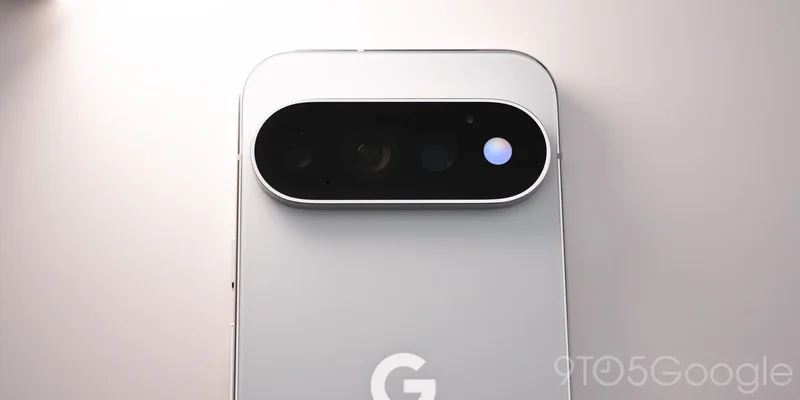
With the launch of the Pixel 11 Pro, Google has fully detailed how HiLight works and the thinking behind the hardware feature.
Available on the Pixel 11 Pro, 11 Pro XL, and 11 Pro Fold, HiLight is an array of ambient LED lights around the camera flash. On the Pro and Pro XL, it appears at the right of the camera bar, while it’s in the top-left corner of the Fold.
HiLight — “highlight,” or more literally “hello light” — is described by Google as a “glow” and works when your phone is placed face down. This light-based communication system serves as a visual cue to pick up your phone when a favorite contact calls.
Complementing the existing Flip to Shhh feature, this works with the Phone by Google app and WhatsApp. You can set one of five colors from the Contacts app, with Google choosing them to be visible for everyone. Possible use strategies include giving up to five people their own colors, or giving family all the same color and others for close friends. When you get a call, tapping the power button dismisses the HiLight glow.
HiLight’s other capability at launch is as a Gemini indicator, with users able to individually turn them on/off in system settings. It can be used to provide confirmation that “Hey Google” heard you, with different glow patterns for listening, thinking, and responding.
Google says that favorite contact colors will also work for messaging in the future, though it’s a shame this is not available on day one. It’s also unclear when third-party app support will arrive, if ever.
- Pixel 11: Google Store | Amazon | Best Buy
- Pixel 11 Pro: Google Store | Amazon | Best Buy
- Pixel 11 Pro XL: Google Store | Amazon | Best Buy
- Pixel 11 Pro Fold: Google Store | Amazon | Best Buy
- Pixel Watch 5: Google Store | Amazon | Best Buy