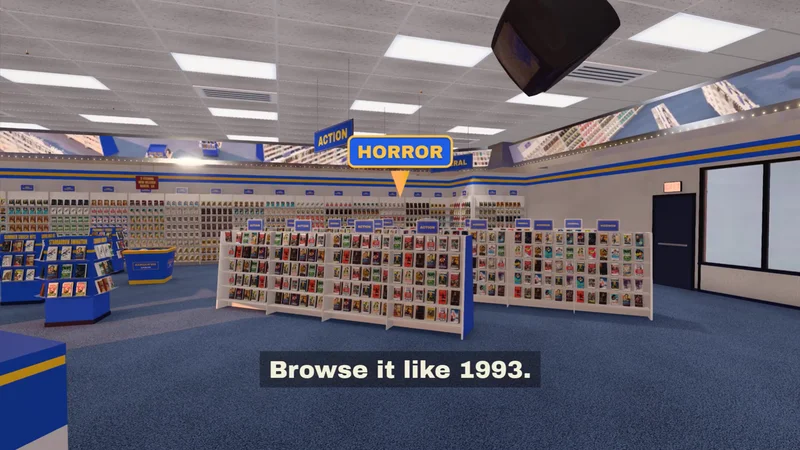
A Redditor shared their vibe-coded project, which added a 3D frontend to your Jellyfin HTPC. The app, called Halcyon Video and available on GitHub, is designed to bring back childhood memories when you spend weekend afternoons browsing video rental stores so the family has something to watch before going to bed. It’s open-source and self-hosted, so you can easily install it on your HTPC, and it also works with RomM if you have your own collection of retro video games.
“Wander the aisles, flip boxes over, rent at the counter, and the movie plays in your room (if you choose hardcore rental mode). TV series come shrink-wrapped as season box-sets,” u/halcyon-video said on Reddit. “‘Recently Added’ becomes ‘New Releases’ on the back wall. Everything has a purpose. There is too much to explain and you have to download and run it to find it all.” They also added, “Go use it, star it if you like it. This project has only just begun, and I will not rest until my childhood has been fully resurrected.” Aside from the GitHub repo, they also created a 45-second tour of the project on YouTube, as well as a demo so you can see how it works.
To complete the nostalgia, the box cover and plastic case pop up when you select a movie or TV series. You can even read warnings and tips at the back of the plastic case like “Please rewind after viewing,” and “If the picture rolls or has a lot of ‘interference,’ adjust the tracking device on your VCR.” Once you’ve chosen what you want to watch, you’ll have to walk out to the front counter to check it out, where the cashier will place it in a plastic bag so you can head back “home” to start watching. There are also several customizations that you can do, like picking a period from 1990, 1993, 2000, and 2010, setting different times like day, sunset, and night, and even choosing between VHS or DVD. We also can’t forget about the tape/disc return box that sits right by the entrance if you’re picking out another movie for tonight.
This isn’t just a random store where you pick out the movie or game that you like, and you’re instantly teleported back to your 4K TV. Instead, it’s a whole experience that you need to see for yourself to understand just how deep and immersive it is. To navigate inside the store, you can use the classic WASD and arrow keys on your keyboard, although Halcyon Video also supports controllers and HTPC remote controls, too. But, most importantly, this front end is all locally supported — it only uses the metadata from your library and does not make any outside calls to some external server.
So, if you’re tired of not owning your video library and are looking to build your own media server from leftover PC parts, consider adding this front end to make movie selection a little bit more exciting. That way, instead of spending hours scrolling through Netflix, you’ll spend a lot of time walking around this store from your childhood.
Get Tom's Hardware's best news and in-depth reviews, straight to your inbox.
Jowi Morales is a tech enthusiast with years of experience working in the industry. He’s been writing with several tech publications since 2021, where he’s been interested in tech hardware and consumer electronics.