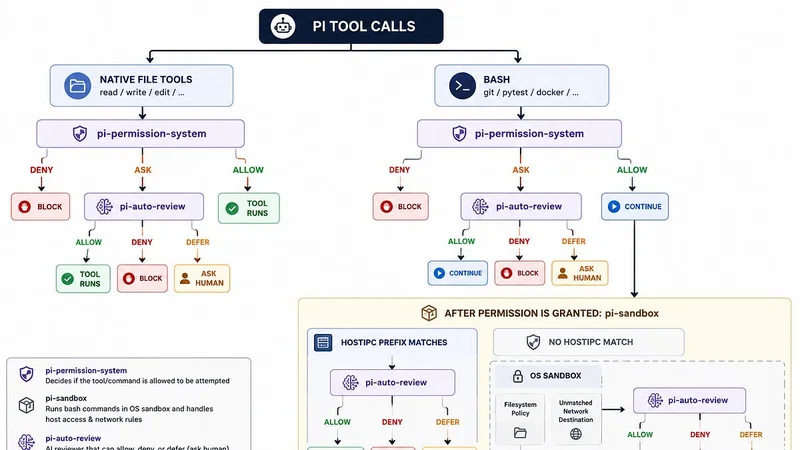
A Pi setup with permission, sandbox, and auto-review
A secure-ish way to run Pi on your host.
1. Motivation
Pi is great precisely because it is so customizable. Its core stays small, and extensions let you assemble the tools and workflow that suit your environment.
The trade-off is that Pi is intentionally permissive. By default, it runs with the permissions of the user who launched it and does not provide a built-in approval system or OS sandbox. That “YOLO” experience is productive, but an agent capable of reading files and running arbitrary shell commands deserves a clearer security boundary.
Running Pi inside a container is one option. However, that becomes awkward when the project itself relies on Docker Compose, the host Docker daemon, or other host-only development services. Giving the container access to the Docker socket also hands it considerable power over the host.
What I wanted instead was:
- normal work inside the current repository;
- OS-level isolation for ordinary shell commands;
- deterministic blocks for secrets and paths outside the repository;
- automatic review of requests that cross selected boundaries; and
- a narrow, reviewed way to run specific commands on the host.
Pi’s extensibility makes this possible, but discovering how the pieces fit together is not obvious. Hopefully this article gives you a useful starting point for a more secure host-based Pi setup.
2. The setup
The design combines three extensions:
@gotgenes/pi-permission-systemdefines deterministic-allow,-ask, and-denyrules.@erichll/pi-sandboxruns ordinary Bash commands inside an OS sandbox.@erichll/pi-auto-reviewreviews network, permission, and host-execution requests that require a decision.
Each layer has one job. The permission system establishes hard boundaries, the sandbox contains processes, and the reviewer handles contextual exceptions. An LLM decision never replaces a deterministic rule for something that must always be forbidden.
How the piece fits together
Install the components
Assuming Node.js is already installed, install Pi and the Linux sandbox dependencies:
npm install -g --ignore-scripts @earendil-works/pi-coding-agent
sudo apt-get install -y bubblewrap socat ripgrep
Install the extensions globally, not from inside a project:
pi install npm:@gotgenes/pi-permission-system
pi install npm:@erichll/pi-auto-review
pi install npm:@erichll/pi-sandbox
pi list # to list the installed extensions
These extensions are trusted host code, so review their source and record the versions used in a reproducible deployment.
Define the hard boundaries
Create ~/.pi/agent/extensions/pi-permission-system/config.json:
{
  "authorizerChain": ["pi-auto-review"],
  "permission": {
    "*": "allow",
    "path": {
      "*": "allow",
      "*.env": "deny",
      "*.env.*": "deny",
      "*.env.example": "allow",
      "*.pem": "deny",
      "*.key": "deny",
      "~/.ssh/*": "deny",
      "~/.aws/*": "deny"
    },
    "external_directory": "deny",
    "bash": {
      "*": "allow",
      "sudo *": "deny"
    }
  }
}
The policy protects secret-shaped files, blocks access outside the working directory, and denies sudo. The authorizerChain connects permission requests that resolve to ask with the automatic reviewer.
The permissive Bash rule is intentional. It allows Bash calls to reach pi-sandbox; it does not run them directly on the host.
Sandbox Bash and select host commands
Create ~/.pi/agent/extensions/pi-sandbox/config.json:
{
  "subagents": {
    "provider": "builtin"
  },
  "hostIPC": {
    "mode": "ask",
    "preflightCommandPrefixes": [
      "docker compose ps",
      "docker compose up -d",
      "docker compose down",
      "docker compose exec app python manage.py test"
    ],
    "retryOnUnixSocketError": false
  },
  "filesystem": {
    "additionalAllowRead": []
  }
}
Commands that do not match a hostIPC prefix run in the OS sandbox. Matching a prefix does not automatically authorize a command; it only makes the complete command eligible for review and one-shot host execution.
Prefixes should describe specific operations. For example:
docker compose exec app python manage.py testis safer than:
docker compose exec appThe broader prefix would also make an interactive shell eligible for host execution. With retryOnUnixSocketError disabled, unlisted Docker commands remain sandboxed and fail when they try to reach the Docker socket.
Network access is handled similarly, with one important difference: approving a destination allows that specific connection while the command remains inside the sandbox.
Configure automatic review
Choose a model that is already configured and authenticated in Pi, then create ~/.pi/agent/extensions/pi-auto-review/config.json:
{
  "model": "your-provider/your-review-model",
  "failureMode": "defer",
  "timeoutMs": 90000
}
failureMode: "defer" means a timeout, authentication error, or unavailable reviewer falls back to the human in an interactive session. It does not turn a successful model decision of deny into a prompt.
After a model denial, /approve lets an interactive user select a recent request and authorize one exact retry. The reviewer still evaluates that retry, and deterministic hard-deny rules remain final.
3. Test the setup
Before relying on the policy, test each boundary with non-sensitive fixtures:
- Check normal project access.- Ask Pi: - Run pwd and git status-
.- Expected: the commands run inside the sandbox. - Check the sensitive-file policy.- Ask Pi: - Read .env- .- Expected: the deterministic path policy blocks the request.
- Check the repository boundary.- Ask Pi: - Read ~/.config/i3/config- .- Expected: the request is blocked because the path is outside the repository.
- Check the same boundary through Bash.- Ask Pi: - Use bash to run: cat ~/.ssh/config- Expected: the request is blocked before any sensitive data is returned.
- Check network review.- Ask Pi: - Use curl to fetch https://some.untrusted.site-
.- Expected: the destination is reviewed before the sandbox connects to it. - Check an eligible host command.- Ask Pi: - Run docker compose ps-
.- Expected: the full command is reviewed and, if approved, runs once on the host. - Check an unlisted Docker command.- Ask Pi: - Run docker compose exec db bash-
.- Expected: the command remains sandboxed and cannot reach the Docker socket.
A forbidden request may be stopped by the permission layer or the OS sandbox. That overlap is deliberate: the layers protect different execution paths.
After changing configuration, use /reload or restart Pi before testing again.
4. Closing thoughts
This setup is not a proof of safety. Extensions are trusted host code, automatic reviewers can make mistakes, and an approved host command really does execute with your user permissions. Docker itself is powerful, especially when containers have host mounts, credentials, privileged access, or the Docker socket.
The useful property here is separation of responsibility:
- deterministic policy handles things that must never happen;
- the OS sandbox contains routine execution;
- automatic review handles narrow, contextual decisions; and
- host IPC exposes only the operations the development workflow actually needs.
Pi’s permissive design is valuable. The goal is not to turn it into a sequence of approval dialogs, but to keep its freedom inside a meaningful boundary. For Docker-based projects, this arrangement preserves the convenience of running Pi on the host without making unrestricted host execution the default.