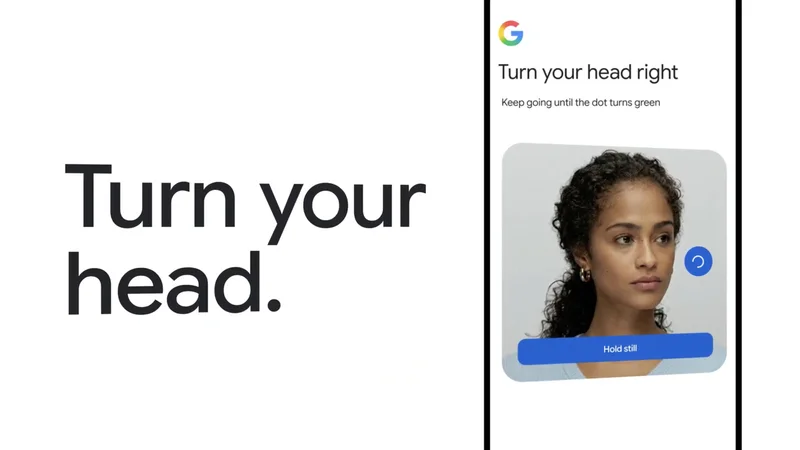
Google adds selfie video as a log-in option
It’s another way to use your face for identity verification.
You'll now be able to use selfie videos to log into your Google account. It has long been possible to log into Google using your face, via your phone's face unlock or if your passkey login uses biometrics for verification. This is yet another option to get into your account using your face to authenticate your identity, which could be especially useful if you don't have access to the phone or computer you typically use or if you got locked out of your account and none of the other log-in options are working.
To be able to use selfie log-in, you'll first have to set it up. On Google's My Account page, click on Security \& sign-in. Under the How you sign in to Google section, click on Selfie video. Click continue on the Add selfie for sign-in page. If your computer has a camera, you'll be able to do it right there. If not, you'll get a QR code that you can scan with your phone to finish the setup. You'll obviously have to remove your glasses or masks for the process, and the company advises against having people or busy backdrops in the background.
Google will ask you to turn your head in certain ways during the verification and every time you use the option to log in. The company says it's to fend off impersonation attempts, such as deepfake videos, and prove you're currently in front of the camera. It will, of course, have to save your selfie video and use it for comparison for future logins.
The company says it will encrypt your video and only use to help you sign in, but if you ever change your mind, you can delete it from your Google account. Just go to the Video Verification page and click delete next to the selfie you want to remove. Take note that the option is unavailable at the moment for Workspace accounts, child accounts and those enrolled in Google's Advanced Protection Program.