My mother and I have the same phone. We ordered ours at the same time from our carrier. We own a Samsung Galaxy S25+.
While we both love using our Samsung phones, our routines and settings are different. One of those habits is charging, as well as battery-saving.
I'm adamant about charging my phone irregularly and keeping the maximum charge at 80%, while she steadily keeps hers at 100%.
It's been a year since we bought our phones, so I wanted to take a snapshot of our battery health and compare our practices.
Our approaches for maintaining phone battery health
We are similar but still deviate
I usually keep my phone's charge between 20% and 80% when I can, though it has dipped to 15% or lower a few times.
My mom charges her device more frequently; she likes to top it off before work and charges it overnight, while I never do.
Our usage is different, but not by much. We both tend to watch videos, listen to music, use various apps, and use it for texting.
Neither of us truly games on our Galaxy S25+. I use it more for Galaxy AI features than she does, comparatively speaking.
All in all, we are both considered moderate-to-heavy users.
Another difference is how we use our battery-saving options. I use a custom battery-saving mode to maintain my phone's battery health.
At the same time, my mom turns it on manually when the battery reaches a certain level, usually when it starts falling below 20%.
I have also customized my screen timeouts and turned off adaptive brightness, opting to adjust it manually instead. She keeps the default screen timeout and uses adaptive brightness.
These options influence how often we may need to charge your devices. I focus on maximizing daily battery life, while she focuses on normalized patterns.
But the biggest difference is changing the maximum charging capacity, since that's supposed to influence the long-term health of your phone's battery.
As a device charges and discharges, its capacity diminishes over time, primarily due to chemical degradation in the phone's lithium-ion battery.
Heat is a byproduct of charging and discharging. Sometimes, during the last 10% of charging, a lithium-ion battery can generate significant heat due to internal resistance.
Heat is what we fear, as it can damage internal components, such as the battery.
To combat this, I became diligent in my charging practices.
I keep my maximum at 80%, and I top off my device when it gets near 20%. Typically, my phone's charge is in the 50% to 60% range.
Though I know this won't have an immediate impact on my battery health for a few years, I decided to run some tests and compare them to my mother's, who doesn't believe in these practices.
The first test involved doing a general diagnostic phone check. I ran the Samsung Members app's diagnostics test first.
I used that test to ensure that there was no major fault with our batteries.
Secondly, I checked our devices at 78% to 79% and took a quick snapshot of the estimated time from the settings menu.
I use dark mode; she uses light.
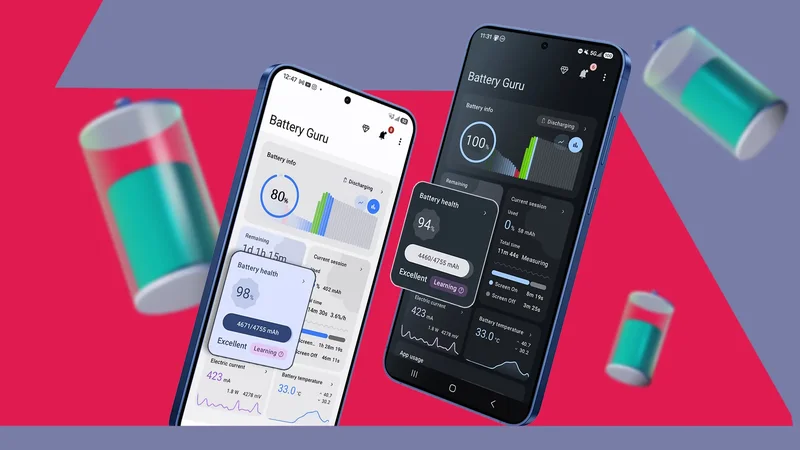
After I downloaded two apps that have been fairly decent at checking my device's battery health, those apps are Battery Guru and AccuBattery.
The results were not surprising except for one thing
My 20% maximum charge capacity loss is noticeable
On the fourth day of the test, the battery capacity estimate for my mother's phone, measured by AccuBattery in the charging section, was 4,505.0mAh.
Mine was at 4,406mAh. I assume that, since this is a stat measured while charging, my 80% cap influences the estimated battery capacity (so I should have a smaller number by default). This is true. I cross-checked it.
Comparatively, our numbers are not far off given that I am only charging up to 80%, whereas my mother diligently keeps hers at 100%.
The Samsung Galaxy S25+ has a design capacity of 4,755mAh (Samsung officially rates it at 4,900mAh).
The next value I checked was the Health section. I set my maximum charging capacity to 100% for this test so I could more accurately reflect the estimated health.
Mine was set to 95%, and so was my mother's.
I also decided to check what Battery Guru estimated.
Battery Guru is my go-to app because it helps me manage wakelocks that can sometimes interfere with my device's screen time, so I have had it on my phone since I installed it a year ago.
I am more inclined to trust Battery Guru's estimated values since the more charging/discharging cycles it detects, the more data it can measure.
Unfortunately, this wouldn't hold true for my mother's phone, since I only had four days to run these tests and had to install both apps on the first day.
For my mother's phone, the status is "learning" (technically, my status changed to learning for the 100% capacity test), even though it's been four days since I conducted the test — which likely means she just isn't charging or discharging it frequently enough.
I semi-expected this because she takes care of her phone, and while we are in a similar category as moderate-to-heavy users, I lean more toward the heavier side than she does because of my job.
Based on the data, battery health was measured at 98%, and her capacity was evaluated at 4,671/4,755mAh, which is again quite healthy.
For me, it was at 94%, measured at 4,460/4,755mAh. That's still healthy given how hard I push my phone.
All in all, our batteries are still in pristine condition after a year of use. However, I have yet to see if my 80% maximum has paid off.
In theory, it should, since I am not exposing the battery to a higher voltage during the final stage of its charging cycle.
Though I expect to notice a slowdown with age (less wear and tear) after a few years of use.
The rate at which it does should be less — but the question becomes: How much?
So far, my mother's phone's battery seems to be in better condition, though this may depend on our usage patterns and the accuracy of these tests — these are still third-party apps, not official Samsung tools.
But I was surprised to see mine being worse by a noticeable amount.
Your choice of charger matters too
While these tests were done in the same household, I was able to use the same charger for both.
I avoid third-party, cheap chargers that don't match my phone's wattage.
I have been punished by using inexpensive cables that have actually heated my phone, regardless of my settings.
If you notice your device heating up while charging, it might be due to your charger, rather than the settings you're using.