I’m always on the lookout for new Android browsers that do a better job than Chrome.
And to my surprise, the Arc Search browser has something far more unique to offer than everything else out there.
I search a lot on search engines, and I tend to use Brave’s built-in search engine or Google in tandem with Aloha browser’s aggressive ad-block feature.
But I finally found a browser that does search engine results differently, and it turned me into a quick-answer powerhouse.
Arc Search’s main feature is the future of search engines
Making search simpler and enjoyable
After using various search engines, I wondered if the entire process could be more enjoyable and simple.
While I do love DuckDuckGo’s no-fuss search engine, I still have to go through a list of websites to find answers.
Thankfully, after coming across Arc Search, all my prayers may have been answered.
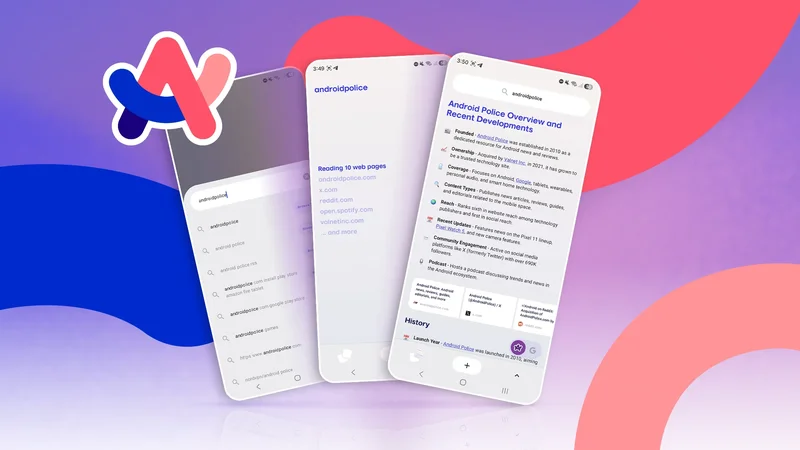
Arc Search has a Browse For Me feature that delivers clean, structured, decluttered, and visually appealing results using two AI models.
What’s neat is that the feature is somewhat similar to Google’s Gemini/AI Mode, but the results are easy to read.
And when I wanted to do a traditional search engine query via Google, I could easily switch with a tap of a button.
I recently asked Gemini to plan my vacation, and it did an excellent job of giving me recommendations.
I wanted to test the same query with Arc Search. Surprisingly, Arc Search gave me great results, similar to Gemini’s, with relevant descriptions and website links I could use.
I was a bit unsure about the result at first, but thankfully, Arc Search provided a full list of sources at the bottom that I could use to verify it.
The experience of getting answers was so fast that, within a few days, I stopped scrolling through SERPs (Search Engine Results Pages) and started using Browse For Me exclusively.
After using this feature extensively, it hit me. Browse For Me is not only convenient, but it might also be the future of search engines.
I didn’t realize this right away because hindsight is always 20/20, but the Browse For Me feature already makes scrolling through SERPs look dated.
SERPs are usually used to serve ads to users and are treated more like an ad profile. Arc Search, on the other hand, has a built-in ad-blocker and prioritizes speed and decluttering.
For the first time, I felt that searching for queries wasn’t a chore or a daunting task, but a cleaner, faster way to get answers.
Arc Search offers more than just a gimmick
They might be on to something
Arc Search’s main selling point is to use it for search queries, get the answer, and get back to normal life.
While many would see it as a gimmick, I see it as a quality-of-life improvement I didn’t even know I wanted.
Arc Search also offers other great features that I wish Chrome or Brave had incorporated.
I’m one of those people who has 60 tabs open in my browser to access information I was looking for earlier.
Unfortunately, in both browsers, having multiple tabs is quite jarring to look at, and some of them need to be reloaded if I access them after a few days.
On Arc Search, I can pin the most important tabs so that I can access them faster.
Similarly, for tabs I’m not using, I can set a time limit after which they will be archived automatically.
Here’s how you can set your own time limit for archiving tabs in Arc Search:
-
Open **App Settings**. -
Go to the **Storage**section. -
Tap **Archive Inactive Tabs**. -
Set your preferred time limit (ranges from **12 hours to 30 days**)
It’s also worth pointing out other features in Arc Search that reinforce the same ethos of fast browsing.
Features like Auto-Open Keyboard, support for 120Hz screens, and a gesture-friendly UI are just a few I want to mention for brevity.
I can go all day on how much I enjoy using Arc Search, but I also have to admit it’s not perfect. Arc Search has caveats that are hard to ignore, and it remains a secondary browser for me.
There are some key features I need in my browser that aren’t currently available or are broken in Arc Search’s Android app.
For starters, the password manager isn’t as reliable as other browsers, and I wouldn’t recommend going all in.
You can use third-party password managers like Bitwarden with Arc Search, but it has issues with the autofill feature.
Similarly, there’s no reader mode to speak of, which can be annoying when visiting websites that have a horrendous user experience.
But what I find most annoying is the lackluster Sync feature, which doesn’t offer the essentials.
If you’re hoping to sync your tabs, browsing history, or even passwords with the desktop version, you’re out of luck.
On top of the missing features, Arc Search is often quite buggy, which prevents me from making it my primary browser at the moment.
The last thing I want is for the browser to crash on me when I need it most.
Arc Search still has a long way to go
For what it’s worth, Arc Search can be an incredible browser if it wants to be. It does everything well that it advertises.
But considering all the issues the browser’s Android version has, it isn’t worth making my primary browser.
Hopefully, with time, Arc Search could .
But until the browser becomes more reliable, it’s better to use it as a quick-answer tool for now.