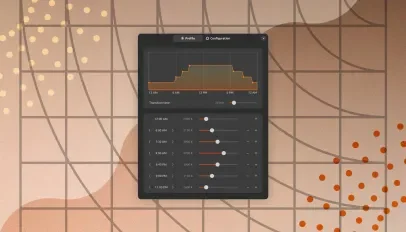
Night Light Scheduler is a new GNOME Shell extension that lets you control how warm your screen is throughout the evening (or day).
GNOME’s built-in Night Light feature offers a customisable daily schedule, and lets you pick a colour temperature that’s more or less orange (which will reduce blue light emitted by your device’s display).
But that temperature you set holds the entire time Night Light is switched on. It eases in and out at each end but it never changes in between.
For most of us, the default behaviour is fine. It’s set-and-forget to a fixed schedule.
But if you want the temperature of your screen to vary over the course of the day, Night Light Scheduler gives you the ability.
You could have a cooler value in the early evening, before gradually climbing in warmth every hour until a deeper tone last-thing-before-bed.
Set up to 7 colour temperatures (1500K to 6500K) for your display to use at specific times of the day (15m increments), and adjust the transition period between them (0 to 120mins).
A higher transition time offers a subtle, smoother segue between values (which is harder to notice). A lower transition time means a faster ramp between values (instant, but the transition can seem jarring).
Schedule configurations can be imported and exported as an editable .ini file.
Want to try it out? Night Light Scheduler works on GNOME 46 (Ubuntu 24.04 LTS) through GNOME 50 (Ubuntu 26.04 LTS). You don’t need anything additional on top as it makes use of GNOME’s built-in colour shift feature.
Install it from the GNOME Extensions website via your browser, or, for less hassle, install the Extensions Manager app from the Ubuntu repos and search it out in that.