Viruses and malware continue to be an issue online, potentially threatening your PC and the data stored on it. While Windows Defender is a great built-in (and free) option, it can be worth investing in a dedicated antivirus solution. After all, what price do you put on keeping your personal information safe and secure?
That’s where Bitdefender and McAfee come in. Both are well-established brands. Bitdefender has been around since 2001 and McAfee since 1987.
Below, I’ve compared Bitdefender Premium Security and McAfee+ Premium based on my experience using both, looking at everything from performance and features to ease of use. I’ve also looked at the wider range of plans available from both companies to help you decide which is right for you.
Bitdefender vs McAfee: Pricing and plans
Bitdefender
Pros: Inexpensive standard plan; basic VPN included with all packages
Cons: More than five devices requires a family plan; subsequent years get much more expensive
McAfee
Pros: Unlimited devices possible; excellent security monitoring
Cons: Can get very expensive
Both Bitdefender and McAfee offer substantial discounts for the first year, with prices rising after that. Bitdefender gets around that pricing structure a little by offering a wealth of different plans for a similarly wide range of budgets.
For simple and straightforward antivirus protection, you can pay either £17.99 for one device or £19.99 for three devices with Bitdefender. These plans offer antivirus protection for all platforms and a VPN with 200MB of traffic per day. A better option for most households is Bitdefender Premium Security, which is the plan I tested for this comparison. It costs £59.99 for the first year and adds a password manager, unlimited VPN, scam protection, anti-tracker and email protection for two addresses.
Other plans include Total Security, which costs £49.99 and offers antivirus protection and a password manager, or Ultimate Security for £69.98, which includes everything in Premium Security as well as dark web monitoring, real-time breach notifications and an identity protection score. Prices increase if you opt for a family package, which includes five accounts and covers 25 devices.
Like Bitdefender, McAfee focuses on making the first year the bargain. It has a basic package for £29.99, which offers antivirus protection, a firewall, password manager, VPN, scam detector and identity monitoring, but it only works with one device at a time. Its Essential plan costs £39.99 and covers five devices, while McAfee+ Premium, the plan I tested for this comparison, costs £49.99 and protects an unlimited number of devices. There’s also Advanced for £74.99, which adds lost wallet protection and assistance from identity restoration experts if needed, while Ultimate costs £169.99 and adds more extensive identity theft and ransomware protection.
For families, McAfee+ Premium Family costs £59.99 and adds parental controls alongside protection for unlimited devices.
For straightforward antivirus protection, go for Bitdefender. Plans start from just £17.99. However, of the two plans I tested, McAfee+ Premium costs £10 less than Bitdefender Premium Security for the first year and protects an unlimited number of devices. In all cases, expect to pay a lot more once the first-year deal ends.
Winner: Bitdefender
Bitdefender vs McAfee: Features
Bitdefender
Pros: Comprehensive set of useful tools; password manager as standard
Cons: Not the cheapest features
McAfee
Pros: Scam detection included with all plans; social privacy manager is great
Cons: Essential plan is a little basic for the price
It’s a somewhat unoriginal answer but, features-wise, neither Bitdefender Premium Security nor McAfee+ Premium will leave you wanting more. I was very content with what each package provides, although the features you get will obviously depend on which plan you sign up for. For this comparison, I spent the bulk of my time with Bitdefender Premium Security and McAfee+ Premium, which sit at roughly similar points in each company’s range.
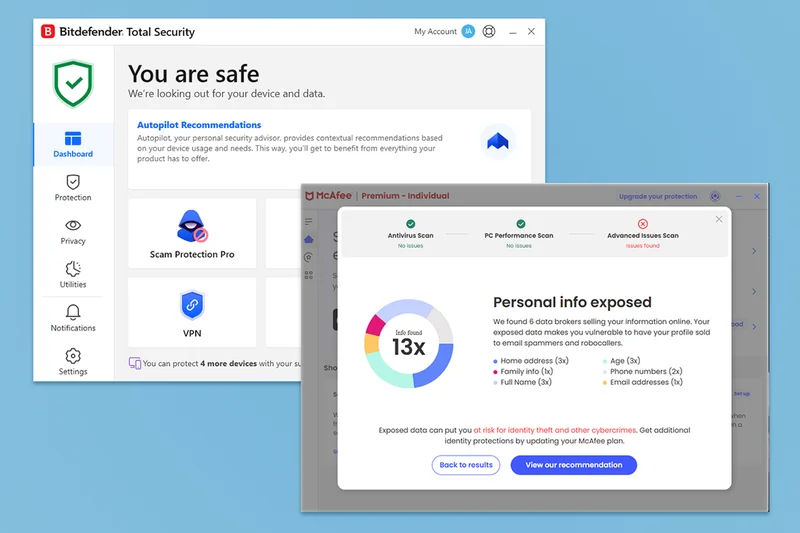
With Bitdefender Premium Security, you get antivirus protection, a password manager, scam protection, an unlimited VPN and other privacy and security tools. It’s all packaged within one dashboard, so there’s no need for additional apps. The interface could be a little clearer but you don’t strictly need to do much, as background checks keep you protected. It takes moments to set up scam protection, while a system scan takes longer but doesn’t require any input from you. There’s a nice focus on prevention over cure, with sections divided according to protection, privacy and other utilities. It is a tad pricey compared with competitors though, even during the first year of discounts.
McAfee+ Premium also offers a packed dashboard of security features. Alongside its antivirus protection, you get a scam detector, password manager, identity monitoring and VPN, as well as its social privacy manager. The latter sounds gimmicky but does a great job of helping you check whether your social media accounts are properly secured. If they aren’t, you could end up exposing information that makes identity theft easier. A scan is immediately performed upon installation, while the firewall and VPN can be instantly enabled.
A highlight of McAfee+ Premium is its smart scan feature. This runs an antivirus scan and a performance scan to look for junk files or registry issues, as well as checking for more advanced issues such as your information appearing on the dark web. Some of the issues it identifies may require a higher-tier plan or additional payment to resolve, but it’s neat that everything is wrapped up in one button. That makes it ideal for less knowledgeable users or anyone in a rush.
Winner: Draw
Bitdefender vs McAfee: Ease of use
Bitdefender
Pros: Very simple to use; lot of additional features
Cons: Dashboard a little cluttered
McAfee
Pros: Very simple setup; smart scan is a big time saver
Cons: Some upselling depending on what you’re signed up to
Bitdefender Premium Security’s dashboard is simple, if slightly cluttered. It may be down to personal preference but I found the amount of text a little imposing when I was first figuring out where everything was. However, it has some neat features that simplify things. These include autopilot recommendations, which provide contextual advice. For instance, it suggested I disable USB drives and similar devices from autorunning when plugged in, something I wouldn’t have particularly thought about otherwise. A set of quick actions is added by default but you can add your own if there are certain tasks you want to do regularly.
Elsewhere, Bitdefender has plenty of settings you can easily enable or disable. There’s also a notifications section, so you can see what it has recently done. You can even turn off promotional offers, which is good to see if you don’t want to be bombarded with upselling.
McAfee+ Premium does provide some upselling with a banner instantly encouraging you to ‘upgrade your protection’ and certain identity monitoring features requiring you to pay extra. None of these are essential for the most part though, and I appreciated the clearly laid out nature of the McAfee dashboard. It’s a little more attractive than the Bitdefender way of doing things.
There’s also a long list of different things to set up if you wish such as detecting video scams or email scams, with it clear what each option does. If you want to keep things simple though, you can’t go wrong with the smart scan feature. It takes out all the effort for you and ensures you’re protected or identifying vulnerabilities quickly.
It’s a close run battle but I slightly preferred McAfee’s way of doing things. I wasn’t a fan of upselling (who is?) but the smart scan feature was very useful, and I preferred the visual style of things.
Winner: McAfee
Bitdefender vs McAfee: Support
Bitdefender
Pros: 24/7 chat and phone; useful guides
Cons: Phone number isn’t freephone
McAfee
Pros: 24/7 chat and phone; easy to find phone number for different locations
Cons: Support base isn’t as easy to browse as competitors
Both Bitdefender and McAfee appreciate that time is critical when dealing with security issues, so both offer 24/7 live chat and phone support. One difference is that McAfee offers a freephone 0800 number, while Bitdefender uses a London-based 020 number. This won’t affect everyone, as if, like me, you have unlimited minutes, it won’t make any difference. However, if you’re reliant on a landline without inclusive calls, it could get expensive.
Elsewhere, the 24/7 live chat works well and both companies offer online support centres. McAfee’s provides plenty of useful information but isn’t the easiest to browse, while Bitdefender offers how-to guides, video tutorials and troubleshooting advice. I much preferred looking through Bitdefender’s support centre, which also includes tips for things such as taking a screenshot or testing your internet connection speed.
A freephone number is useful but Bitdefender’s easier-to-browse support centre means it sneaks ahead in terms of practicality.
Winner: Bitdefender
Should you get Bitdefender or McAfee?
Both Bitdefender and McAfee are excellent antivirus packages. At their most basic, they’ll keep you aware of any suspicious files or malware trying to infect your PC, Mac or other devices. For basic antivirus protection, go with Bitdefender, as its entry-level plans are cheaper. However, of the two plans I tested, I found McAfee+ Premium slightly better and more well-rounded than Bitdefender Premium Security. Its all-in-one smart scan feature is particularly useful for anyone seeking a one-tap solution, while I also found McAfee easier to use overall.
You can’t go wrong with either, however. That said, I did love McAfee’s social privacy manager that can help keep you better protected. Just keep an eye on its habit of upselling at certain points. If you have an older PC, you may also find Bitdefender kinder on your system’s resources. Both companies offer significant discounts for the first year, with prices rising considerably after that.
How Bitdefender and McAfee were tested
I’ve used both Bitdefender and McAfee products in the past, but I signed up as a new user for each to get the full experience from scratch. I spent around a week using both alongside my day-to-day tasks, testing everything from ease of use to the other criteria listed below.
- Ease of use:The most feature-rich antivirus software isn’t much use if it’s awkward to use. I looked at how simple both Bitdefender and McAfee were to use, from sign-up to daily use, right down to cancelling them if need be. I wanted a user-friendly experience that would appeal to both novices and advanced users.
- Features:I looked at what features Bitdefender and McAfee provide alongside the core antivirus experience. That meant seeing if these features were competitive with other antivirus software tools, but also looking at whether they were genuinely useful or not.
- Value for money:I evaluated whether Bitdefender and McAfee offer good value for money. That didn’t mean they needed to be the cheapest option, but that they represented something that was worth the asking fee. That also entailed looking at the competition to see if the prices aligned favourably.
- Performance: I wanted to confirm that Bitdefender and McAfee performed well. That meant no unnecessary impact on your PC’s performance, no slowdown issues and speedy virus scans, as well as performing other key duties.
Why you can trust our reviews
Jennifer Allen is an expert in tech and websites and has reviewed everything from VPS options to web hosting services. She also writes gaming and console reviews for IndyBest. During her testing process, Jennifer evaluated everything from design and key features to ease of use and value for money.
Read more: The best VPNs of 2026, according to a tech editor