You spent three hours debugging a broken ETL script, your data is sitting in five different places in five different formats, and the stakeholder meeting is tomorrow morning. If you've ever stared at a pile of raw CSVs, API responses, and database dumps wondering how to wire it all into something that actually works reliably, this walkthrough is for you. Building a data pipeline from scratch sounds intimidating, but with the right Python development approach, it's less about wizardry and more about making a series of deliberate, testable decisions.
What Is a Data Pipeline and Why Build One Yourself?
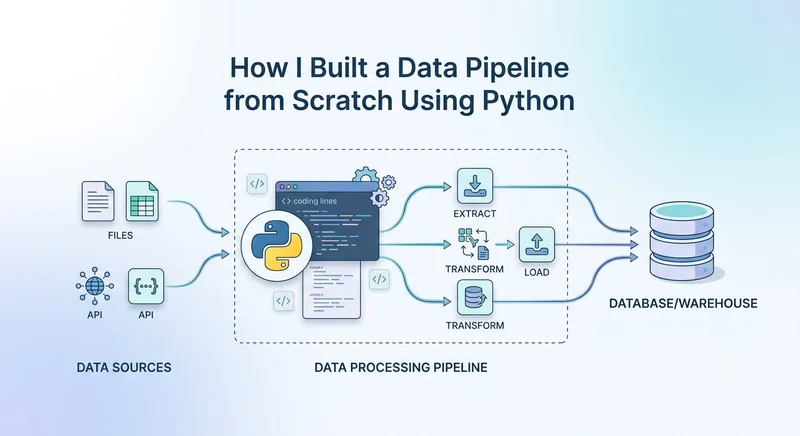
A data pipeline is a series of steps that move data from one or more sources, transform it into a usable format, and load it into a destination: a database, a data warehouse, a dashboard feed, or another system. The classic pattern is Extract → Transform → Load, or ETL.
Off-the-shelf tools like Airbyte, Fivetran, or AWS Glue handle a lot of this. But they come with trade-offs: cost at scale, limited customization, vendor lock-in, and the constant gap between what the tool supports and what your data actually looks like. When you build your own pipeline in Python, you control every decision, and you understand exactly why it breaks when it does.
That's the real value. Not saving money and understanding your data flow end-to-end.
The Architecture I Started With (And Why I Changed It)
My first version was a single Python script that did everything: connected to the API, parsed the JSON, ran some transformations, and inserted rows into PostgreSQL. It worked. Until the API started rate-limiting me, a schema change broke the parser, and the whole thing failed silently at 2 AM.
The lesson: a pipeline isn't a script. It's a system. Here's the architecture I landed on after iteration:
Source(s) → Extractor Module → Raw Storage → Transformer Module → Validated Data → Loader Module → Destination
Each stage is isolated. If the transformer breaks, the raw data is already saved. If the loader fails, you don't re-extract everything from the source. This separation of concerns isn't over-engineering; it's what makes debugging manageable.
Step 1: Extraction — Connecting to Your Data Sources
The extractor's only job is to pull data and save it as-is. No transformations here. This matters because you want to replay extractions without touching the source again.
For REST API sources, I used requests with retry logic baked in:
import requests
from requests.adapters import HTTPAdapter
from urllib3.util.retry import Retry
def create_session_with_retries():
    session = requests.Session()
    retry = Retry(
        total=5,
        backoff_factor=1,
        status_forcelist=[429, 500, 502, 503, 504]
    )
    adapter = HTTPAdapter(max_retries=retry)
    session.mount("https://", adapter)
    return session
def extract_from_api(url, headers, params):
    session = create_session_with_retries()
    response = session.get(url, headers=headers, params=params)
    response.raise_for_status()
    return response.json()
The backoff_factor=1 means retries happen at 1s, 2s, 4s, 8s, 16s, which is important when hitting rate limits. Without this, a brief API hiccup kills your entire run.
For database sources, I used SQLAlchemy for its dialect abstraction. Whether the source is MySQL, PostgreSQL, or SQLite, the extraction code stays identical.
Where people go wrong here: They try to filter or clean data during extraction. Don't. Pull everything, save it raw (JSON files, Parquet, even a staging table), then transform. You'll thank yourself when a bug in your transformer means you can fix and re-run without re-hitting the source.
Step 2: Raw Storage — Save Before You Transform
Before any transformation occurs, serialize the raw data to disk or to a staging layer. I used local JSON files during development and moved to S3-compatible object storage in production.
import json
import os
from datetime import datetime
def save_raw(data, source_name):
    timestamp = datetime.utcnow().strftime("%Y%m%d_%H%M%S")
    filename = f"raw/{source_name}_{timestamp}.json"
    os.makedirs("raw", exist_ok=True)
    with open(filename, "w") as f:
        json.dump(data, f, indent=2)
    return filename
This gives you a complete audit trail. If a stakeholder asks "what data did we have on March 14th?" you have it. If a transformer bug corrupts output, you replay from raw without touching the source again.
Step 3: Transformation — Where the Real Python Development Happens
This is the meaty part. Transformations include cleaning null values, standardizing date formats, type casting, deduplication, applying business logic, and joining across sources. I used pandas for most of this, with pyarrow for larger datasets where memory becomes a constraint.
A typical transformer looks like this:
import pandas as pd
def transform_orders(raw_data):
    df = pd.DataFrame(raw_data)
    # Standardize column names
    df.columns = [col.lower().replace(" ", "_") for col in df.columns]
    # Type casting
    df["order_date"] = pd.to_datetime(df["order_date"], utc=True)
    df["amount"] = pd.to_numeric(df["amount"], errors="coerce")
    # Drop duplicates on business key
    df = df.drop_duplicates(subset=["order_id"])
    # Filter out test records
    df = df[df["customer_email"].str.endswith("@yourdomain.com") == False]
    # Handle nulls with intent
    df["discount_code"] = df["discount_code"].fillna("NONE")
    return df
Notice the errors="coerce" on numeric conversion. That turns unparseable values into NaN instead of crashing. You then handle them intentionally rather than discovering a production crash.
The trade-off with pandas is that it loads everything into memory. For datasets under a few million rows, it's fine. Above that, consider Dask for parallel processing or polars for speed. Polars, in particular, is dramatically faster on large DataFrames because it's built in Rust and uses lazy evaluation.
Step 4: Validation — Catch Bad Data Before It Lands
Skipping validation is how corrupted data ends up in your production database. I added a validation layer between transform and load using pandera, a DataFrame validation library that integrates cleanly with pandas.
import pandera as pa
order_schema = pa.DataFrameSchema({
    "order_id": pa.Column(str, nullable=False, unique=True),
    "order_date": pa.Column(pa.dtypes.DateTime, nullable=False),
    "amount": pa.Column(float, pa.Check.greater_than(0)),
    "customer_email": pa.Column(str, pa.Check.str_matches(r".+@.+\..+")),
})
def validate_orders(df):
    return order_schema.validate(df)
If validation fails, the pipeline raises an exception before writing a single row to the destination. This is far better than loading bad data and discovering it three weeks later in a business report.
Step 5: Loading — Writing to the Destination Reliably
The loader writes validated data to the destination. Key decisions here: upsert vs. append, batch size, and transaction management.
For PostgreSQL with upsert behavior, I used SQLAlchemy with a custom upsert via psycopg2:
from sqlalchemy import create_engine
import pandas as pd
def load_to_postgres(df, table_name, engine, if_exists="append"):
    df.to_sql(
        name=table_name,
        con=engine,
        if_exists=if_exists,
        index=False,
        chunksize=1000,   # batch inserts, not one giant query
        method="multi"
    )
The chunksize=1000 setting matters on large datasets; without it, pandas tries to build a single INSERT statement with millions of rows, which PostgreSQL handles poorly and destroys memory.
For true upsert (insert or update based on primary key), you'll need to drop down to raw SQL with ON CONFLICT DO UPDATE; pandas' to_sql doesn't support upserts natively.
Step 6: Orchestration — Making It Run on a Schedule
A pipeline that only runs manually isn't a pipeline. Early on, I used cron for simplicity. As complexity grew, I moved to Apache Airflow for task dependency management and retry logic.
A minimal Airflow DAG looks like:
from airflow import DAG
from airflow.operators.python import PythonOperator
from datetime import datetime, timedelta
default_args = {
    "owner": "data-team",
    "retries": 2,
    "retry_delay": timedelta(minutes=5),
}
with DAG(
    dag_id="orders_pipeline",
    default_args=default_args,
    schedule_interval="0 6 * * *",   # 6 AM daily
    start_date=datetime(2024, 1, 1),
    catchup=False,
) as dag:
    extract = PythonOperator(task_id="extract", python_callable=extract_from_api)
    transform = PythonOperator(task_id="transform", python_callable=transform_orders)
    load = PythonOperator(task_id="load", python_callable=load_to_postgres)
    extract >> transform >> load
If transform fails, Airflow retries it twice before alerting. The >> operator defines the dependency chain: load won't run if transform hasn't succeeded.
Prefect is a lighter alternative to Airflow worth considering if you want a simpler setup. Dagster is excellent if you care about data lineage and want assets (not just tasks) as first-class concepts.
Logging, Monitoring, and Not Flying Blind
A pipeline without observability is a pipeline you'll fear running in production. At minimum, add structured logging to every stage:
import logging
logging.basicConfig(
    level=logging.INFO,
    format="%(asctime)s %(levelname)s %(name)s — %(message)s"
)
logger = logging.getLogger(__name__)
logger.info("Extraction started", extra={"source": "orders_api", "run_id": run_id})
Beyond logging, track row counts at each stage. If you extracted 50,000 records but only loaded 47,000, something dropped in between; you want to know that immediately, not when someone files a data quality complaint.
Conclusion
Building a data pipeline from scratch in Python is a practical Python development skill that pays dividends far beyond the first project. The pattern is consistent: extract cleanly, store raw data before touching it, transform with intention, validate before loading, and orchestrate with retry logic. Each layer is independently testable, independently debuggable, and independently replaceable.
The pipeline I described above handles millions of rows daily in production. It didn't start there; it began as a messy script that kept breaking. What made it reliable wasn't a fancier library. It was the discipline of separating concerns, validating data at each stage, and building observability in from the start. That's the approach worth carrying into any data project you take on.
FAQs
What Python libraries do I need to build a data pipeline from scratch?
The core stack for most pipelines is requests (API extraction), pandas or polars (transformation), SQLAlchemy (database connections), pandera (validation), and Apache Airflow or Prefect (orchestration). For large-scale data, add pyarrow for Parquet serialization and Dask or Spark for distributed processing.
What is the difference between ETL and ELT in Python pipelines?
ETL (Extract, Transform, Load) transforms data before loading it into the destination. ELT (Extract, Load, Transform) loads raw data first and then transforms it in the destination, typically a data warehouse like BigQuery or Snowflake, using SQL. Python ETL gives you more control over transformation logic; ELT scales better when your warehouse can handle heavy compute.
How do I handle errors and retries in a Python data pipeline?
Use retry logic at the extraction layer with urllib3.util.retry.Retry for API calls. At the orchestration layer, Airflow and Prefect both support configurable retry counts and backoff intervals. Store raw data before transformation so failed runs can be replayed from the raw stage without re-hitting the source.
How do I schedule a Python data pipeline to run automatically?
The simplest option is cron on a Linux server for single-script pipelines. For multi-step pipelines with dependencies, Apache Airflow is the most widely used tool; it handles scheduling, retries, and monitoring via a web UI. Prefect is a lighter-weight alternative. For cloud-native setups, AWS Lambda with EventBridge or GCP Cloud Scheduler works well for short-running pipelines.
How do I test a data pipeline built in Python?
Test each layer in isolation. Unit test transformers by passing in mock DataFrames and asserting output shape and values. Use schema validation with pandera to catch type and constraint violations before data lands in the destination. Integration tests should run against a test database with a small representative dataset. For orchestrated pipelines, Airflow supports dag.test() for local DAG runs without a scheduler.