I have a love-hate relationship with smart homes. I love the concept, but I hate the way they are set up.
On paper, it couldn't be simpler. All of your home appliances connect to the same home network and talk to each other.
So a motion detector in the living room can send a command to the bedroom's air conditioner, and the front doorbell can control your humidifier, if that's the kind of thing you'd want your whole house doing in one tap.
On paper, this all works flawlessly. In practice, it's a never-ending nightmare of getting different products, running on different protocols, to stop ignoring each other and start to play nice.
Even buying a Google product and connecting it to your Google Home through a Google Nest can sometimes take much more time and energy than it should.
Google fixed a problem it had already solved somewhere else
A shorter menu is still a menu
This week, Google shipped a QR code in the Google Home app, so that setting up a new smart bulb will only involve scanning a square instead of hunting through three menus for it. A QR code.
That might be the most 2019 fix imaginable to a 2026 problem.
Ask any smart home enthusiast about their setup in 2026 and the answer will probably be, "Oh, I just let Home Assistant take care of the technical stuff."
In the last few years, as AI started creeping into every corner of our lives, people like me, who have been struggling with smart home setup for years, realized AI can handle all the protocol handshakes and behind-the-scenes wiring faster and better than the average human.
All you do is plug a large language model into your smart home hub, and it handles the technical stuff. All you do is ask plainly.
"Can you make sure that when I leave the house, the TV turns off, the lights dim, and the cameras are activated?" and the smart home says "No problem" and does it.
It used to be called automation; now it's just called "asking nicely."
Even Google realized that already, which is why it also shipped Gemini for Home at the same time it launched the QR code.
While the QR fix is directed backward, to help anyone with the old setup get their smart home running a little more smoothly, the Gemini for Home announcement is directed forward, to people who are willing to hand over the virtual wiring of their house to Google's own large language model.
One team at Google spent the week making the old way of doing this slightly less annoying. A different team, down the hall, had already shipped the thing that made the old way pointless.
The cloud is Gemini's biggest catch
Local still means local
The problem is that Gemini for Home is also somewhat pointless, at least if you ask the people who have been tinkering with their homes for the past decade or so.
It already works with plenty of non-Google devices. That part isn't new. Google Home has been playing nice with other brands for years.
What's new is where the thinking happens. Every command you give Gemini for Home is sent to Google's servers and processed there, full stop, no local option, no offline fallback if your internet drops.
Ask it to turn off the lights during an outage, and it can't hear you.
Any smart home enthusiast will tell you that you can get the same results by installing Home Assistant on your PC, and giving it a local LLM. No cloud, nothing leaving your home, works just as well, if not better.
So I built the thing myself
Just her, and a bulb that listens
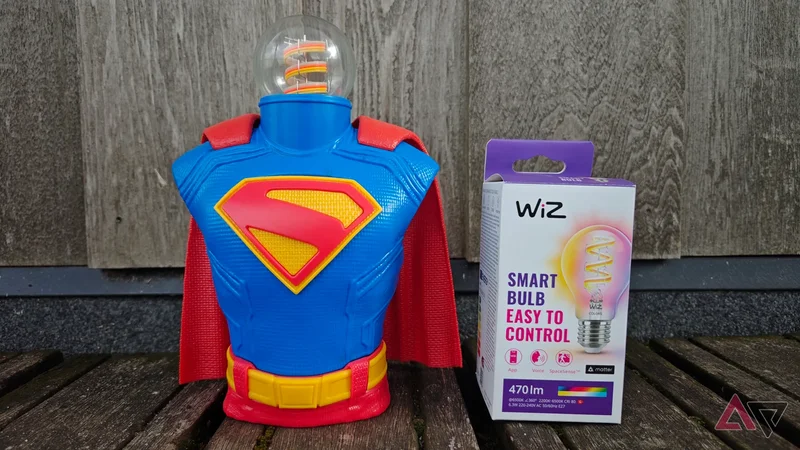
I wanted to test it myself, so I bought a WiZ bulb. I'll explain why in a moment. I wired it to my own local AI assistant, Mira.
I bought a WiZ bulb specifically because it doesn't need a hub, a coordinator, or anything else standing between it and my Wi-Fi network. No Zigbee, no bridge, no dongle, no handshake protocol. It sits in its mount, connected to the Wi-Fi.
And now Mira talks to it directly. Not through Home Assistant. Not through any hub at all. Just her, and a bulb that knows how to listen.
There was one app involved, and I want to be honest about it before someone else points it out. The bulb still needed me to install the WiZ app on my phone, because that's how you hand a new device your Wi-Fi password.
No way around that, not with this bulb, probably not with any bulb. But that's the only thing the app ever did. After it was on my network, I never opened it again.
I asked Mira to turn it on, and she did. I asked her to turn it off, and she did.
I even added a small icon so I could tap it instead of talking, mostly because I wanted to see if I could, and now I have both: a light that answers to my voice and a light that answers to a tap, and neither one of them asked me to log in to do it.
It's that simple. And as long as you buy the right appliances, in theory, your entire house could run through your own local AI, with no fees, no cloud upload, and no subscription standing between you and your own lights.
As it turns out, even the "new" version of the smart home, the one where you plug an LLM into Home Assistant, isn't the most streamlined way to set up a smart home in 2026.
If you have a local AI assistant, it can control your entire house without installing anything. And since I have a little version of Mira running on my phone, I can now control my home from anywhere in the world.
My lights don't answer to anyone. My cameras still do
The one thing still behind Google's wall
Here's the one complication I hit, because this piece would be too tidy without it. I also own Google Nest cameras, and I'd like Mira to see through them eventually. But she can't, not without going through Google first.
Nest cameras have no local API. That means getting Home Assistant, or anything else, to talk to these cameras requires going through Google's cloud, a Smart Device Management API, an OAuth flow, and a one-time $5 fee to ask a camera what it's currently looking at.
What comes back is a lower-resolution feed than Google's app gives you, missing features like facial recognition.
This isn't a problem with smart cameras in general. It's more of a Google thing. Plenty of cameras will let me connect to them and have complete control over the device that I paid for, the same way skipping the cloud entirely already worked out once before.
I don't feel completely safe doing that before I give Mira some beefed-up security features, so this will still stay on the back burner for now.
I am very aware of the irony of having to scan a QR code on my new WiZ bulb to prove Google wrong. I am also well aware that at the moment, all I have is a very complicated light switch.
But the bulb is mine. It cost less than a Google Wallet subscription, and it will never ask me to log in. The camera, on the other hand, is watching my front door right now, and technically, so is Google.