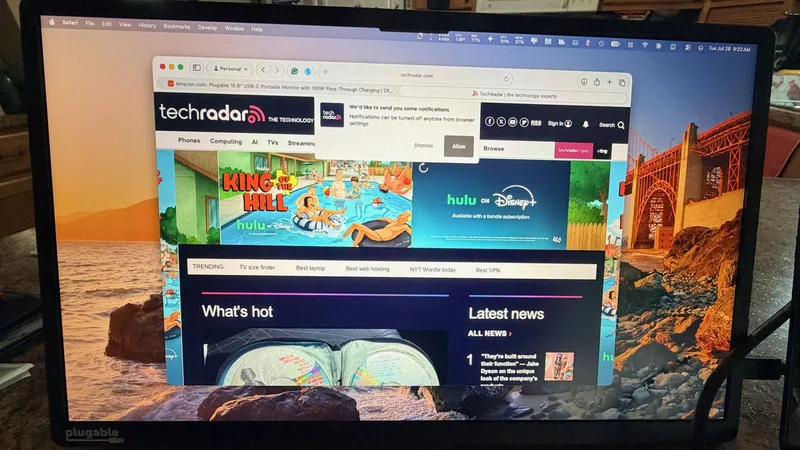
I didn't think a second screen would change how I work until I actually used one. For the last few weeks, I've been running the Plugable USB-C Portable Monitor alongside my laptop, and it's quietly become the accessory I'm most annoyed to leave at home.
Not because it's flashy, but because it solves a problem I'd stopped noticing I had: everything I do, from research with three tabs open to editing a draft while a spreadsheet sits in the background, is easier with two screens instead of one.
Why a second screen changes more than you'd expect
The real benefit of a second monitor isn't extra pixels—it's just relief from overlapping windows. With the Plugable next to my laptop, Slack and email stay parked on one screen while I focus on the other. I tab-switch way less, which keeps me from constantly losing my spot throughout the workday.
It's a 15.6-inch 1080p IPS screen, 60Hz, anti-glare coating. Nothing exotic on paper. But I've had it wedged at some awkward angles trying to fit it on cramped desks, and it still looks right, no washed-out colors like some of the cheaper portable screens I've tried. 300 nits of brightness.
That's fine at a desk or on the couch, but take it outside on a sunny afternoon and you'll be squinting at your own reflection. Didn't expect this part: it does HDCP, so Netflix and the rest just work instead of giving you that annoying black screen some portable monitors throw when they hit copy protection.
The Plugable USB-C Portable Monitor is a 15.6-inch 1080p IPS display built to turn any laptop into a two-screen setup with a single cable. It handles both video and up to 100W of pass-through power, so it can charge your laptop while running the screen, provided you're plugging into a video-capable USB-C port (DisplayPort Alt Mode, USB4, or Thunderbolt). Two additional 10Gbps USB-C ports double it as a hub for external drives, and it also works with USB-C iPads, Android devices, and iPhone 15 and later. At 1.85 pounds with a folding cover that doubles as a stand, it's built for travel and hot-desking rather than color-critical or gaming work. All told, it's a straightforward way to add a real second display anywhere you can find a laptop and an outlet.
Read our Plugable Portable Monitor review**. **
One cable does everything, if it's the right port
The setup is genuinely just one cable. Plug the included USB-C cable from the monitor into a video-capable USB-C port on your laptop, and the screen lights up immediately- no drivers, no software to install.
That single cable also carries power in the other direction: the monitor can pass through up to 100W from a connected charger, using 15W to run itself and sending the remaining 85W on to power your laptop. In practice, that means I run one cable from the wall to the monitor, and one cable from the monitor to my laptop, and both the screen and my laptop's battery are taken care of at once.
The important caveat, and the one thing that catches people out, is that this only works over a USB-C port that actually supports video, meaning DisplayPort Alt Mode, USB4, or Thunderbolt. Plenty of laptops have USB-C ports that only handle charging or data, and plugging into one of those gets you a black screen and nothing else.
It's worth checking your specific laptop's port specs before assuming any USB-C port will do the job. The same logic applies to cables: the one included with the monitor handles video, power, and data over its 3.3-foot length.
But if you want a longer cable for a more comfortable desk setup, you need one explicitly rated for DP Alt Mode plus Power Delivery plus at least 10Gbps data, since plenty of USB-C cables that look identical are charge-only and won't carry a picture at all.
Built-in USB-C hub functionality
This is the part I didn't expect to actually use. Beyond the main port handling power and video, there are two more 10Gbps USB-C ports built right into the monitor. So when I need to pull footage off an external SSD, I just plug it into the monitor instead of digging out a separate hub or hogging a port on the laptop itself.
It also isn't limited to laptops. The monitor works with USB-C iPads and Android phones with video-capable ports, and with iPhone 15 and later. The one thing to know is that most phones and tablets can't power the screen on their own.
So, if you're driving the monitor from a phone, you'll want a USB-C power adapter connected to the monitor's pass-through port to keep both the screen and your device running smoothly. Laptops, by contrast, can usually power it without any extra adapter.
Where it fits (and where it doesn't)
It weighs 1.85 pounds, measures roughly an inch thick, and the protective cover doubles as a stand — making it simple to pack and deploy anywhere. Color accuracy and refresh rate aren't suited for heavy media work or gaming, but as an everyday secondary display for work, it does the job effortlessly.
I went into this expecting a nice-to-have and ended up with something I genuinely plan trips around. That's a weird thing to say about a monitor, but here we are. It's not going to wow anyone with specs, and it's definitely not the display you want if your job involves color grading or fast-paced gaming.
What it's actually good at is the boring stuff: giving you a second screen with zero setup friction, wherever you happen to be working that day. Hotel desk, kitchen table, coffee shop with one free outlet, doesn't matter. Plug in the right port, and it just works. At $199 in the US, it's not an impulse buy, but if you've ever tried to get real work done on a single 13-inch laptop screen, you already know what that's worth.
For more top-performers, see our guide to the best portable monitors* we've tested. *
Bryan M. Wolfe is a staff writer at TechRadar, iMore, and wherever Future can use him. Though his passion is Apple-based products, he doesn't have a problem using Windows and Android. Bryan's a single father of a 15-year-old daughter and a puppy, Isabelle. Thanks for reading!