Tom's Hardware Verdict
MSI’s Cubi NUC AI+3MG offers a quiet, compact computing experience with easily upgradable RAM and storage. However, its $2,000 price is very expensive, and the iGPU doesn't allow for gaming alongside your office work.
Pros
- +Compact, understated design
- +Easy access to RAM and SSD
- +Low power, with strong performance
- +Relatively quiet
Cons
- -More ports would be welcome
- -Expensive
- -Fingerprint reader is inconsistent
- -Weak iGPU
Why you can trust Tom's Hardware
Intel’s codename "Panther Lake" Core Ultra Series 3 mobile processors were designed for laptops, but now we are starting to see them trickle over into mini PCs. That includes the recently launched MSI Cubi NUC AI+ 3MG (starting from $569, $1,999 as tested). This particular design is pleasingly compact and low-key in a traditional NUC manner, but can this matte black panther roar?
Design of the MSI Cubi NUC AI+ 3MG
Simply put, the MSI Cubi NUC AI+ 3MG is a very compact roughly 4.5 x 4.5 x 1.5-inch design with an Intel Core Ultra 9 386H chip inside.
The Core Ultra 9 386H delivers 16 cores and threads of processing power (6P + 8E + 2LPE) running at up to 4.9 GHz. MSI is also selling models with the Ultra 7 355, and Ultra 5 322 processors.
The Cubi’s shell is sturdy and pleasant enough in a matte black finish, made from recycled plastics. Inside, the motherboard is held firm inside what looks like a folded sheet aluminum frame.
Another welcome feature is the external power switch. This is a small power button puck on a slim connector that is 18 inches (45 cm) long. There’s a dedicated port for this on the left side of the Cubi, and the end of the puck is mounts with a little double-sided foam tape..
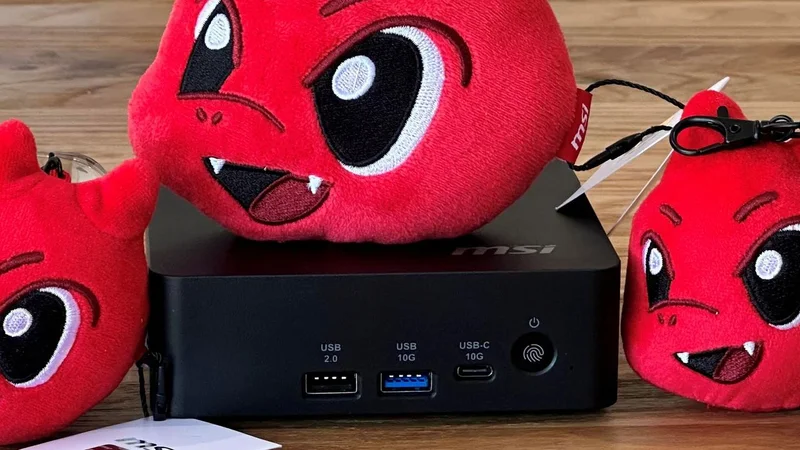
The power button dongle is a nice touch for those who might mount the Cubi NUC AI+ 3MG somewhere out of view, like behind a monitor or under a desk. Those who keep the Cubi in reach can benefit from the fact that the power button on the unit has an embedded fingerprint reader. I found the biometric unlocking here to be hit and miss, however, and it often didn’t recognize my thumb.
MSI Cubi NUC AI+ 3MG Mini PC Specifications
| Processor | Intel Core Ultra 9 386H (16C/16T: 6P + 8E + 4LPE), up to 4.9 GHz |
| Graphics | Intel Graphics iGPU with four Xe3 cores |
| RAM | 32GB DDR5‑5600 SO‑DIMM (Samsung 16GB x2), supports up to 128GB (64GB x2) with two slots |
| Storage | 1TB PCIe 4.0 NVMe SSD (Phison ESR01TB) populating the single M.2 2280 slot |
| Physical Ports | 2x Thunderbolt 4 (DP-alt, one with 98W PD), 2x USB‑A (1x 3.2 Gen2 + 1x 2.0), 1x USB-C 10G, 2x HDMI 2.1 (one with MSI PowerLink) 2x 2.5G Ethernet, DC‑in |
| Wireless | Wi‑Fi 7 + Bluetooth 5.4 (M.2 2230) |
| Other Features | Fingerprint reader, power button dongle/port, VESA mount, dual‑fan cooling, TPM 2.0, Kensington lock |
| Dimensions | 4.71 x 4.54 x 1.48 inches (119.60 x 115.20 x 37.50 mm) 0.8 L chassis at 1.21 pounds (0.55 kg) |
| OS Installed | Windows 11 Pro |
| Price (as configured) | MSRP $1,999 with 32GB RAM + 1TB SSD |
Ports and Upgradeability
MSI has implemented a couple of physical convenience features in the build, starting with the three-step toolless access system.
Get Tom's Hardware's best news and in-depth reviews, straight to your inbox.
All you have to do to pop the metal bottom off is turn a slotted screw, push a metal latch, and pull a ring. The trouble is I did need a tool to turn the first slotted screw, I fear my fingernail would have split if I hadn't grabbed a screwdriver. The force of pulling a tiny ring attached to the latch was also slightly concerning.
Beyond the Core Ultra 9 386H processor, our sample came loaded with 32GB of DDR5 (2x 16GB DDR5-5600 SODIMMs made by Samsung) and a removable 1TB PCIe 4.0 NVMe 2280 DRAM-less SSD from Phison. With these inserted, the Cubi NUC AI+ 3MG was fully populated. \The Wi-Fi card is also removable from its M.2 2230 slot.
On the front of the unit, there are three ports: USB-A 3.2 Gen 2 and USB 2.0 ports, and a 10 GBps USB-C port. On the back, there are two Thunderbolt 4 ports, two HDMI 2.1 ports (one with MSI PowerLink, which turns the PC on with a monitor), and a pair of 2.5G Ethernet jacks. Finally, on the side of the system, there's a Kensington lock slot.
I feel that the MSI is slightly stingy with ports here. Most notably, there is not even a single USB Type-A port in the rear. So I had to use a USB-C dongle to keep my wired keyboard connected at the back for the tidiest possible setup.
It is good to see various USB ports on the front, however. And I appreciate that this small device allows up to four displays at once (2x HDMI, 2x USB-C DP-Alt).
For wireless networking, there is Wi-Fi 7 on board and Bluetooth 5.4 is also built-in.
There is no 3.5mm audio jack here, which would have been welcome on the front. You'll need Bluetooth, or to use audio out through HDMI or USB Type-C ports.
Test System Setup
|
|
|
|
|
|
| GMK EVO-T2 | Intel Core Ultra X7 358H (16C/16T: 4P + 8E + 4 LPE), up to 4.8 GHz | Intel Arc B390 (Xe3, 12 cores, up to 2.5 GHz) | 2x 32GB LPDDR5X-8533 soldered | Dual-fan,1.72 liters |
| MSI Cubi NUC AI+ 3MG | Intel Core Ultra 9 386H (16C/16T: 6P + 8E + 2LPE), up to 4.9 GHz | Intel Graphics (Xe3, 4 Cores, up to 2.5 GHz) | 2x 16GB DDR5-5600 Sodimm | Single fan, 0.52 liters |
| Geekom A9 Max 2026 | AMD Ryzen AI 9 HX 470 (12C / 24T: 4x Zen 5 , 8x Zen 5c), up to 5.2 GHz | Radeon 890M (RDNA 3.5, 16 CUs, up to 3.1 MHz) | 1x 32GB DDR5-5600 Sodimm | Single fan, 0.82 liters |
| Arctic Senza AI 370 | AMD Ryzen AI 9 HX 370 (12C / 24T: 4x Zen 5 , 8x Zen 5c), up to 5.1 GHz | Radeon 890M (RDNA 3.5, 16 CUs, up to 2.9 MHz) | 2x 16GB LPDDR5X‑8000 soldered | Passive, 4.82 liters |
| Beelink SER10 MAX | AMD Ryzen AI 9 HX 470 (12C / 24T: 4x Zen 5 , 8x Zen 5c), up to 5.2 GHz | Radeon 890M (RDNA 3.5, 16 CUs, up to 3.1 MHz) | 2x 32GB DDR5-5600 Sodimm | Single fan, 0.81 liters |
Productivity Performance on the MSI Cubi NUC AI+ 3MG
The MSI Cubi NUC AI+ 3MG was built to be an office workhorse, so there won’t be many complaints about performance. It comes wielding Intel’s latest silicon, with 16 cores to take CPU-demanding tasks and multitasking in its stride. And the system does its job while sipping very low amounts of power, and rather quietly.
In Cinebench 2026, Maxon’s current-gen CPU rendering benchmark, the little MSI Cubi comes last in the rankings of our recent crop of mini PCs. Though low in comparison to its peers, its score isn’t disastrous here, as this is testing the kind of CPU muscle that won’t be called upon by a typical home or office user of a mini PC like this.
Similarly, in CPU-heavy benchmarks like Blender and Handbrake, the MSI Cubi lags behind the crowd. Even against the GMKtec EVO-T2, which also uses Panther Lake silicon and has fewer P-cores, the MSI still lags here. We are certain this is due to MSI’s default configuration maxing out at around 55W. The GMKtec machine was seen pulling over 70W at the wall.
On a more positive note, during our demanding tests, the MSI Cubi NUC AI+ 3MG stayed admirably cool and quiet. This feat was clearly aided by the chosen lower power limits and use of Intel’s newest energy-sipping mobile silicon in this form factor.
Gaming and Graphics on the MSI Cubi NUC AI+ 3MG
Unlike some mini PCs, this one isn't squarely targeted at gamers. Still, with a mere quartet of Xe3 cores pushing the 3D visuals along, this compact and quiet mini PC can do some gaming.
I fired up Forza Horizon 5 for a bit of racing down in Mexico. I liked the High and 1080p settings, and the game managed 45-40 frames per second. The frame rate felt like it dropped precipitously every few minutes as I was driving around, though. This indicates that the game's suggested Low or even Medium settings would be a better choice for consistency.
Our benchmarks included a trio of 3DMark synthetics and two PC gaming standards. 3DMark Solar Bay is a great way to frame and compare cross-platform iGPU performance. Meanwhile, Steel Nomad turns to screws on raw graphics performance with its heavy modern GPU load, and will be better for comparisons when we start testing the higher-end mini PCs, some with dGPUs. Last and definitely not least, Speed Way is a 2025 benchmark from UL that uses DirectX Raytracing tier 1.1 for real-time global illumination and real-time ray-traced reflections.
Next up, some real gaming courtesy of Shadow of the Tomb Raider and Cyberpunk 2077. The former scales well with processor resources and can still look and run great on humble iGPUs. As for Cyberpunk 2077, it can really push and tax even the strongest modern GPUs, so here we've used two settings to show how the little MSI Cubi can - and can't - play this game.
Shadow of the Tomb Raider performed quite nicely on the Intel Graphics (four Xe3 cores) fed by the dual-channel DDR5-5600 memory configuration we had. Using the High settings at 1080p makes for pleasing visuals, and I would argue the 37 FPS average was perfectly adequate for this solo-play atmospheric adventure.
Cyberpunk achieved a similarly playable frame rate using the Steam Deck preset at 1080p. On a big screen this is a little bit blurry / smeary. Moving up to the High preset at 1080p (with upscaling and frame gen turned off) dropped the frame rate below the magic 30 FPS, though, and below most folks' tolerance. If you had no other avenue to enjoy this demanding title, there could still be a spot in between these settings that would work for you.
In comparison to the other devices we have recently tested, the MSI NUC sat near the bottom of the pile. It only undercut the Geekom A9 Max 2026, which should have benefited from a great performing Radeon 890M iGPU but was kneecapped due to its single-channel memory configuration. This system is really made for work, and while you can technically play on it, you'll want something stronger for a good experience.
Power, Heat, and Noise when using the MSI Cubi NUC AI+ 3MG
According to system tools like HWiNFO, the Intel Core Ultra 9 386H processor inside this MSI Cubi has a TDP of 25W, with PL1 30W and PL2 65W. During testing, I measured total system power consumption with a plug-in power meter, as well as reading CPU temperature using a Windows tool.
In an idling state on the desktop, the system pulled around 17W consistently. At the same time, the CPU temperature would stick around 40 degrees Celsius.
During prolonged stress testing of the MSI Cubi, the highest consistent wattage consumed was around 55W. It seemed to stabilize at approximately the 75 degrees Celsius level.
I would characterize this as a quiet mini PC. Its MSI Frozr AI Pro fans were more or less unnoticeable in idle and light loads. My meter showed 30.8dB, and the meter doesn't measure below 30, so there's a possibility it may be even quieter. Meanwhile, the 37.3dB at max fans wasn't horrible, and it takes effort to tease this much noise out of the MSI.
Software and Warranty on the MSI Cubi NUC AI+ 3MG
MSI’s latest NUC comes with MSI Center pre-installed. This is a suite of controls and extras wrapped up in a tabbed Windows interface. The main tab is packed with system monitoring information, but this new version of the tool offers to leverage AI to “automatically recognize various user scenarios, triggering appropriate adjustments in performance, sound effects, display mode,” and more. Elsewhere, MSI’s NUC was pleasingly free of bloat and third-party clutter, including a wonderful lack of short-lived free trials. Businesses really don't want to deal with that.
MSI sells the Cubi NUC AI+ 3MG with a 1-year warranty as standard, but opting for a pre-built configuration with Windows 11 Pro on Amazon will also boost your warranty to 3 years of advanced tier coverage.
Configurations of the MSI Cubi NUC AI+ 3MG
Nosing around online retailers in the U.S. today didn’t uncover the MSI Cubi NUC AI+ 3MG with the exact configuration, as tested. We got in touch with MSI about the 32GB RAM model, as tested, and were informed that it was only available business-to-business and its MSRP was $1,999 but that depends on factors such as order size.
On Amazon we saw a barebones version with the same Core Ultra 9 386H for $809. Upgrading to 16GB of RAM (single-SODIMM, single-channel) and a 1TB SSD, with Windows 11 pre-installed skyrockets the price to $1,661 (with Win 11 Home) and $1,767 (with Win 11 Pro), respectively.
MSI is also marketing Cubi NUC AI+ 3MG mini PCs with Intel Core Ultra 7 Processor 355 and Ultra 5 Processor 322 configurations. You can find these on Amazon, both in 16GB/1TB/ configurations for $1,549 and $1,079, respectively.
Bottom Line
Though the MSI Cubi NUC AI+ 3MG is clearly aimed at businesses with its productivity focus and vPro remote management features. Its understated looks and quiet operation may attract those who want a small-form-factor productivity PC at home, especially if they intend on putting together a minimum-fuss multi-monitor setup.
If the MSI’s quiet, efficient, and compact form isn’t a killer combination for you, and you are open to less established brands, we have recently tested several other mini PCs from companies like Arctic, Beelink, GMKtec, and Geekom.
These less established brands definitely offer better value with more potent processors, and more generous memory/storage configurations, at better or similar pricing to the MSI. In the MSI’s favor, I’d say it quietly satisfies its target market more than adequately, and sprinkles attractive bonuses like fingerprint security, the remote power button, MSI Power Link, vPro remote management, the touted ‘tool-less’ component access, and 3-years of advanced warranty coverage when you choose a Cubi NUC AI+ 3MG with Win 11 Pro.
Mark Tyson is a news editor at Tom's Hardware. He enjoys covering the full breadth of PC tech; from business and semiconductor design to products approaching the edge of reason.