Windows laptops run an impressive gamut from slick ultraportables to beastly gaming stations to approachable modular systems. They're more customizable than Apple's MacBooks and compatible with a broader range of software. Moreover, some newer models trounce MacBooks on battery life — a feat made possible by the latest Intel and Qualcomm processors.
Shopping for a new Windows laptop is no cakewalk these days. New AI data centers are hogging memory components, fueling a global RAM shortage that's led to steep PC price hikes. After testing nearly 50 Windows laptops (and counting) in the past two years, including models from top brands like Acer, Asus, Dell, HP, and Lenovo, we've identified eight that are definitively worth it for various use cases. Read on for our complete list of the best Windows laptops to buy in 2026.
Overview
These are the tech, tools, and products — from laptops to e-readers, from earbuds to robovacs, and more — that Mashable ranks best in class.
Table of Contents
What's new this month
In late July 2026, I updated this guide with one fresh pick. I also replaced or removed three previous picks that were no longer available. The Asus Zenbook A14 remains my top choice for most people.
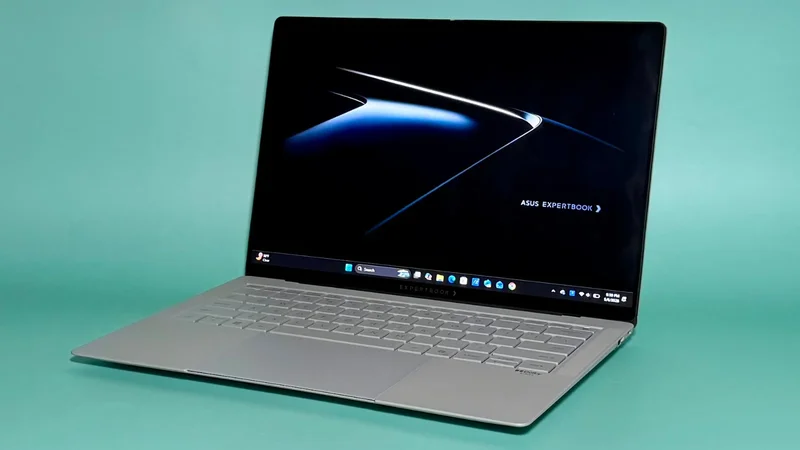
The Asus ExpertBook Ultra is my new favorite Windows laptop for work: It's incredibly thin and light yet impressively powerful, and its display is dreamy. The Acer Swift Edge 14 AI succeeds the sold-out Lenovo Yoga 7 14 as the best Windows laptop for college students. Its ultraportable design, decent battery life, and competitive value won over our reviewer.
I'm currently looking for replacements for Acer Aspire 16 AI and the Alienware 16X Aurora, our former picks in the budget and gaming categories, respectively. Both of them were out of stock at the time of writing.
As a quick note before we get into the picks, Mashable evaluates laptops on the basis of performance, battery life, design/build quality, and value. We do so using a combination of synthetic benchmarking and real-world usage. You can read more about our testing process below.
The Good & The Bad
- Incredibly impressive performance in any everyday scenario
- Amazing battery life
- Super lightweight
- Pretty OLED display
- Creamy keyboard
-
A great value
-
Some compatibility issues
- Average webcam and speakers
Who it's for
The 2026 Asus Zenbook A14 is the best general-purpose Windows laptop for most people needing an attractive, lightweight, and affordable everyday driver. It's also my first choice for folks looking for the best MacBook Air alternative.
Why we picked this
I loved the original Zenbook A14 from 2025, and this year's model is even better. It's a very well-rounded ultraportable with a very fair MSRP. I challenge anyone to find a faster, longer-lasting, and better-made Windows laptop for the regular retail price of $1,349.99.
A new Snapdragon X2 Elite CPU adds some extra pep to this 14-incher's step. It can now keep up with modern MacBooks in both basic single-core and demanding multi-core scenarios, something only one other Windows laptop can claim. (That would be its 16-inch sibling, the Asus Zenbook A16, below.) It's actually slightly faster than the M5 MacBook Air in multi-core tasks like light video editing, which is nuts. It beats 90 percent of all the laptops in our testing database on this metric, including much pricier models meant for gamers and creatives.
The new Zenbook A14 also comes with a massive 80-TOPs neural processing unit (NPU) that can chew through local AI tasks. That's double Microsoft's TOPs requirement for Copilot+ PCs.
The Zenbook A14's stamina got even better this year, too. It lasted 27 hours and 36 minutes in our battery life benchmark, a video rundown test, which makes it our third-longest-lasting laptop of all time. For reference, last year's model couldn't compete with same-gen MacBooks and died just before the 22-hour mark.
The Zenbook A14's chassis is still made from a unique material called "Ceraluminum," which is durable, scratch-resistant, textured matte (almost like pottery), and remarkably lightweight. The base configuration I tested weighs just 2.4 pounds, but doesn't feel fragile. It comes in a modern-organic "Zabrinskie Beige" finish that's embellished with metallic, jewelry-like accents — a nice change of pace from your standard silver PC. Other highlights include a creamy keyboard, a silky touchpad, and a vivid OLED display.
Details
The Good & The Bad
- Absurdly good battery life — best of any laptop we've ever tested (by a lot)
- Pretty thin for a 16-inch laptop
- Large, surprisingly colorful display
- Above-average speakers
-
Snappy, comfortable keyboard
-
Very boring design with a plastic keyboard deck
- Display is a little dim
- Competitors offer better performance
- Expensive for what it is (but easy to find on sale)
- Some compatibility issues
Who it's for
Our reigning battery life champ, the HP OmniBook 3 16 is a mid-range, big-screened Windows laptop that will appeal to on-the-go workers who hate being tethered to outlets. It's best-suited for those who don't need a ton of processing power.
Why we picked this
I love seeing people's reactions when I tell them that this 16-inch laptop ran for over 40 hours before dying. Forty hours! That number is so high it seems fake. Only one other Windows laptop we've tried has surpassed the 30-hour mark. (That would be last year's OmniBook 5 14.) Moreover, the latest MacBooks are capped at about 21 hours per charge. We've known for a while that Snapdragon X-powered laptops offer great battery life, but this one's is stupidly good.
Design-wise, OmniBook 3 16 is a basic silver laptop. Its IPS display isn't super sharp, but it's huge and punchy. (I actually thought it was an OLED display at first.) Its comfy island-style keyboard is an almost-perfect mix of snappy and cushy, almost like it's trying to do an impression of one of Lenovo's premium thocky keyboards. I love that its backlighting doesn't cost extra, like it did on the OmniBook 5 14. It also doesn't suffer from the same rattling trackpad issue. It has a pretty average weight, but it's relatively thin for its size.
My testing unit cost $1,629.99 on HP's website — a steep price for a partially plastic laptop with an entry-level CPU. However, it came with 32GB of RAM and 1TB of storage, which is overkill for most everyday users. You can safely bump that down to 16GB RAM and 512GB SSD, or even 8GB RAM and 256GB SSD, depending on your needs. (It starts at $999.99.) Try to buy it on sale, when it becomes a better value than usual.
Details
The Good & The Bad
- Soooo portable; ridiculously thin and light
- Gorgeous 2.8K anti-glare OLED touchscreen
- Great battery life
- Velvety keyboard
- A very good deal for plenty of RAM and storage
-
No compatibility issues
-
Competitors offer better performance
- Feels a little plasticky (even though it's not made of plastic)
- Mediocre speaker and webcam
Who it's for
College students who need or prefer Windows will appreciate this laptop's decadent screen and featherlight build. It'll hardly take up any space in your backpack.
Why we picked this
The Acer Swift Edge 14 AI is a beautiful, remarkably portable notebook that's easy to tote across campus. It comes in at just 0.37 inches thick and 2.18 pounds, making it the sleekest laptop we've ever tried. It's 0.06 inches thinner and 0.22 pounds lighter than the Asus ExpertBook Ultra. Compared to the 13-inch MacBook Air, which has a smaller footprint, it's 0.07 inches thinner and over half a pound lighter. Acer somehow worked in an HDMI port, two USB-A ports, and two Thunderbolt 4/USB-C ports, too.
The Swift Edge 14 AI comes in a pearly white finish with gold accents that gives it a unique, modern-minimalist look — and as an added bonus, it's very good at resisting fingerprints. Mashable contributor and reviewer Sarah Chaney noted that its chassis felt very sturdy, which surprised her given its svelteness. She also appreciated the "velvet-like" feel of its keys; Acer said its keyboard has a first-of-its-kind "soft-touch" UV-cured coating.
The Swift Edge 14 AI isn't nearly as fast or long-lasting as the Asus Zenbook A14, but it gets you twice the RAM, more storage, and a luxe 120Hz 2.8K OLED touchscreen for only $150 more. (At $1,500, this is a very fairly priced laptop.) It also runs on an x86-based Intel chip, so you don't have to worry about ARM compatibility issues. Its battery life is still pretty great for an Intel laptop, offering almost 21 hours of use per cycle. You probably won't need to charge it during an all-nighter.
Details
The Good & The Bad
- Stellar performance; runs very cool
- iGPU is powerful enough for AAA gaming
- Beautiful and bright 2.8K OLED touchscreen with matte finish
- Smooth haptic touchpad
- Keyboard has a UV coating so its keys don't look greasy
- Impossibly thin and lightweight design with plenty of ports (including double-sided charging ports)
-
Solid battery life
-
Expensive
- Lousy webcam
Who it's for
The new Asus ExpertBook Ultra is a great bet for business users who need an ultraportable PC that does basically anything. Preferably, you'll pay for it with the company card.
Why we picked this
The ExpertBook Ultra is a mind-boggling laptop — an impossibly light, impossibly thin machine with the best display I've ever seen, over two shifts' worth of battery life, and just as much brawn as an entry-level gaming laptop. It has virtually no flaws, aside from a muddy webcam... and a sky-high price, though it feels mostly warranted all things considered.
Its design is striking. It has a magnesium-aluminum chassis with a matte "Nano Ceramic" coating that's scratch- and finger-print resistant. It only weighs 2.4 pounds and measures 0.43 inches thick at its thinnest point, yet it's solidly made and packed with ports. (There are even double-sided Thunderbolt 4/USB-C ports for convenient charging.) It has a velvety haptic touchpad and an island-style keyboard with a UV coating that prevents its keys from looking greasy. A pulsing LED lighting effect appears on the bottom of the display when it starts up, which gives it a futuristic vibe.
Speaking of that display: I just adore it. It's a rich OLED touchscreen with a crisp 2.8K resolution, a peak brightness of 1,400 nits for HDR content, a 30 to 120Hz variable refresh rate, and a matte finish that prevents distracting glares and reflections. It's my new five-star standard.
Given its sleekness, it's amazing that Asus was able to cram so much power into the ExpertBook Ultra. It runs on the new Intel Core Ultra X7 385H chip, which is a decently strong single-core performer but a standout in multi-core scenarios. If you're working through a huge Excel file on a Teams call, for example, it'll feel just as fast as a MacBook Pro. A wind tunnel-like thermal design with big fans that spin slowly keeps it surprisingly cool and quiet all the while.
The Core Ultra X7 comes with the Intel Arc B390, a very capable integrated graphics card. iGPUs aren't normally much to shout about, but this one is on par with a lower-end discrete GPU. If you crank on AI upscaling tech like Intel XeSS Super Res 2.0, the ExpertBook Ultra can run AAA games at 1080p well above 100fps. (I used it to play CyberPunk 2077 in my testing.) On a laptop this lean, that's actually kind of wild.
Details
The Good & The Bad
- Impeccable build quality; so sleek
- Great performance
- iGPU is powerful enough for AAA gaming
- Luscious tandem OLED display option; refresh rate drops to 20Hz when you're viewing static content
-
No compatibility issues
-
Expensive; got a price hike because of RAMageddon
- Battery life is mediocre (depending on the task)
- Scant on ports
Who it's for
The revamped Dell XPS 14 is the best option for well-heeled shoppers who want an extremely elegant and well-made Windows laptop — one that looks just as good as a MacBook, maybe even better.
Why we picked this
Can a laptop be sexy? One look at the new XPS 14 and you'll say, "Absolutely, yes." In one of the best tech comeback stories of recent memory, Dell revived and refined the minimalist XPS 14 for 2026. It's thinner and freed of past design burdens like a capacitive touch function row. It's more polished than before and more pleasant to use. It's also newly configurable with a gorgeous 2.8K OLED touchscreen (optional, but highly recommended). In short, its build quality is better than ever — you can see and feel the attention to detail in its construction.
I tried out two different variants of the XPS 14: the base model with an Intel Core Ultra 5 325 CPU and a 2K IPS display ($1,999.99), then an upgraded model with an Intel Core Ultra X7 358H CPU and the crisp OLED touchscreen ($2,899.99). The former had a much better battery life but lackluster performance and a duller picture. Overall, I thought the upgraded version did a much better job of justifying its premium price tag. (If you are leaning toward the base model, I would look into the Dell 14S instead.)
That Core Ultra X7 358H chip has impressed me in just about every laptop I've tried it in so far. It's not quite as fast as Apple's M5 chip in single-core scenarios, but among x86-based CPUs in Windows laptops, it's one of the snappiest for basic tasks. It's even better in multi-core workloads, vying with the latest MacBooks and even some recent gaming laptops. Since it's paired with the Intel Arc B390 iGPU, you can play AAA games on this bad boy, too.
The Core Ultra X7-powered XPS 14 only lasted about 10 hours in our usual video rundown test, which is well below our current 14-hour median for the Windows laptop category. However, you should get more juice out of it when it's not looping a video: The OLED touchscreen can dip from 120Hz to 20Hz for static content.
Details
The Good & The Bad
- Vibrant 2.8K OLED touchscreen
- Solid performance; good for gaming
- Plenty of ports
- Clickety-clackety keyboard
- Great battery life for a laptop with dedicated graphics
- Premium haptic touchpad; you can draw on it with the included stylus
- Reasonably priced
-
No compatibility issues
-
Very boring design; not very sleek
- Screen is dim and overly glossy
Who it's for
I highly recommend the Acer Swift X 14 for creatives who need a Windows laptop that can run the most demanding apps. That includes photo and video editors, graphic designers, and animators.
Why we picked this
Most professional creatives need a Windows laptop with a dedicated graphics card to handle their intensive workloads. I like the $1,999.99 Acer Swift X 14 with a top-end Intel Core Ultra 9 285H CPU and RTX 5070 graphics because it's super powerful, fairly priced, equipped with a striking OLED screen, and long-lasting, relatively speaking. You can go with a gaming laptop instead, but most aren't nearly as compact.
This 14-inch desktop replacement is just as fast as an M5 MacBook Pro when it comes to demanding multi-core scenarios (i.e., most creative tasks). In my testing, its RTX 5070 GPU was more than capable of running graphically taxing games like Cyberpunk 2077 at over 100fps at 1080p resolution without the help of any AI upscaling technology, so it's very well-suited for the likes of Adobe After Effects and Premiere Pro. (And other AAA games, obviously.)
For what it's worth, I also tried a $1,699.99 Acer Swift X 14 AI with an AMD processor and RTX 5060 graphics, and the Intel/RTX 5070 version performed much better. The AMD/RTX 5060 one had 17 percent worse multi-core performance, so it couldn't compete with the MacBook Pro, and it could barely run Cyberpunk at its 60fps minimum without upscaling tech. It also had a much worse battery life of about 6.5 hours per charge. My go-to RTX 5070 model lasted just over 10 hours, which is fantastic for a laptop with a dedicated GPU.
Note that the Swift X 14 is not a Copilot+ PC, meaning it doesn't have a super-powerful NPU for running on-device AI tasks. This isn't a deal-breaker for creatives, but it is for serious machine learning engineers and software developers.
The Swift X 14 comes with plenty of creator-forward ports (like a microSD card slot) as well as a crisp, vivid 120Hz OLED touchscreen. It's a real attention-getter on an otherwise plain laptop. You can't draw on it with the included stylus, but you can do so on its haptic trackpad. It functions kind of like a built-in drawing pad.
Details
The Good & The Bad
- Ridiculously powerful; the fastest Windows laptop for everyday productivity
- Remarkably light for its size
- Big, beautiful, ultra-bright 2.8K OLED touchscreen
- Creamy keyboard
- Above-average speakers
-
An awesome value (tons of RAM!)
-
Muted webcam
- Some compatibility issues
Who it's for
Asus' new Zenbook A16 is an amazing choice for on-the-go professionals who want a blazing-fast laptop with a big, bright OLED touchscreen for multitasking and a great price.
Why we picked this
Our top pick's bigger brother has an upgraded display and even more power. It's the first laptop on the market with the top-end Snapdragon X2 Elite Extreme chip, and it cruises. It handily beats the latest M5 MacBooks in both single- and multi-core tasks. It's the second-fastest laptop we've ever encountered in our 10-plus years of reviewing laptops, after the 16-inch MacBook Pro with the M4 Pro chip that started at $2,499. (The newer M5 Pro and M5 Max models are even faster, though we haven't tried them ourselves. They're also prohibitively expensive.) The Zenbook A16 is configured with 48GB of RAM to boot, making its $1,699.99 price tag feel like an absolute bargain.
The Zenbook A16 doesn't last as long as the Zenbook A14, but 16 hours and 26 minutes is pretty good for a laptop this large and speedy.
I like that "large" doesn't translate to "bulky" here. The Zenbook A16 only weighs 2.87 pounds, making it the lightest 16-incher we've ever tried. Its design is very similar to that of the Zenbook A14 — thank you, Ceraluminum — but it has a better OLED display with added touchscreen capabilities, a smoother 120Hz refresh rate, a sharper 2.8K resolution, and a higher maximum brightness of 1,100 nits for HDR content. There's also an extra SD card slot on its side.
Details
The Good & The Bad
- Ridiculously easy to assemble, repair, and upgrade
- Super customizable
- Swappable ports are brilliant
- Pretty light
-
No compatibility issues
-
Lackluster specs, battery life, and performance for the money
- Touchpad rattles slightly when you tap it
- Lousy speakers and webcam
Who it's for
DIYers, tinkerers, and anyone sick of buying a new laptop every few years will love the modular, repairable Framework Laptop 13.
Why we picked this
This unique Windows laptop is much more expensive than other models with similar specs and performance, but it has the advantage of being infinitely upgradable and repairable. It's the closest thing you can get to a buy-it-for-life laptop and a gateway drug to the right-to-repair movement. You can configure it from scratch or go with a pre-built model.
If you've never had an innocent Geek Squad repair appointment turn into a several-hundred-dollar fiasco, you may not care much about at-home fixability, but it's a massive deal. You can swap out the Framework Laptop 13's motherboard, memory, storage, keyboard, and display all by yourself, and it's super easy to do. I have zero prior PC building experience, and after putting together an IKEA shoe cabinet a few months ago, I can confidently say that assembling the Framework Laptop 13 is a simpler process. Everything snaps or screws into place so cleanly.
Its port situation is especially brilliant: You can take your pick of expansion cards and swap them out as necessary. No more dongles!
I originally reviewed a model with an Intel Core Series 1 processor in mid-2025, right around when Framework released an AMD Ryzen AI 300 Series version with an upgraded thermal system, WiFi 7, and an updated keyboard. The company sent me those new components to test, along with an optional 2.8K 120Hz matte display it launched the year prior. I'm delighted to report that I installed them all myself without breaking anything. I didn't notice a huge difference with the keyboard, but my entry-level AMD system ran much cooler than its Intel counterpart and offered drastically better single-core performance. I'd also recommend the nicer display; it's visibly crisper and smoother than the regular 2.2K 60Hz option.
Details
What's on deck
I just finished testing the new Dell 14S and was very impressed by its build quality and battery life. For the average everyday user, it's a smarter buy than the snazzy-but-splurgey Dell XPS 14. I plan on naming it a new top pick in the next update to this list. In the meantime, you can read more about it in my guide to the best laptops for college students.
The Mashable team has several other Windows laptops in hand for testing right now, including the Dell 16S, HP OmniBook Ultra 14, LG gram Max 17, Alienware 16 Area-51, Lenovo LOQ Essential 15, and MSI Prestige 16 AI+. We're also waiting on a review unit of the new Dell XPS 13, a very promising budget option. (At $599 for students, it's a direct competitor to Apple's MacBook Neo.) Stay tuned to see if any of them make the cut.
A note about ARM-based Windows laptops
Qualcomm's Snapdragon X series chips use ARM-based architecture, not traditional x86 architecture like Intel and AMD chips. As such, their compatibility differs. ARM-based laptops don't work natively with certain specialty software (like AutoCAD), nor can they run as many PC games.
ARM compatibility issues are a non-concern for the majority of general-purpose Windows users, but they'll be dealbreakers for some demographics — PC gamers being an obvious one.
College students should also steer clear of ARM laptops. When I examined the 10 top public universities' hardware recommendations for the 2026 fall semester, I found that a couple schools explicitly advised their students against getting ARM-based laptops to make sure they can run all of their necessary coursework without emulation. (This is one big reason why I recommend the Acer Swift Edge 14 AI for rising freshmen: It has an x86-based Intel chip.)
The good news is that ARM compatibility has gotten better over the past couple years, and it will definitely continue to do so now that Nvidia is coming out with its own Windows on ARM chips.
Mashable has been writing about laptops for over a decade, and I've personally been covering them since 2023. I also helped develop the rigorous hands-on testing process we currently use to review them. This methodology revolves around four criteria:
The laptops we review get put to work as our primary computers. This includes trying any unique software or use cases they support. We also subject all of our loaners to a multi-app/tab stress test and Primate Labs' Geekbench 6, which measures CPU performance in common tasks. Gaming laptops get put through additional graphical benchmarking.
To gauge a laptop's stamina, we conduct a battery rundown test that involves playing a looped 1080p version of "Tears of Steel," a short open-source Blender movie, at 50 percent brightness and 50 percent volume. Ideally, we hope to get at least 14 hours of battery from regular Windows laptops and four hours from gaming laptops. (They're notoriously power-hungry.)
As we're using a laptop, we zero in on certain components to evaluate its build quality. These include the display, keyboard, touchpad, webcam, speakers, and ports. We also assess its overall aesthetic and portability.
We determine the ultimate value of a laptop by comparing its performance, design/build quality, and battery life to other laptops with similar pricing, specs, release dates, and use cases. We consider any accessories it comes with, any upgrades from its predecessor(s), and its future-proofing.
Haley Henschel is a Chicago-based Senior Shopping Reporter at Mashable who reviews and finds deals on popular tech, from laptops to gaming consoles and VPNs. She has years of experience covering shopping holidays and can tell you what’s actually worth buying on Black Friday and Amazon Prime Day. Her work has also explored the driving forces behind digital trends within the shopping sphere, from dupes to 12-foot skeletons.