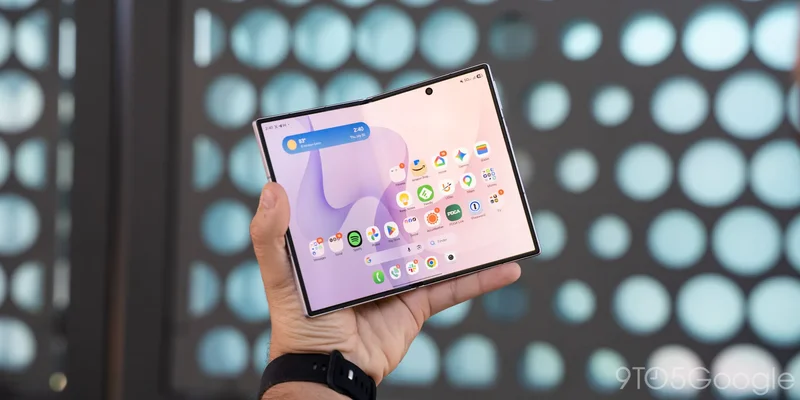
The appeal of a book-style foldable is obvious. A smartphone that opens up to something more expansive, more capable – just, more. Yet, the tall and narrow Galaxy Z Fold designs of yesteryear never fully resonated with the general public. As each generation has pushed itself a bit wider than the last, the Galaxy Z Fold 8 is now here as Samsung’s first “ultra-wide” foldable. After spending over a week with it, I see why Samsung released two Galaxy Folds this year, and I figured out that this new Galaxy Z Fold 8 shape is the one made for everyone else.
Hardware |
It’s all about that shape
Put simply, the whole story around the Galaxy Z Fold 8 centers around its shape. That’s because the new design is, well, new. Foldables have been relatively stagnant over the past few years, with all efforts focused on refinement rather than experimentation. Everyone settled on the same core designs, form factors, and use cases, and all just put efforts behind thinner designs and not much else. Samsung is as guilty of that as anyone else, too.
The Galaxy Z Fold 8 sits in this weird place of somehow being a copy of the past and the future. This device is clearly gearing up for battle against Apple’s identically-shaped first foldable iPhone rumored to launch this Fall while also revisiting the lost form factor of Oppo’s original foldables and the first Google Pixel Fold. Originally, Android turned away from this wider design due to issues with app compatibility. While the shape was pretty much universally praised for a compact footprint and good handling of content, Android apps largely weren’t ready for it.
And the story is pretty similar on the Galaxy Z Fold 8.
Samsung’s new design has a 16:10 aspect ratio on the outer display – “short, fat, and proud of that,” I’ve been joking. With every other modern smartphone going taller, this is such an interesting change of pace, and you feel it throughout the experience. Physically, it’s a whole new set of finger gymnastics to get around the UI, but I adapted very quickly. Meanwhile, apps are hit or miss. Nothing is completely broken on this outer display, but there are some quirks. The Walmart app’s login screen is cut off in a funky way. The Nothing X app has some bizarre scaling. Short-form videos are also a little weird between apps – Instagram and YouTube add letterboxing, while Facebook and others crop the video. Android as a whole is good about scaling, though, so the bigger question I had going in was the inner display.
The Galaxy Z Fold 8’s inner display is the star of the show, with a new 4:3 aspect ratio. This is exactly the same as an iPad, so Samsung’s new foldable is effectively like carrying around an even-smaller iPad Mini in your pocket.
I’ve gone back and forth on how I feel about this, but I think that, overall, this is the superior shape for a foldable.
It all comes down to use cases. Where prior generations and the Galaxy Z Fold 8 Ultra have a vertical layout that’s better for content creation and productivity, the wider layout of Galaxy Z Fold 8 is better for content consumption. Videos are an obvious win. While letterboxing isn’t gone entirely – nor do you gain any additional space – it’s a nicer experience on the whole, especially if you happen to find content that’s taller (like IMAX Enhanced movies on Disney+). Games are even better. You get a canvas that’s way bigger than a normal smartphone without the quirks of the old shape, which often didn’t work well with games that simply weren’t designed to work on the unorthodox canvas. My colleague Damien also points out that the 4:3 canvas is a perfect way to view photos you’ve taken.
Multitasking is a weaker point. While you can absolutely throw two or three apps onto this screen, they’re not nearly as usable as they are on the Fold 7 or 8 Ultra. It’s just so cramped to get three apps onto this canvas, and two apps still struggle, especially if you try to throw a keyboard into the mix.
The same goes for web browsing and reading. While e-books are a huge win for this design, reading web articles is decidedly not as nice. In Chrome, for instance, the top bar just takes up so much room. If you’re trying to type in a URL or even just take notes in another app, any keyboard will also dominate at least half of the display – combined with Chrome’s top bar, it devastates usable real estate.
I was pretty sure this would be my deal-breaker on the Fold 8. My main use case for a foldable is the ability to write articles for this very site through Chrome while on the go, so having a tiny sliver of the display to actually see what I’m writing would be a huge problem. But that’s where this aspect ratio shines.
Where the Fold 7 and Fold 8 Ultra see very little benefit from switching between portrait and landscape orientations, the Fold 8 is a totally different device depending on how you hold it. By default, it’s good for content consumption. Flip it on its side, though, and the portrait orientation becomes way better for productivity, especially when that involves typing.
That realization is what convinced me that this might be the superior form factor. Where the Fold 8 Ultra is designed around one use case with the ability to shift to (mostly) fit other tasks, the Fold 8’s shape gives it the flexibility to be a better tool for both jobs, just depending on how you hold it. It just makes a device that’s better for everyone using it, rather than just the select few that have the perfect use case.
Crazy that building a foldable like an actual tablet makes it a better tiny tablet, huh?
And this is all wrapped up in a fit and finish that’s come from Samsung building these phones for the better part of a decade.
The boxy design is thicker than the Ultra at 9.7mm, but it’s still very comfortable in the hand and, at just 201g, it’s just a giant difference compared to every other foldable on the market. Heck, it’s lighter than some standard slab phones. Samsung has also refined some key downsides of prior generations, like adjusting the hinge and frame to make the device much easier to open.
Display |
Finally*, this is the foldable display we’ve all been wanting
Aspect ratio aside, Samsung also built a nearly perfect foldable display.
This thing checks (nearly) all of the boxes.
Crease? Drastically improved, but still there. Bright? Eye-searing. Anti-reflective? Freaking finally. That last one is a big deal. Foldable displays have had this annoying quirk of being ultra-reflective for years and, while Samsung’s competitors had addressed that, this is the first time a Galaxy Z Fold has reduced reflections. A layer in the display partially rejects reflections, making the whole display pop a bit more and, when you’re under lights, reducing how much you see reflected back at you.
The sole thing not addressed here is durability. There are no improvements to dust resistance, nor do you get much added strength from the cover materials. The top layer is still plastic, even if it’s backed up by glass and titanium that continue to bolster the feeling under your finger.
I will say that, after spending the past few years primarily using foldables, durability concerns remain overblown. In day-to-day use, these devices hold up way better than anyone gives them credit for. That said, you do still have to practice more care with a foldable than a traditional slab. I still strongly advocate for buying insurance with any foldable.
On the note of the S Pen
Yes, this is another Samsung foldable without S Pen support. Yes, you’re right to be a little frustrated by that. But, after a year with Galaxy Z Fold 7 and over a week with this latest generation, I’m still willing to accept the trade-off here.
Samsung ditched the S Pen because, in its existing state, the needed hardware would make the phone markedly thicker. I’d still rather take the thinner phone over stylus support. The frustration of signing a document (ironically one from Samsung itself) clumsily with my finger does not outweigh the value of this form factor.
That said – Samsung, just make the change. There are clearly other options for stylus support on a thinner foldable. Stop letting stubborn refusal to change keep holding your devices back – yes, that was some Qi2 rage coming through.
Software & Performance |
One UI 9 isn’t much, but it’s still solid
At risk of sounding like a broken record, again, Samsung’s take on Android in One UI is pretty solid. It’s a heavy skin and I don’t like that Samsung has gone down the whole Liquid Glass bandwagon, but day-to-day use is still good.
The “everything and the kitchen sink” approach Samsung has to features means that if you want to do something on the Galaxy Z Fold 8, you probably can. It’s all customizable and, most of the time, easy to turn off too. One UI 9, like One UI 8 before it, isn’t exciting by any means. It carries over some nice big-screen optimizations like the new notification shade, but it’s a rather minor update filled with refinements – much like the Android 17 update that it’s based on.
What has been nice to see is the attention Samsung has paid to optimizing for foldables. Per-app scaling options and automatic screen orientation lock based on which screen you’re using, for example, are welcome quality-of-life improvements.
My biggest complaint in the software is Samsung’s completely unnecessary homescreen restriction. Out of the box, the Fold 8 only supports a 4x wide app grid on the homescreen across both displays. You can’t customize this at all, and it’s incredibly annoying. Your mileage may vary depending on how you set up your homescreen, but this is just a dumb limitation in my book. For one thing, it goes against Samsung’s entire reputation as being big on letting you customize your phone, but also this phone is literally wider. There’s more horizontal space for apps here than on the Galaxy Z Fold 8 Ultra, and yet, that device has no such restriction. It’s just dumb. Luckily, the “Home Up” extension in Samsung’s Good Lock offers a workaround that I quickly set up, but it’s ridiculous that someone has to go that far just to have the same homescreen layout as every other Android phone.
A good start – let’s see if it pays off
On the performance side of things, it’s obviously great.
Snapdragon 8 Elite Gen 5 and 12GB of RAM is a recipe for success no matter what you’re doing, and it shows. The Galaxy Z Fold 8 is quick all of the time, but it’s not raw performance I’m concerned with.
A year with Galaxy Z Fold 7 showed me the shortcomings. Constant overheating, horrid battery life following software updates, and more are things Samsung needs to pay attention to on Galaxy Z Fold 8. This form factor literally has more room to keep cool through its thicker design and, thus far, it’s holding up well – it only runs moderately warm from time to time. Then again, so did my Fold 7 at first. I’ll be curious to see how things look several months down the road, but it’s off to a good start.
Cameras |
The biggest stumble
There’s a lot of good in the Galaxy Z Fold 8, but the cameras are the biggest mistake in this whole package.
Not only does the Fold 8 drop its main camera to 50MP, but it’s missing a telephoto lens entirely. The good news? The shots you do get are solid enough. Nothing is particularly out of line with my experience with Galaxy Z Fold 7 or Galaxy S26 Ultra. Everything is mostly crisp and colorful, though Samsung’s processing remains inconsistent and terrible at motion.
It’s the lack of a telephoto lens that really irks me. While the 10MP, 3x shooter on Fold 8 Ultra is nothing impressive, optical zoom is always superior. Why did Samsung ditch it? It’s impossible to say, but the whole “vertical camera is our core identity” keeps ringing in the back of my head and, if that’s the reason, it’s super dumb. Much more likely is that it came down to physical space, but adding back a telephoto is my #1 request for the sequel here.
Another issue with the physical hardware design here is that, thanks to the smaller form factor, I found my finger constantly showing up in pictures. Not even the ultrawide lens, just in the standard lens because my finger happened to rest right around the bottom of that lens. Wouldn’t happen with a different design!
Anyway, the results are fine, I just wish I could punch into the frame like I’d be able to do on any other high-end Android phone, and like anyone would reasonably expect from a $1,900 smartphone.
Ultrawide
2x zoom
Battery |
The second-biggest stumble
Powering the Galaxy Z Fold 8 through the day is one of Samsung’s first-ever silicon-carbon batteries. That tech has pushed some devices to incredible heights by squeezing more capacity into smaller footprints.
The Galaxy Z Fold 8 still has a mere 4,800 mAh battery inside.
That’s not bad, to be clear. The Fold 7 was at just 4,400 mAh, but Samsung certainly took a conservative approach to battery capacity here. The result is mediocre, if technically “better” battery life. Especially compared to a Fold 7 post-One UI 8.5, an update that absolutely tanked battery life on last year’s foldable, the Galaxy Z Fold 8 lasts quite a bit longer. I’m getting through each day comfortably with somewhere between 10-25% left in the tank. Far from alleviating battery anxiety, but good enough to where I’m not dying to find a charger halfway through the day like I was on the Fold 7. We’ve had better results with the Fold 8 Ultra – review coming up shortly – and both of Samsung’s new releases fall well behind Motorola’s Razr Fold and Oppo’s Find N6 (and the Honor Magic V6, obviously), but they’re decidedly okay.
I’ll be curious to see if Samsung expands on silicon-carbon capacity next year, but right now I’ll consider this the second-biggest problem with the phone. Battery life is going to continue to be a problem on Samsung foldables for as long as the company lets it, and this is yet another release going down the same path.
At least the 45W charging is solid. A quick top-off is faster than ever (20% – 70%~ in around 20m minutes), but I generally didn’t need it, and wireless charging overnight was more than sufficient.
On that note, let’s get the Qi2 rage back for a second. As the entire wireless charging world moves along with this magnetic tech, it’s only going to get harder to find chargers that work with a Galaxy Z Fold 8 without a case or alignment ring. Samsung – get on board already.
Final Thoughts |
I’m sold, and you should be too
The Galaxy Z Fold 8 is a peek into the future of foldables, of that I’m certainly convinced. As mentioned, I think the first few generations of book-style foldables were designed more so with the “how” of building these devices in mind more than the “why” of how they were going to be used. That resulted in some funky first form factors that happened to find some utility along the way, but has really evolved into this – a book-style foldable that’s ready for everyone.
This is a design that anyone can pick up and immediately see the utility in, regardless of what they’re doing.
I was initially skeptical that this device would prove a worthy replacement for my use cases on the Fold 7, but the new shape works. In the end, the realization for me was that the new shape is more versatile than what came before. They both accomplish 90% of the same goals, but where the Fold 8 has advantages such as a smaller footprint in your pocket, less letterboxing for the same size video playback, and a more comfortable canvas for content inside, it can also flip up on its side to more or less do everything the prior Fold’s form factor was capable of.
To be clear, I’m very glad that both of these shapes exist. For the productivity warrior, I still think the “Ultra” shape is superior. But for the average person who sees the appeal of a book-style foldable in carrying a little tablet in their pocket, this is it.
This is what you’ve been waiting for.
The biggest honor I can give any product I review is putting my own money behind it and, for the past few years, that’s what’s been happening with Samsung foldables. The Galaxy Z Fold 7 was my primary smartphone for all of last year, and it was one that I purchased with my own money. Now, that’s going into the Galaxy Z Fold 8.
Galaxy Z Fold 8 pre-orders are open right now, with the device going on sale widely and shipping on August 7.
Based on early reports, it sounds like Samsung has a hit on its hands, too. The Fold 8 is pretty heavily delayed on Samsung’s website, with most variants (except the “Lavender” purple) delayed through late August. You can head over to Amazon or Best Buy for quicker availability and, in the case of Amazon, a really good deal with boosted trade-ins and a gift card with your purchase.
Where to buy Galaxy Z Fold 8
- Samsung.com (up to $1,200 trade-in)
- Amazon (boosted trades + $350 gift card)
- Best Buy (up to $1,200 trade-in)
- Verizon
- AT&T
- T-Mobile