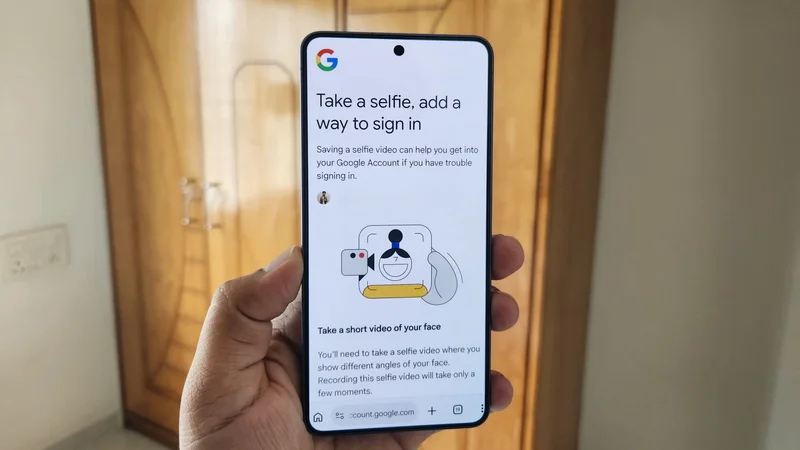
I was wrong about Google's new selfie sign-in tool. Here's how (and why) you should set it up now
Aug 1, 2026 — 6:30 AM ET
When I first heard Google was letting users recover their accounts with a selfie video, I had to try it. Was I skeptical? Absolutely. After all, uploading a video of my face to Google’s servers doesn’t exactly scream “great idea.” And enabling selfie verification for your Google account in the age of AI deepfakes sounds counterintuitive.
But after trying it and understanding how it actually works, I’ve changed my mind. This might be one of the most genuinely useful additions to account security Google has made in a while.
Here’s how Google’s selfie sign-in feature works, how to set it up on your account, and why you really should.
What's your biggest concern with Google's selfie sign-in feature?
Your face could save your Google account
Losing access to your Google account isn’t just an inconvenience. It means losing years of emails, photos, files, and perhaps every account where you’ve signed in with Google. Of course, Google already offers several ways to recover your account — and they might seem enough, until they’re not. If you lose your phone, backup emails, and backup codes all at once, getting your account back can be tough, if not impossible.
Google’s new selfie video feature may be its smartest account recovery trick yet, because it doesn’t rely on a trusted device, backup codes, or a string of security questions nobody actually remembers the answers to. Those are things that can be lost, forgotten, or stolen. Selfie video lets you verify your identity with just your face. You do need to set it up before you actually lose access — but after that, getting back in is just as simple as taking a short selfie video. Google then compares it to the previously recorded video, and if it matches, you’re in.
What if someone holds up a photo of you, or worse, creates an AI-generated deepfake? Well, Google has obviously thought about that.
My first thought when I heard about this feature was probably the same as yours — what if someone holds up a photo of you, or worse, creates an AI-generated deepfake? Well, Google has obviously thought about that too. The sign-in flow actually requires you to move your face left and right, and that liveness detection is what makes it significantly harder to spoof than a static photo match. Google has also said it is layering its existing suspicious sign-in detection on top of all of this, so it’s not just your face doing the heavy lifting. That said, we’ll just have to wait and see how effective this all turns out to be in practice.
Account recovery is the most obvious reason for this feature, but it’s not the only one. Google also uses your selfie video to verify you’re a real person, and it can even help you generate a Gemini avatar — if you’re into that sort of thing.
How to set up Google’s selfie sign-in feature
Setting up a selfie video isn’t complicated. I did it for my primary Google account, and it took me less than a couple of minutes. The only thing to note is that this feature isn’t available for Workspace accounts, child accounts, and accounts enrolled in Google’s Advanced Protection Program. You can check if your account is eligible and set up selfie video using these steps:
- Open the Googleapp on your phone.
- Tap your profile picturein the top right corner.
- Choose Manage your Google account.
- Tap Security and sign-inand chooseSelfie video. You can also head to g.co/signin-selfie directly in a browser.
- Follow the on-screen instructions to record a short selfie video.
- Tap OKto confirm.
The process is quick and easy overall — you basically need to show your face from different angles, kind of like Android’s face unlock. That said, you do need to be wary of a few things to get it right on the first try.
First, make sure your room isn’t too dim or too bright, and keep your eyes, nose, and mouth fully visible. Glasses are fine — sunglasses, masks, and hats aren’t. Also, avoid having people in the background while you’re recording this, not even any images or portraits. The on-screen instructions will walk you through all of this anyway, and if the video doesn’t turn out right, you can always delete it and reshoot.
You can remove your video whenever you want
The obvious hesitation with this new selfie sign-in tool is privacy. Thankfully, Google doesn’t use your video for anything else unless you’ve explicitly enabled the “Improve Google services” toggle during setup. If you have, Google may use the selfie video to improve facial recognition, age estimation, and other verification methods that rely on physical features.
Google also says your selfie video is encrypted on its servers. Still, if you’re still worried about a potential data breach, I don’t blame you. You can remove your selfie video at any time by heading back to the selfie video page in the Google app. From the same page, you can also opt out of contributing data to improve Google’s services without disabling the feature altogether. Deleting the video, of course, means losing access to selfie sign-in and the Gemini avatar feature along with it.
You don’t have to set it up — but you really should
Google isn’t forcing anyone to set up selfie sign-in, at least not yet. I also feel most people probably won’t bother with it because account recovery isn’t something you think about seriously until you’re locked out.
Personally, though, I suggest setting it up. It only takes a couple of minutes and can be handy when recovering your account. Don’t get me wrong — I’m not saying all the other recovery options aren’t reliable — and you should absolutely set those up first. But they’re only as reliable as your ability to hold onto a phone number, remember a backup email password, or not lose a recovery code. Your face, on the other hand, isn’t going anywhere — and it’s something you always have on you.
So yes, I feel it’s worth it — though I know not everyone will agree, especially given the privacy concerns. Do you have any thoughts about this feature? Let us know in the comments below.