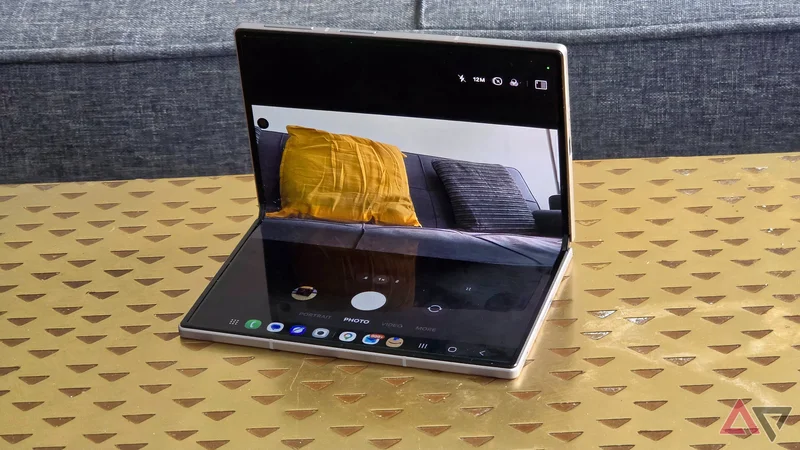
It's safe to say that the Samsung Galaxy Z Fold, one of three new bending smartphones Samsung recently launched, is a hit.
Not only are pre-orders crushing the Fold Ultra, but Android Police's writers are already singing its praises.
For the week since the Samsung Galaxy Z Fold 8 and Z Fold 8 Ultra came out, I've been using them both. I've taken them on photography jaunts, played hours of games on both, and used them on holiday.
The Samsung Galaxy Z Fold 8 has become my daily driver; I love using it. Still, it misses one key feature that the Ultra enjoys, and I can't quite call it the perfect foldable without it.
What the Galaxy Z Fold 8 misses
Close, but no Flex Mode
I love the portability of the Samsung Galaxy Z Fold.
When folded, it's more compact than any rival on the market. Unfolded, it offers a fair amount of screen real estate for movies, games, or dual-screening apps.
But there's one key foldable feature missing: Flex Mode. It's available with the Galaxy Z Fold 8 Ultra and on older models, but the smaller (and slightly more affordable) handset doesn't get to enjoy it.
Flex Mode automatically occurs in most Z Fold devices when the device is partially opened, between 75 and 115 degrees. It lets you enjoy both sides of the main display in a different way, with purposes that combine.
For example, you can partially bend the Z Fold while in the camera app: the viewfinder will appear on the top half, while the controls will be at the bottom.
There's a long list of apps that offer this kind of dual-screen functionality, offering loads of options.
Another example happens in the Gallery app. Half of the screen turns into a trackpad, so you can enjoy more control when editing pictures without your hands getting in the way.
When you fold the Samsung Galaxy Z Fold 8, the display doesn't change; you have a crease running down the middle of whatever you were doing.
There's no handy app repositioning to take into account your changed form factor.
Why Flex Mode could be so useful on the Z Fold 8
Appreciating the new form factor
An important difference between the Samsung Galaxy Z Fold 8 devices is the aspect ratio. The new member of the family has a 16:10 outer display and a 4:3 inner one, while the Ultra has a 21:9 outer display and a 1:1.11 inner one.
Samsung used the Z Fold 8's aspect ratio to define its creation. Now, as the brand points out, you can watch movies or TV shows without undue letterboxing (black bars at the top and bottom).
In Flex Mode, each half of the Ultra is long and thin, making them useful for some functions (a keyboard, for example), but less so for others (like a gaming handheld-esque control system).
Given that the Galaxy Z Fold 8 is a different shape, it'd be much more handy for certain tasks while in Flex Mode. Each half would have less depth, but more width, handy when you need close-together tools.
I can see it being much more convenient as a camera viewfinder. For example, if shooting in square for social media. And for work, lists and other vertical-shown information would be presented in a way that's easier to parse.
The Galaxy Z Fold 8 would give Flex Mode a new lease on life, with new functionality, making it a viable alternative to the Z Fold 8 Ultra or Z Flip 8 (I've not mentioned it, but the clamshells have Flex Mode).
Unfortunately, it's likely this new aspect ratio is the Galaxy Z Fold 8's undoing (at least, when it comes to Flex Mode).
The foldable can't stay in flex without slowly toppling, opening or closing, unlike the Ultra. Staying in this bent shape is fundamental for Flex Mode. And with no other reasons provided, the screen change seems to be to blame.
Flex Mode is part of the foldable charm
Foldable phones aren't cheap. If you're paying $1,700 for a mobile phone, especially one with decent but not amazing specs like the Galaxy Z Fold 8, you want the folding experience to be impeccable.
Flex Mode is an important part of that folding experience. It's a unique way to use your bending mobile that makes the most of the bending screen, the part of the phone you're paying a premium for.
Without Flex Mode, the Samsung Galaxy Z Fold 8 feels like it's missing something. It's either a smartphone or a tablet, depending on how you use it, but there's a void between those form factors.
It's one small department in which the Samsung Galaxy Z Fold 8 Ultra seems like a more premium device, even if some would argue it doesn't justify the Ultra name.
Samsung Galaxy Z Fold 8
-
**SoC** - Qualcomm Snapdragon 8 Elite Gen 5 for Galaxy
-
**RAM** - 12GB / 16GB
-
**Storage** - 256GB / 512GB / 1TB
-
**Battery** - 4,800mAh
-
**Operating System** - Android 17 / One UI 9
-
**Front camera** - 10MP main / 10MP cover
The Samsung Galaxy Z Fold 8 has a 4:3 aspect ratio open screen, making it great for video and reading books, and when closed the device is compact, with apps on the cover screen appearing normally. It joins Samsung's Galaxy Z Fold 8 Ultra, which has a more traditional tall-and-thin design.