Apple Pay launches in the Philippines
After a long wait, Apple Pay has finally launched in the Philippines, today August 4, 2026. Here are 7 questions we answer about the rollout. We were fortunate to interview Jennifer Bailey, Vice President of Apple Pay and Apple Wallet to talk about the implementation of the service in the Philippines.
What is Apple Pay?
Apple Pay is a digital wallet and mobile payment service that allows you to make purchases with your iPhone, iPad, Mac, and Apple Watch. To make it work, you need to add or link a supported credit or debit card to the Apple Wallet app on your device. The most common use case of Apple Pay is to make contactless payments via NFC on your iPhone.
How do I use Apple Pay?
Using Apple Pay in stores is seamless and easy. Simply double-click the side button or Home button, authenticate using Face ID or Touch ID, and hold the top of the iPhone or display of the Apple Watch near the contactless reader to pay.
Article continues after this advertisement
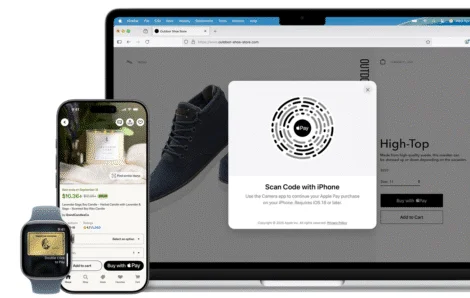
Users can also make purchases with Apple Pay on iPhone, iPad, and Mac for faster and more convenient payments in apps or on the web without having to create accounts or repeatedly type in contact information, card details, or shipping and billing information.
Today, Apple Pay is available in more than 90 countries and regions, and works with more than 11,000 bank partners worldwide.
What are the initial supported banks and merchants?
Apple has initially partnered with UnionBank, GoTyme Bank, Metro Bank, and China Bank for the initial rollout of Apple Pay. There are more partners lined up as the rollout is fully implemented. Apple claims that consumers will be able to earn the same rewards and benefits offered by their partner bank cards.
Customers of select banks will be able to apply for a virtual card through their bank app or website.3 The virtual card can be issued instantly and added to Apple Pay, allowing users to begin paying immediately with their Apple devices.
Article continues after this advertisement
Merchants such as Abenson, Anko, Ayala Malls Cinemas, Ayala Malls, Beyond the Box, Coach, Digimap, Foot Locker, Globe, HOKA, Hollister, Jollibee, Lush, Power Mac Center, Rustan’s, SaladStop!, Shake Shack, Smart, The Loop, The Matcha Tokyo, The Movie Snackbar, The Underbelly, and WalterMart Supermarket — and apps and websites including foodpanda, Jollibee, Rustan’s, and Shopee — will offer users the ability to pay with Apple Pay today, with even more to come. Maya Business, a leading payment processor in the Philippines, will also begin enabling Apple Pay for over 5,000 online merchants.
What devices are supported?
Just like the global rollout in other countries, Apple Pay works together with the Apple Wallet app. Any modern iPhone with NFC support is required for in-person transactions (“tapping to pay”) as the Filipino consumer has grown accustomed to with the wireless / contactless terminals. NFC is not required for online shopping on your browser.
You will need an iPhone with NFC support, Face ID and / or Touch ID for contactless payments. It also supports Apple Watch.
Article continues after this advertisement
Specifically, Apple Pay supports the iPhone 6 or later with iOS 12.5.2 or later. It is available on Apple Watch Series 4 or later with watchOS 9 or later. Apple Watch must be paired with iPhone 8 or later.
Does Apple keep track of my purchases?
No. Apple does not know what you buy nor keeps track of your purchases. They are merely intermediaries. No information or customer demographics are kept or tracked as first party data or used for retargeting / remarketing for ads.
How secure are my transactions?
According to Bailey, when you add a card to Apple Pay, a unique device account number is created. This number is encrypted and securely stored on your device. When payments are made, your real card number is never shared with the merchant, nor with the payment processors. Every single payment is authorised with Face ID or Touch ID or your passcode, so unlike a physical card that can be stolen and used by anyone, there is a layer of authentication with Apple Pay.
What happens if I sell my iPhone or buy a second-hand iPhone?
If you plan to have someone else inherit your device, it is absolutely necessary to do a factory reset to wipe all information, not just Apple Pay.
If I am a developer and want to include Apple Pay into my app, how can I learn more?
There’s a wealth of information from Apple Pay developer support for the SDK currently available online.
With the launch of Apple Pay in the Philippines, there’s now a more complete picture of the full ecosystem support with Tap-To-Pay services from Google Wallet, Apple Wallet, alongside the current QRPH initiatives by the BSP and other financial services. It was less than six years ago when the Philippines ramped up its digital money spurred mostly by the Covid-19 pandemic. The realization that physical money may be a cause of transmission of the virus had the entire population decide to move swiftly to digital payments.