Karpenter's consolidation behaviour is counter-intuitive
OK, this story starts off with a colleague messaging me at 9am on a Tuesday morning: “Hey, drmorr, Karpenter is behaving a little bit strangely in this cluster, could you take a quick look?”
“Sure,” I said, before I’d gotten my morning caffeine. It’ll probably take about 15 minutes and then I can get on with my day, I thought to myself1. Five hours later, I finally understood what was going on. Two hours after that, I understood it well-enough to be able to explain it to my colleague2. A week or so later, I understood it well enough to write this blog post.
Spoiler warning: there’s no bug in Karpenter, and everything in the sequence logically follows from one step to the next, but (at least for me) the outcome was still surprising enough that I thought I’d write a post about it.
It all starts with a graph
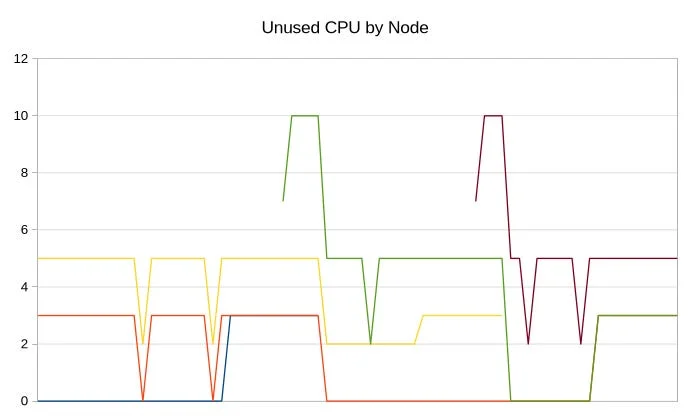
So just to be clear, I’ve filed off all the serial numbers on this post to protect… I dunno, probably nobody, I don’t think there’s anything particularly sensitive here, but anyways. The issue started out with a graph that looks like this:
This graph is showing the unused CPUs in a cluster, aggregated by the nodes in the cluster. In other words, each line represents a different node, and the value at any point is the number of available (schedulable) CPUs on that node. It is a stacked graph so that we can get an idea of both the distribution of unused CPUs as well as the total unused CPUs in the cluster.
This graph is pretty hard to read! But, if you squint at it for long enough, two things become apparent: first, the “available CPU capacity” in the cluster is pretty constant: we more-or-less always have 5 CPUs available. And secondly, despite this, nodes in the cluster are churning constantly. This pattern in this graph repeated for well over 12 hours. What??? Why would Karpenter be doing this? Is this even Karpenter’s fault???
However, after checking the Karpenter logs, I was able to confirm that Karpenter was terminating these nodes because of node consolidation. But I’m still very confused: Karpenter is supposed to consolidate nodes to binpack the cluster better—in other words, after a node consolidation event, the “available capacity” in the cluster should decrease! But that’s not what we see: after a node consolidation event, the available capacity stays constant.
To understand what’s happening here, we need to know about two things: what’s running on this cluster, and how Karpenter’s node consolidation works. Let’s first talk about Karpenter node consolidation, because I hear a lot of ~~lies~~ subtly imprecise discussion about how it works3.
Who’s consolidating who?
The standard sales pitch4 for Karpenter goes like this: “Install this magic autoscaler and all your problems will go away!”
Sorry, that was snarky. Let’s try again. The standard sales pitch for Karpenter goes like this: “Install this magic autoscaler and it will make your cluster much, much cheaper!” That was still snarky5, but is closer to the truth. The question is, “How does Karpenter make things cheaper?” The answer is node consolidation.
At a very high level, Karpenter has two control loops: one is the “scale up” loop and the other is the “consolidation” loop (I wrote about analyzing the performance of these two control loops way back in the SimKube 1.0 days). The scale-up loop is designed to be fast: it responds to any Pending pods very quickly, and launches new nodes to get those pods scheduled ASAP. The consolidation loop is slower; it’s constantly on the hunt for the “optimal” configuration of pods and nodes, where “optimal” in this case means “cheapest”. In practice, what this means is that it is constantly trying to shrink the cluster (aka, bin-pack it) by moving pods off of “lightly used” nodes so that those nodes can be terminated6. In theory, this results in lower cost since you’re not paying AWS for as many compute resources.
Let’s dig into the consolidation behaviour in a bit more detail; if you read the Karpenter docs on this topic, you might be surprised to learn that there are very few knobs you can turn here! You can only set two parameters (on a per-node-pool basis): consolidationPolicy and consolidateAfter. The first parameter controls how Karpenter performs consolidation, and you can either set it to WhenEmpty or WhenEmptyOrUnderutilized7; the second parameter controls how long a node has to sit around before the consolidation mechanism kicks in.
In general, if you’re running Karpenter, you “probably” want to be using WhenEmptyOrUnderutilized; if not, you’re just waiting for pods to naturally cycle out of your cluster before any sort of bin-packing kicks in, and this is in general going to result in a lot of mostly-empty nodes sitting around in your cluster. So really the only parameter that has any meaningful choices is consolidateAfter. This knob helps reduce churn: set it low, and Karpenter will kick nodes out of the cluster extremely rapidly8; but this might be undesirable if you have a new workload coming in that could have used that node. Then you have to spin up a new node, and node provisioning likely takes you longer (and costs you more) than just keeping a “warm” node around in the cluster a bit longer. If you expect this sort of thing to happen regularly, you can set consolidateAfter to a higher value to tell Karpenter to keep nodes around9.
I’ve read through that Karpenter documentation page dozens of times at this point, and every time I’ve read through it, I’ve thought, “It sure is weird that there’s no way to control the utilization threshold for Karpenter’s consolidation behaviour!” In other words, we always talk about Karpenter consolidating “underutilized” nodes, which implies that there is some threshold at which Karpenter considers a node “not underutilized”, and I’ve always been a little surprised that threshold isn’t tunable. But it turns out there’s a very good reason why that threshold isn’t tunable: there is no such threshold.
Specifically: Karpenter will consider a node for consolidation regardless of how full it is. Doesn’t matter if there’s one pod or one hundred pods running on the node, as long as we’re outside the node’s consolidateAfter window, the node is eligible for consolidation. The only10 thing that matters, from Karpenter’s perspective is, “do all these pods fit somewhere else?” If the answer is yes, buh-bye, out you go!
The implication here is that Karpenter’s consolidation behaviour has nothing at all to do with the state of the node in question, and EVERYTHING to do with the state of the cluster around it. A node with a hundred pods in a fully loaded cluster? Won’t get consolidated. That same hundred-pod node in a cluster with lots of other empty nodes? Might get consolidated. Or to put it in even starker terms: Karpenter is using global state (what does the entire cluster look like?) to make a local decision (what should I do with this node?). Generally that is the inverse of what we want in distributed systems.
Now you see it, now you don’t
Now that we (or, at least, I) have a better understanding of Karpenter’s consolidation behaviour, let’s look back at the workloads running on this cluster, and specifically at the graph I shared at the beginning of this post. Does anything seem odd about this graph? I didn’t see it until I looked at the inverse of the graph. Instead of looking at the remaining available capacity in the cluster, let’s look at the committed (scheduled) CPU capacity in the cluster:
This graph is still kinda hard to read, but it’s a little bit easier. We can see that the used capacity in the cluster is more-or-less constant now, even as nodes are churning, but also—huh, look at those spikes11! I wonder what those are? It turns out that in this cluster, there are a number of long-lived pods running on the same node pool as an extremely short-lived Job that a) gets triggered at fairly regular intervals, and b) consumes quite a large amount of compute (relatively speaking). The other important thing to understand is that some of the long-lived pods in the cluster have a termination grace period set, which means that (after Karpenter has marked the node for consolidation) the node will stick around for some period of time before the remaining pods get shuffled off of it.
So now we have all the pieces to understand what’s happening; instead of squinting at stacked timeseries graphs, it will be a little clearer if we draw the nodes and their contents out explicitly. So, consider the following scenario: we have three nodes, A, B, and C with workloads distributed as follows:
At this point, there is no short-lived, resource-heavy pod present, and all of the other pods can fit on two nodes, so Karpenter decides to start consolidating node A:
Most of the pods on node A have been evicted and rescheduled onto node B; one of the pods on node A is still in a “terminating” state while its grace period expires. Now, shortly thereafter, the big, short-lived pod shows up (for the purposes of this example, it takes up an entire node, but it’s trivial to construct cases where it does not). It has no place to run12, so Karpenter launches a new node for it:
Soon thereafter, the short-lived pod finishes, and we now have three active nodes in the cluster again. Nodes B and D are both ineligible for consolidation, because they’ve both had scaling activities recently13; however, node C has just been sitting there for a while! Karpenter can consolidate it! So it does:
And, now we’re back at the beginning of the cycle. This will repeat indefinitely as long as this short-lived, resource-heavy pod continues to appear at regular intervals, and as long as nothing else breaks the cycle. Congratulations! You have introduced constant node churn into your cluster as a consequence of seemingly isolated and independently logical scaling rules.
So, how do you fix it?
Well now, that’s the real interesting14 question, isn’t it? How do you fix this? This is the real challenge with autoscaling: you can add in another rule to try to break the cycle, but how do you know that this new rule that you add isn’t going to have other unintended consequences down the line? Basically: you don’t. There is so much emergent behaviour when you try to scale things up and down, and it’s nigh-impossible to reason about all of it.
I know you all are hoping I have a good answer, but I actually don’t. It’s a little bit bonkers that Karpenter has decided, “Hey, I’ve got this fully loaded node, and this mostly empty node over here, but I’m not allowed to touch the mostly empty node, so I’m going to reschedule ALL OF THE PODS on this fully loaded node instead!” But how do you fix this? Here are some options:
- Maybe Karpenter should actually have some kind of consolidation threshold for nodes? E.g., if node A is more than 75% full (or it has more than 42 pods as an absolute number), Karpenter won’t touch it. This would prevent nodes with a lot of pods from getting consolidated, but could also prevent the cluster from scaling down when desired.
- Karpenter could consider nodes that have had recent scheduling activity as ineligible for other pods during its scheduling simulation15. This could also have significant impacts to its consolidation ability, and is also a significant departure from what kube-scheduler would - actuallydo
- Maybe Karpenter needs some kind of “global churn threshold”: it - kind ofhas this, with its node pool disruption budgets, but this just takes into account nodes that are being terminated Right Now, and doesn’t look at historical churn rates.
- Maybe Karpenter should consider historical usage when making consolidation decisions; in other words, it tries to predict that “oh, this short-lived but resource-intensive pod has been showing up extremely regularly, maybe I should try to leave some room for it.” This would be extremely cool, but predictive autoscaling behaviour is also - extremely hard to do, and there’s even more cases where it can go wrong than a purely reactive autoscaler.
There are probably some other potential solutions as will, but which one is right? Maybe you should implement multiple options? But what if they conflict in weird ways with other scaling rules? How do you even know? Most of the time, when faced with an autoscaler problem like this, people make decisions based on extremely rigorous criteria such as “vibes” and “YOLO”.
But man, wouldn’t it be nice if there was a better way?
As always, thanks for reading :)
~drmorr
Turns out there were actually two separate issues, but I’m just going to talk about one of them in this post.
And I’ve repeated/contributed to these ~~lies~~ imprecise language in the past as well, possibly even somewhere in this very blog post! gasp
I just did it! I said the ~~lie~~, err, sorry, imprecise statement, about Karpenter’s consolidation behaviour. Did you catch it?
In the process of doing this investigation, I discovered that the most recent version of Karpenter (1.14, at time of writing) has introduced a third policy, called Balanced. I know nothing about how it works except that it appears to be an attempt at a less-aggressive form of consolidation that reduces node churn. I won’t talk about it further here because a) the cluster in question is not on the most recent Karpenter version so couldn’t use this Balanced mode anyways, and b) I know nothing at all about it.
By the way, everybody I’ve ever talked to about this has said “we just pick a value for consolidateAfter based on vibes and feelings”. Wouldn’t it be great if there was some way to cough simulate the effects of different consolidation periods on your cluster?
I’m ignoring disruption budgets here, which aren’t relevant to the discussion and also don’t &%($ing do what you want them to anyways.
As an aside, I was trying to figure out why I just glossed right over them in the first graph; the spikes still show up, just inverted! Stalactites instead of stalagmites, as it were. But I finally figured it out: in the “available capacity” graph, the metrics change looks exactly like some metrics data points have been dropped, and I am extremely conditioned at this point to ignore these types of artifacts in graphs, because data gets lost in Prometheus so often. BUT, if this really was a missing data points issue, you would see the same drop in the inverted graph; instead, we see the opposite, a spike! Which means these are “real” data and not just missing metrics.
This is another tidbit I learned about Karpenter while investigating this; Karpenter resets the consolidateAfter timer any time a pod is scheduled or evicted from a node. I think this behaviour makes sense, but previously I had thought that removing pods from a node didn’t reset the consolidation timer.
A colleague of mine told me yesterday that they’ve learned any time I say the word “interesting” what I actually mean is “likely to break in all kinds of weird, messed-up ways”. I consider this a compliment of the highest order.
This is the converse of its current behaviour: right now, if a node’s consolidation timer is too low, Karpenter won’t try to move pods off of it. What I’m proposing is that maybe Karpenter also shouldn’t try to move pods onto it.