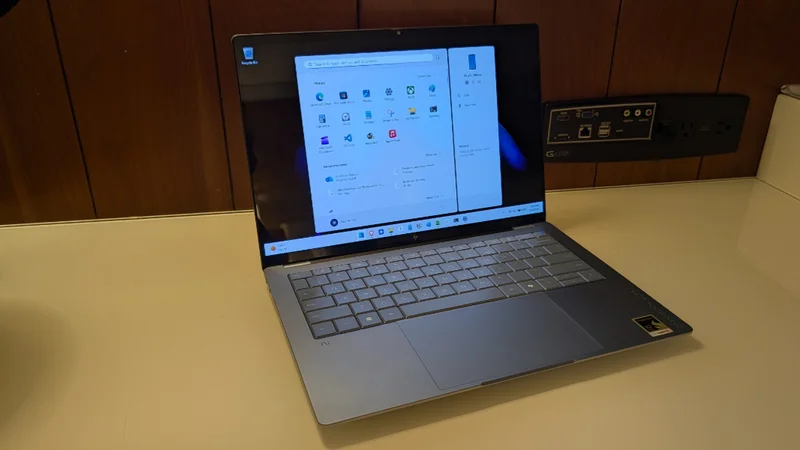
We didn’t need more evidence that Qualcomm’s Snapdragon X2 compute platform is superior to anything in the x86 world. But here it is, regardless: The HP OmniBook Ultra 14 is yet another nearly-perfect laptop running Windows 11 on Arm, an ideal combination of hardware and software that delivers a superior overall experience.
The OmniBook Ultra 14 is a handsome, premium laptop aimed at creators and other consumers–what I would call prosumers–with a three-piece matte aluminum body that was sandblasted on the edges for a shiny, polished look. Few Windows laptops are head-turners, but through a combination of design, colors, and materials, HP landed on something special here.
In Snapdragon X2 guise, the laptop comes in a unique blue-gray Stone Blue color that’s nicely complemented by the darker gray of the keyboard keycaps. But if you get an Intel model, oh the horror, you can choose between Eclipse Gray and Silk Sand colors instead. Either way, the branding is minimal and classy and premium all the way.
As good, the outside of the display lid and the top of the keyboard deck are both coated in an anti-fingerprint finish that mostly works. I can turn the laptop in the light and catch some visible skin oils on the touchpad, but the wrist rests and display lid are notably clean despite the regular usage.
The screen doesn’t fare as well: The keycaps transfer finger oils to the display in a distractingly visible pattern that I found myself wiping away every few days. The MacBook Air has the same issue, but PC makers generally place small rubber stops below the keyboard at the top of the wrist rests to prevent this from happening. HP didn’t do so in this case, and it also elevated the keyboard ever so slightly above the laptop deck. I feel like the company was going for some kind of thinness record here, and therein lies a tale.
I grew up in Dedham, Massachusetts, which at one point claimed that the Fairbank’s house, built in 1637, was the oldest house in the United States. This claim fell apart with just a little scrutiny, with the town later adjusting the claim to its being the oldest house east of the Mississippi, also not true, and whatever else over time. Today, the Fairbank’s house is, well, old. Today, it’s described as the oldest timber frame house in North America.
With the OmniBook Ultra 14, HP makes a few similarly curious claims tied to the laptop’s thinness. It was originally described as the thinnest premium consumer laptop on the market. And now it’s the world’s most durably slim consumer notebook and, separately, the world’s slimmest consumer notebook with the fastest AI performance. Whatever the claim, the OmniBook is thin, but there are a few cheats in there, too. It’s thinner at the front than the back; it has a concave design that gives the appearance of even better thinness, and no one is counting the size of the large rubber feet under the thing in any of these measurements.
None of this matters, of course. The OmniBook Ultra 14 is thin, light, and gorgeous, with a delightfully refined design and that unique Stone Blue color. That it’s so durable even with this thinness is perhaps more notable: The OmniBook passed 20 standard MIL-810H drop, shock, and extreme temperature tests, which is typical for premium business-class thin-and-light laptops, but less common in the consumer space.
HP offers two display choices with the OmniBook Ultra 14. Both are impressive 14-inch multitouch OLED panels with a 16:10 aspect ratio, ultra-wide viewing angles, edge-to-edge Gorilla Glass 3 protection, low blue light capabilities, and 100 percent coverage of the DCI-P3 color gamut and Delta E < 1 color accuracy for creative professionals.
If you order the Snapdragon X2 Plus configuration, you get the base display with a Full HD+/2K (1920 x 1200) panel with a 60 Hz refresh rate that emits 300 nits of brightness by default. The upgraded display provided with Snapdragon X2 Elite configurations like the review unit is a 3K (2880 x 1800) panel with a 120 Hz variable refresh rate (VRR) that emits 500 nits of brightness or up to 1100 nits for HDR content.
I did enable the 120 Hz VRR mode in Display settings and kept it that way, but I also temporarily experimented with some display-related settings in the HP (formerly myHP) app. For example, you can configure the display for photo and video work (P3 D65), entertainment, or a native output, and you can even manually adjust the contrast if needed. In the end, I stuck with the default display mode, but you can even create custom display modes for specific apps, which may be of interest to creators.
Though OLED displays tend to be glossy and reflective, this one isn’t horrible in that regard unless you’re in, say, a hotel room, and I found it to work well with productivity and creative work as well as entertainment.
The display bezels are quite small, especially on the left and right sides.
But the display comes nowhere close to lying flat. It’s unclear why.
The OmniBook Ultra 14 can be configured with a 10-core Snapdragon X2 Plus X2P-64-100, a 12-core Snapdragon X2 Elite X2E-84-100, or an 18-core Snapdragon X2 Elite X2E-90-100 processor. And then there are different base amounts of soldered RAM (16, 32, or 64 GB LPDDR5x-9523 MT/s) and removable storage (512 GB, 1 TB, or 2 TB of M.2-based PCIe Gen 5 NVMe SSD). The X2 Plus variants have an 80 TOPS Hexagon NPU, while those with an X2 Elite have an 85 TOPS NPU that HP claims is exclusive to its laptops.
The review unit includes the highest-end Snapdragon X2 Elite processor, an incredible 64 GB of RAM, and 2 TB of storage. As was the case with the original generation Snapdragon X chipsets, it’s unclear what, if any, benefit one sees from the processor upgrades in normal day-to-day work. But the benefits of Snapdragon X2 are undeniable: In addition to epic battery life, there’s no noticeable performance change when you’re detached from power as is the case with x86 chipsets, especially those made by Intel. And while the transition to local AI is proceeding slowly, the 85 TOPS NPU in the review laptop is about as future-proof as such a component can be.
I rely on real-world experiences, not benchmarks, for my reviews, but I found it interesting that HP supplied its own results for this laptop in both Snapdragon X2 and Intel Core Ultra Series 3 “Panther Lake” versions, in part because the Snapdragon versions routinely trounced the performance of the Intel variants, and often by a large margin. Intel only came out ahead in two of several graphics benchmarks, and then just barely. Other than that, Snapdragon X2 ran the rack.
In my usage, compatibility and performance of standard productivity, developer, and creator apps and services were top-notch with not a single issue, as is always the case with Snapdragon X/X2. In addition to the usual daily work–web browsing with Brave and Helium, writing with Typora, note-taking with Notion, image editing in Affinity, and Slack-based collaboration–I edited several videos for our Eternal Spring YouTube channel using Clipchamp, used the Windows Subsystem for Linux with multiple distributions, and hammered on other little-touched parts of Windows 11 while updating the Windows 11 Field Guide. The OmniBook never broke a sweat from what I can tell: I didn’t hear the fans come on once.
Snapdragon X2 is terrific, but Qualcomm got a bit of help here, too. In addition to the inherent efficiency of the laptop’s Arm-based innards, HP redesigned the OmniBook’s active cooling system to accommodate its first compact vapor chamber with liquid cooling, and it uses an AI-based Smart Sense feature by default to optimize performance in real-time. So there’s still a pair of fans, but they’re needed less often than ever, even when the system is under load.
Also helping matters, those two cross-body rubber feet that don’t factor into the laptop’s size measurements keep it elevated for air circulation. The system was always delightfully cool and quiet.
Connectivity is modern thanks to the OmniBook’s Qualcomm FastConnect 7800 Wi-Fi 7 and Bluetooth 5.4 capabilities. However, 5G cellular connectivity isn’t available, even as an option. You may recall that this was originally a major selling point of Windows on Arm, but customer demand never materialized.
Given the laptop’s thin form factor, it’s perhaps not surprising that it only has a handful of modern Type-C ports. But there’s at least one on each side of the laptop, which is ideal. I can’t tell you the last time I needed a dongle.
On the left, HP provides a single 40 Gbps Thunderbolt 4/USB4 Type-C port with Power Delivery 3.1, DisplayPort 1.4, and HP Sleep and Charge capabilities and a combo microphone/headphone jack.
On the right, there are two 40 Gbps Type-C ports with the same capabilities as above.
Despite its thin body, the OmniBook Ultra 14 has four discrete downward-firing speakers–two tweeters and two woofers–with spatial audio tuning, though there’s no Dolby Atmos or DTS: Whatever sound optimization there is comes courtesy of HP Audio Boost and Poly Studio, according to HP.
The sound quality is excellent, with no distortion at the highest volumes and a wide stereo soundstage. But there’s no software included on the laptop for customizing the sound, oddly, and the Audio section in the HP app recommends using the Windows 11 Settings app for configuration. Which, yes, is useless.
Regardless, the multimedia experience is very good, and the OLED display panel really helps to complete the story. As always with bottom-firing laptop speakers, the best results are had when the device is used on a hard surface like a table or desk.
With its consumer focus, HP might be forgiven for under-delivering on the OmniBook Ultra 14’s remote and hybrid work capabilities. But that’s not the case, for the most part. Instead, you get a 5 MP webcam with a surprising range of additional capabilities and the type of dual-array microphone system that’s common in laptops these days.
The webcam is surprisingly good, with crisp video and little noise unless you’re in a very dark environment. It supports the full suite of Windows Studio Effects, which is nice. But also optional screen distance and posture detection, along with camera gestures, each of which can be enabled and configured to some degree in the HP app. The camera gestures are mostly tied to entertainment scenarios–you can pause/resume videos, adjust the volume, and scroll with hand movements if desired–but feel unique.
The microphones aren’t all that interesting, though they do at least support Windows Studio Effects Voice Clarity with Voice Focus for reducing background noise. But they’re still just average, with a bit of distortion as is typical for laptop microphones.
HP doesn’t get enough credit for the quality of the keyboards it delivers with its premium consumer and business laptops. But the full-sized and backlit keyboard that comes with the OmniBook Ultra 14 is perhaps a new high-water mark and among the best I’ve ever used.
The keyboard is latticeless, which means there’s no spacing between the keys, but HP sculpted each key to introduce spacing while making the key dishes deeper. Despite having relatively long key throws, especially for the form factor, these changes deliver a nearly perfect typing experience with excellent feedback. I love it, though I wish the backlighting supported an automatic mode. Instead, you get two levels of manual brightness.
Given the form factor, the precision touchpad is surprisingly large, and I did have to disable the three-finger swipe gesture to achieve the level of reliability I want. That’s probably at least partially my fault, but the touchpad’s glass haptic design is excellent overall and handles a light touch as well as it does my usual more punishing interactions.
Snapdragon X2-based Copilot+ PCs like the OmniBook Ultra 14 provide the best out-of-the-box security protections thanks to Windows Hello Enhanced Sign-in Security (ESS) and all the low-level enhancements that feature requires.
The OmniBook Ultra 14 comes with Windows Hello ESS facial recognition but not a fingerprint reader. There’s also a full suite of presence-sensing capabilities for automatic wake and lock, with discrete toggles for turning off the screen when you leave, waking the PC when you approach, dimming the screen when you look away, and detecting when others are looking over your shoulder at the screen.
These features are undeniably useful and improve both security and convenience, especially when you use facial recognition to sign in. But I find some of these behaviors annoying, and so I keep experimenting with different configurations. With the OmniBook Ultra 14, I only left the auto-wake capability enabled.
Beyond all that, you get a manual webcam privacy switch right above the camera on the display lid top, which isn’t ideal but works OK, and a microphone mute toggle key in the function key row.
The HP OmniBook Ultra 15 is made with up to 80 percent recycled metal in the cover, keyboard frame, and base, over 40 percent post-consumer recycled materials in the keyboard keycaps, scissors, and keyboard plate, and ocean-bound plastic in the speaker enclosures and bezel.
In keeping with HP’s sustainability work in recent years, the OmniBook is user serviceable and easily repaired thanks to four exposed screws on the bottom of the laptop. Anyone can replace the SSD and battery, while other internal components are accessible to service technicians.
The HP OmniBook 14 is quite portable with a thin and light form factor that measures 12.25 x 8.49 x 0.42 inches (in the rear; it’s just 0.29 inches in the front) and weighs just 2.81 pounds. That’s well under the 3-pound norm for a 14-inch premium thin and light laptop, and I barely noticed it in my bag when we traveled to Mexico City from Pennsylvania and during a subsequent trip from Mexico City to Las Vegas. (Where I am as I finish writing this review.)
What I did notice was the battery life.
HP claims that the Snapdragon X2-based OmniBook Ultra 14 models deliver up to 28 hours of battery life, though that’s for offline video playback, not real-world usage. That’s well understood, but my first few experiences with Snapdragon X2 Elite suggested that the additional performance gains of this generation of chipset were reducing the battery life gains we saw with the OG Snapdragon X. And so I went into this curious whether that would continue.
It did not. In over a month and a half of real-world usage, I saw an average of almost 11 hours of uptime. That’s on par with the best results I saw with the original Snapdragon X laptops I reviewed two years ago and a welcome return to form. And I can only assume that the 2K display option would improve matters further.
As an example, I wrote part of this review while on battery power flying from Mexico City to Las Vegas for a work conference. After using it for four hours straight while charging my iPhone over USB, I was told to stow it for landing, and there was 65 percent battery life left.
HP bundles its new 65-watt USB Type-C GaN mini wall adapter with the OmniBook Ultra 14. It’s excellent, thanks to its small size, removable USB-C cable, and foldable power prongs. And it can fast-charge the 4-cell 70 watt-hour battery in the laptop to about 50 percent in 45 minutes.
As good, the instant-on performance and reliability were both flawless too. You raise the lid, the laptop springs to life instantly, and Windows Hello ESS facial recognition kicks in immediately. Two years into this miraculous platform, and I still smile as this happens every single time.
The OmniBook Ultra 14 is a Copilot+ PC that can be configured with Windows 11 on Arm Home or Pro. So you get all the software advantages of that platform, including Click to Do and Recall, the many local AI-based additions across in-box apps like Notepad, Paint, Photos, and more.
The crapware situation is a bit less positive. The OmniBook Ultra 14 may be a premium laptop, but it’s also a consumer product, and HP doesn’t always do right by its customers when it comes to the software loadout. That’s true here, sadly. You get some traditional forms of crapware like McAfee, which is two apps, one of which you can only uninstall using Control Panel. There are nonsense app links for Adobe, Booking.com (for some reason), and Dropbox. And a slew of superfluous or pointless utilities like Find My HP by Absolute, HP, HP Documentation, HP Inc. Energy Star, HP Privacy Settings, HP System Event Utility, many of which should simply be part of a single utility.
But the real insult here is the collection of pointless apps that add almost literally no value, from the HP app that combines system utilities with subscription and accessory upsells, yet another password manager in the form of HP Omni+, and perhaps the strangest entry of all, the HP TV+ streaming video app. I can’t imagine a single person using this laptop cares about or wants either of these things. (To be fair to HP, there are some incredibly useful and unique system features available in the HP app.)
And that’s before we get to the junk Microsoft tosses into Windows 11 with abandon, including its most recent atrocity, OneDrive Photos. In the good news department, cleaning this stuff off the PC is simple enough for the most part, though the McAfee uninstall requires a reboot along with its dire warnings.
A base OmniBook Ultra 14 with a Snapdragon X2 Plus processor, 16 GB of RAM, 512 GB of storage, and a 14-inch 2K (1920 x 1200) OLED multitouch display panel is $1900 at the time of this writing. That’s quite expensive, yes, and all the usual component crisis caveats apply in this terrible era to buy a new laptop. But the prices can go up sharply from there.
The three Snapdragon X2 Elite processor upgrades are an additional $400, $540, and $1120, respectively, though each brings more RAM (32, 32, and 64 GB). You can move up to 1 TB of SSD storage for an additional $170 and to 2 TB for a horrifying $620. And the display upgrade to a 3K OLED panel is a reasonable $70. Which means that you could spend as much as $3700 on this laptop if you wanted to.
You can save money by buying a stock configuration, but your best bet is to wait for a sale. HP isn’t quite as aggressive in this regard as Lenovo, but there are almost always deals to be had. And that’s just HP: Mass market retailers like Best Buy also sell specific OmniBook Ultra 14 configurations and often at better prices.
Aside from the sky-high pricing that’s not HP’s fault, the OmniBook Ultra 14 is a nearly flawless premium thin-and-light laptop that’s ideal for productivity, developer, and creator workloads. It delivers effortless and silent performance, excellent compatibility with all the apps most people use every day, terrific reliability, unmatched battery life and efficiency, and all the AI and security benefits of the Copilot+ PC platform. HP’s keyboards remain a personal favorite and yet keep getting better, and everything from the connectivity to the expansion capabilities is as modern and future-proof as possible. You can’t go wrong with this laptop.
Pros
✔️ Epic, silent performance
✔️ Gorgeous thin and light design
✔️ Incredible battery life and efficiency
✔️ Vibrant, color-correct display
✔️ Modern connectivity and expansion
✔️ Best-in-class security
✔️ Terrific keyboard, haptic touchpad
Cons
❌ Not HP’s fault, but it’s expensive