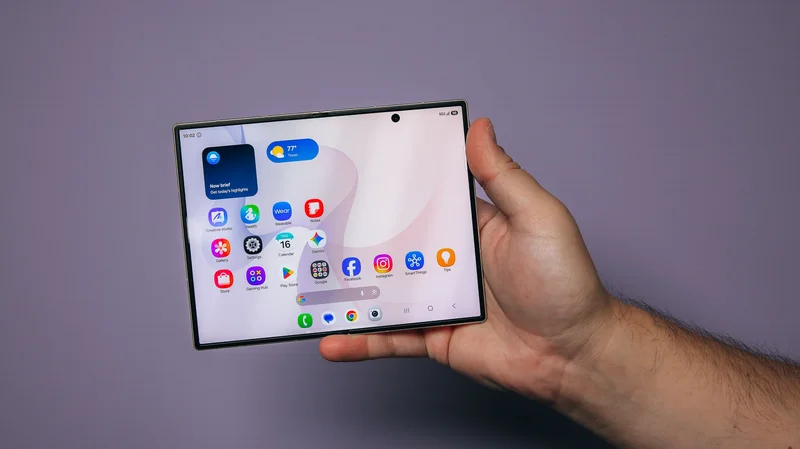
At a glance:
Key specs: The Z Fold 8 weighs just 201 grams and is just 4.5 mm thick when unfolded; the 7.7-inch inner AMOLED display is huge, bright, and virtually glare-free.
Its biggest flaw: The dual 50MP wide and 50MP ultrawide cameras are fine, but not elite. Professionals and creators used to 200MP main cameras or iPhone 17 Pro Max video will notice a difference.
Price: The $1,899.99 price isn't unreasonable amidst the global memory crisis, but it still hurts.
Our 50-word review: This stylish foldable is so much fun to use, and there's nothing else like it. The spacious inner screen looks fantastic and is great for videos and gaming, yet the phone still folds up and slips into your pocket like a flip phone from 2010. The Gemini-backed AI features make photo editing a breeze, too.
Galaxy Z Fold 8: In-depth review
The Galaxy Z Fold 8 is the new passport-style foldable smartphone from Samsung that officially launched today. And as much as Samsung might wish that it wasn't living in the iPhone's shadow here in the United States, we have to acknowledge the elephant in the room. The wider design of the Z Fold 8 matches the rumored shape of the iPhone Ultra, the biggest open secret in Silicon Valley. If Apple does indeed reveal its first folding phone in September, it will be going head-to-head with the Z Fold 8 (and to a lesser extent the Z Fold 8 Ultra), which has a more familiar design and an Ultra-level camera array.
I'll do my best not to mention Apple again in this review, because the Z Fold 8 is a damn fine phone that stands on its own.
Starting with last year's generation of foldables, I've been telling everyone that these devices are finally ready for primetime. And if the Galaxy Z series' record-breaking preorders are any indication, consumers are ready, too.
So, is the Galaxy Z Fold 8 worth it's $1,899.99 price tag? Overall, I had a great experience with this phone, which is only really hampered by one flaw: The camera array is just fine. Without a doubt, it's the best foldable I've tested yet.
The Galaxy Z Fold 8 review: By the numbers
This phone is remarkably thin, yet Samsung packed some impressive hardware into its svelte frame:
- Inner display:7.6-inch inner and 5.5-inch outer AMOLED displays with 120Hz refresh rate
- Processor:Snapdragon 8 Elite Gen 5 for Galaxy chipset
- Colors:Lavender, cream, graphite, and pistachio
- Dimensions:123.9 x 161.4 x 4.5 mm unfolded / 1123.9 x 81.9 x 9.7 mm unfolded
- Weight:201 grams
- RAM:12GB to 16GB RAM
- Storage:256GB, 512GB, or 1TB storage
- Battery:4,800mAh battery
- Charging:45W wired, 20W wireless
- Cameras:50MP wide, 50MP ultrawide, 10MP selfie camera
Galaxy Z Fold 8 introduces an awesome new form factor
The 7.7-inch inner display is far and away the Z Fold 8's best feature. I've never used a phone with this large a screen, and you immediately appreciate the difference in a variety of ways. The larger size results in a much more comfortable feel in your hand, and the keyboard is designed for you to use both thumbs, making typing faster, more accurate, and easier.
When unfolded, this is definitely a phone designed for two-handed use, but you can also leave it unfolded and operate it one-handed using the external display. I actually found myself using the phone while folded quite a bit, and you can easily use the camera, messages, phone, and other apps without opening it. One important note: The Z Fold 8 doesn't support Flex Mode, meaning you can't leave it half-opened on your desk in an L or A shape.
Overall, it feels more like a small tablet than a big phone.
Both displays offer up to 120 Hz refresh rates and a peak brightness of 3,000 nits. Combined with Samsung's glare-free display tech, I never had trouble using the phone in direct sunlight. And if you're worried about a visible crease, don't be. The crease is virtually invisible while using the phone, and Samsung introduced new Flex Titanium hardware to make the hinge more durable.
You can just do so much more with the larger screen, which looks incredible. I generally avoid streaming TV shows and movies on my phone, but not with the Z Fold 8. Likewise, while I've never been a huge fan of mobile gaming, the mobile version of Mario Kart looks and plays awesome here.
There is a small, annoying cutout in the screen for the 10MP selfie camera, and I wouldn't be surprised if it gets eliminated in the future. The 10MP selfie camera is pretty low-quality anyway, and I expect it will either disappear under the screen or be cut in future versions of the phone. (Keep scrolling to see the results of my camera test.)
The large size does have some drawbacks. Accessing the fingerprint sensor to unlock the phone can be tricky depending on how you hold it, and you can't easily open or close it with one hand, which is annoying.
I have to note one other complaint: The phone still has the characteristic wobble of all smartphones with a camera bar, and as my colleague Abrar Al-Heti at CNET aptly demonstrated, wireless charging is a pain without magnets. (Disclosure: Mashable and CNET are both owned by the same parent company, Ziff Davis.)
Galaxy Z Fold 8 review: Strong performance and a versatile user experience
Under the hood, the Z Fold 8 is powered by the Snapdragon 8 Elite Gen 5 for Galaxy chipset. Think of this mobile chipset as the phone's engine. The chip offers powerful performance, and on the Geekbench 7 benchmark test, the phone earned a single-core score of 2,375 and a multi-core score of 6,766. The single-core score is double that of the Motorola Razr Ultra (the multi-core scores were nearly identical).
What you need to know is that the phone quickly supports on-device AI processes and never slows down while multitasking. When shooting 4K and high-resolution video, the phone did get noticeably warm, and the thin design compromises heat dissipation. However, it never got so hot that it was painful to hold, like older GoPros sometimes did.
The wide display and chipset also support seamless multitasking. As with the new iPad experience (and other foldables), you can have multiple apps open side by side. You can also have floating app windows and resize the edges on the display.
So, if you want to leave Spotify open while you read a book in the Kindle app, you can do that. If you're using a web browser, you can keep the Gemini app open and ask questions as you browse.
I did find some very minor bugs in the windowing and multitasking. The Kindle app had an awkward white bar at the top of the screen, and you could resize apps until they were too small to use. On top of that, not all apps will travel seamlessly between the inner and outer display. Ideally, when you close the phone, the app you're using should continue to run on the smaller outer display, but this doesn't always work.
But most of the time, the phone just works. And once you get used to the larger screen, it will be hard to go back.
Galaxy Z Fold 8 camera review: What's better than mid but worse than elite?
A few years ago, we would have been wowed by the cameras on this trendy little smartphone. Today, not so much.
The cameras aren't bad, but if you're used to the iPhone 17 Pro Max or the Galaxy S25 or S26 Ultra, the difference is noticeable. As a reminder, the Galaxy Z Fold 8 has three cameras:
- 50MP wide lens
- 50MP ultra-wide lens
- 10MP selfie camera
The dual 50MP main shooters are... fine. The selfie camera is pretty crap, unfortunately. I found myself awkwardly flipping the phone around to use the main cameras when taking selfies.
I went around New York City testing the various cameras, and I'll let my pictures do the talking here.
The Z Fold 8's cameras and processor capture good photos, even when there's a lot of detail and movement. While the Z Flip 8 sometimes overexposed or oversaturated photos, I found that the Z Fold 8 handled highlights and shadows much better.
Please note: All of the photos I took with the Z Fold 8 are untouched (except for slight cropping), though some of the photos have been compressed during the export process.
Portrait mode is fine, and I found I got the best selfies with the main camera, not the 10MP selfie camera. Accomplishing this is a bit awkward, however.
Unfortunately, I found the selfie camera to be a bit trash, and I'm too vain to get any use out of it. The dropoff in photo quality is very apparent, which isn't unusual, of course.
As for the zoom, I found that it worked surprisingly well, though not as well as you'd get with an actual telephoto lens.
Left:Credit: Timothy Werth / Mashable
Right:The 2X and 4X zoom work very well, but the photo looks grainy beyond that. Credit: Timothy Werth / Mashable
Left:Credit: Timothy Werth / Mashable
Right:Credit: Timothy Werth / Mashable
Most of the time, I found myself shooting at the 2x zoom, which I found worked really well indoors and out.
Weirdly, I found that the digital zoom worked better on the Z Flip 8, the Z Fold 8's littler, flippier sibling. Go figure.
Left:The 10x digital zoom on the Z Fold 8. Credit: Timothy Werth / Mashable
Right:The 10x digital zoom on the Z Flip 8 works better. Credit: Timothy Werth / Mashable
A well-rounded AI feature set, especially for photo editing
The best AI feature on the Galaxy Z Fold 8? It comes with a free six-month subscription to Google AI Pro, letting you experiment with a lot of Google's best AI features. (Just set a reminder so you don't forget to cancel the subscription, or else you'll be charged $19.99 in seven months.)
Thanks to Samsung's close relationship with Google, you also get the support of Gemini, which generates a daily briefing of updates and news for your review, the "Now Brief." Your device will also automatically suggest actions across apps, such as making a calendar invite after a friend texts about dinner plans.
However, the main AI feature I find myself using on Galaxy phones is the build-in photo editing suite, which is very impressive. I praised these AI features in my review of the Galaxy S26 Ultra, and they're just as useful here. In fact, they may actually be better, because the larger screen makes it easier to see the photos you're editing.
You can quickly and easily erase photo bombers, enhance focus, and make other simple edits. I find these features generally work well, and the text prompting in particular is useful.
Left:You can easily remove photo bombers from photos with the Eraser tool. Credit: Timothy Werth / Mashable
Right:The finished result Credit: Timothy Werth / Mashable
You can also have more fun with your photos if you so choose. I also appreciate that a digital watermark is added to AI-edited photos.
Left:Describe the edits you want in plain text. Credit: Timothy Werth / Mashable
Right:Credit: Timothy Werth / Mashable
Quick Share to Apple devices is a game-changer
One of the biggest barriers to ditching my iPhone for good? As a tech journalist, I often need to move photos, videos, and other files from one device to another. Without AirDrop, it's a huge pain to switch from an Android smartphone to my work MacBook Pro.
However, with the Z Fold 8 running Android 17 and One UI 9, the new Quick Share feature is a godsend. This allows you to quickly and wirelessly send files to nearby devices, including Apple devices. Samsung is working hard to make it easier to switch from iOS to Android, and this feature could be the one that gets me.
Is the Galaxy Z Fold 8 worth it?
As much as I love this phone, I know that $1,899.99 is a really big ask. It's no coincidence that Samsung introduced a new Galaxy credit card to help users finance their devices.
So, here's what I'd say: If you can take advantage of a good trade-in or carrier offer at T-Mobile or Verizon, I think this phone is absolutely worth the upgrade, especially if you love phones that fit in your pocket. If you've been sitting on the foldable fence these last few years, the Z Fold 8 is a phone that makes it easy to get down.
Phones have been getting pretty boring in the past few years, and the Z Fold 8 finally makes phones fun again. And, I'll be honest: showing off this phone to your friends and family will make you feel pretty cool.