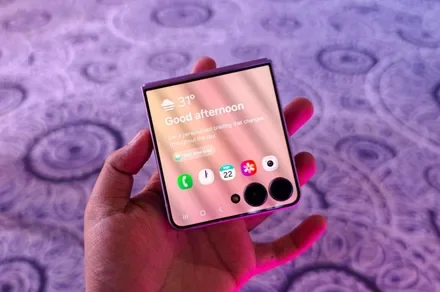
Samsung is finally making the Galaxy Z Flip’s cover screen much more useful. With the new Galaxy Z Flip 8, you no longer have to rely on workarounds to access more apps without unfolding the phone. Instead, Samsung has expanded native support on the FlexWindow, allowing 16 apps to run directly on the outer display and also making it much easier to launch virtually any other app.
The update addresses one of the biggest complaints Flip users have had for years and brings Samsung up to the level of rivals like Motorola, whose Razr series has long offered a more flexible cover screen experience.
Which apps can you use on the Galaxy Z Flip 8 cover screen?
Nadeem Sarwar / DigitalTrends
Samsung ships the Z Flip 8 with 16 apps supported out of the box. 12 of them are fully optimized system apps, including Bixby, Samsung Browser, Calculator, Calendar, Camera, Clock, Contacts, Gallery, Samsung Health, Notes, Phone, and Voice Recorder, all accessible through a native app drawer.
The remaining four are third-party apps that matter for daily use. Google Maps, Google Messages, Netflix, and YouTube are grouped under a section called Labs, although Samsung notes that the experience may not always be perfect. Samsung also improved Now Bar and Now Nudge for quicker glanceable access.
What if your favorite app is not officially supported?
Samsung has not removed the option to run unsupported apps. Instead, it has made the process much easier. The Good Lock MultiStar module is still required for apps that are not officially optimized, but the Galaxy Z Flip 8 now shows a prompt on the cover screen that helps you install and set it up. Older Flip models required users to search through settings while the phone was unfolded, making the feature less obvious.
Android Authority also reports that Samsung plans to bring this updated cover screen experience to the Galaxy Z Flip 7. However, it is still unclear whether older Galaxy Z Flip models will receive the same improvements through a future One UI 9 update.