Welcome to the Proof of Usefulness Hackathon spotlight, curated by HackerNoon’s editors to showcase noteworthy tech solutions to real-world problems. Whether you’re a solopreneur, part of an early-stage startup, or a developer building something that truly matters, the Proof of Usefulness Hackathon is your chance to test your product’s utility, get featured on HackerNoon, and compete for $150k+ in prizes. Submit your project to get started!
Today, we're chatting with Anton Korenyako, the creator of Netok. Netok is a free, open-source Windows application designed to diagnose internet connection issues and translate complex network errors into simple, everyday language. By rolling multiple diagnostic and VPN tools into a single streamlined platform, Anton aims to make networking accessible to everyone.
What does Netok do? And why is now the time for it to exist?
When the internet dies, most people have exactly one diagnostic tool: turn it off and on again. Reboot the router. Reboot the computer. Reboot the router again, but this time count to ten. It often works. But rebooting the router teaches you nothing — next time, same ritual, same ignorance. And when your computer does explain itself, it's a gray page with some ALL_CAPS_GIBBERISH about a DNS probe.
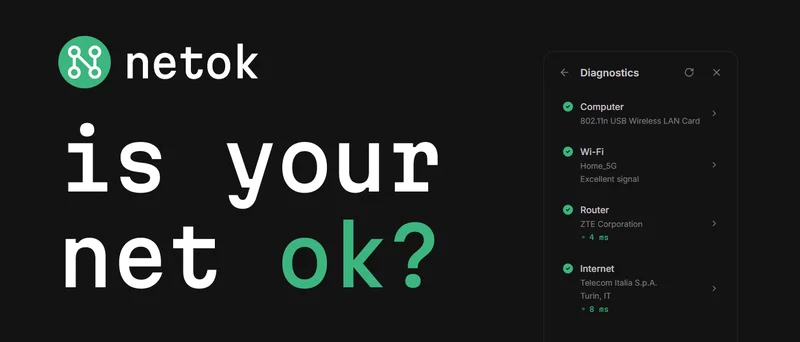
Netok shows your connection as a chain: Computer → Wi-Fi → Router → Internet. Each link gets checked and reports its status in words a human would use. "Excellent signal." "Telecom Italia, Turin." If something breaks, the broken link says what's wrong and what to try, and the app takes you where the fix lives.
Everything else grew from that chain. DNS switching became one tap instead of a trip through Windows adapter properties. The speed test shows the megabits, then goes further and answers "will video calls work?" The VPN screen accepts a key and shows two things: your ping and your new location. One app instead of six.
Why now? Because the gap keeps widening. Networks got more complex, censorship got more aggressive, and the tooling still assumes you're an engineer. Checking a connection properly means installing three or four separate programs: one to measure speed, one to scan the network, one to... actually, most people give up before the third one.
Who does Netok serve?
Windows users who want to know whether the problem is the Wi-Fi, the router, or the provider, and what to do about it, without networking knowledge.
And there's a second audience I care about a lot: people in countries with internet censorship, like Iran, Russia or Belarus. Commercial VPN apps mostly don't work there; connections run over protocols like VLESS and Shadowsocks. A seller hands you a key, and you're supposed to paste it into some client built by programmers for programmers, where the setup screen assumes you know what a transport protocol is. I didn't want to teach my older relatives to use a terminal. In Netok, you paste the key into one field, hit apply, and see two things: the ping is fine, and the location matches what you paid for.
No notable customers: it's a free consumer tool, six months old in public. Forty years in, the personal computer still isn't truly personal. That's who Netok is for.
You keep saying "plain language". Every tool promises that. What does it mean in practice, in the code?
It's one architectural rule: on every path a user is meant to see, the backend returns tokens like "WEP" or "gateway_mac_duplicate:AA:BB:...", and the React side maps them to localized text from JSON files. 377 keys per locale, 15 locales, from Persian to Japanese.
There's a pre-commit hook that blocks the commit if any of the fifteen locale files drifts out of sync with English: a missing key, an orphaned key, a placeholder that doesn't match. That's not a style preference, that's a mechanical guarantee: I'm a Russian speaker, and I can't ship a screen that speaks to me and goes blank for the other fourteen locales. The boundary between what the machine knows and what the human reads is enforced at commit time.
Wi-Fi security checks sound like a place where apps love to scare users. How does Netok decide when to alarm someone?
The internal rule is: uncertainty resolves toward Safe.
Take evil twin detection. Enumerate every visible access point, keep the ones broadcasting your SSID, check the 802.11 Privacy flag. If the same network name is on the air both encrypted and open, that's the classic shape of an attack: a fake access point can clone your SSID but not your password, so it has to run open. But a perfectly legitimate guest network produces the same signal, and from the outside there's no way to tell them apart. So this check is capped: it can raise a Warning, never a Danger.
Same posture everywhere. Unknown encryption algorithm? Safe, because an algorithm the code doesn't recognize is almost certainly newer and stronger, not weaker. Empty ARP table? Safe, because no data is not evidence of an attack. The DNS hijack check compares resolver answers by overlap, not equality, because example.com sits behind rotating anycast IPs and strict comparison would cry wolf on every run.
Two things turn the screen red. An open network with no encryption at all: that one is a fact, not a judgement call. And the ARP verdict: a single MAC address answering both for the router's IP and for another machine on the network, the signature of a man-in-the-middle. That second one is the only condition that earns the strong words: don't enter passwords, don't open your banking app.
Scaring users is easy and it sells VPN subscriptions. A diagnostic tool earns trust the opposite way: by staying calm about everything it isn't sure of, so that a red screen means something.
What technologies were used in the making of Netok? And why did you choose the ones most essential to your tech stack?
Rust and Tauri v2 for the desktop core, React and TypeScript for the UI, sing-box as the VPN engine, M-Lab's NDT7 for the speed test, the Windows WLAN API for Wi-Fi security checks, i18next for the 15 locales.
In numbers: about 7,500 lines of hand-written Rust across three crates, roughly 10,000 lines of TypeScript, 26 Tauri commands between them, 158 Rust tests and 47 TypeScript tests. The installer is 16.8 MB, most of which is the bundled VPN engine.
Why this stack: I wanted the app fast and small, and a network tool that ships a whole Chromium inside would be embarrassing about it. That ruled out Electron. Tauri uses the WebView Windows already has, so the installer stays under 17 MB and the app starts instantly. Rust wasn't an ideological choice, it simply comes with Tauri; though I've grown to appreciate a compiler that refuses entire categories of mistakes before they reach users.
Any war stories from making Rust talk to Windows?
Two scars worth showing. Release builds set windows_subsystem = "windows", meaning no console. PowerShell, detecting no console, silently switches its output encoding to UTF-16. Your parser suddenly sees a null byte between every character, and nothing in any error message tells you why. On top of that, Get-NetNeighbor output is localized: a Russian or German Windows returns different status strings. Both problems are now fixed once, centrally:
```
[cfg(target_os = "windows")]
pub fn run_powershell(command: &str) -> Option {
let prefix = "[Console]::OutputEncoding = [System.Text.Encoding]::UTF8; \
[System.Threading.Thread]::CurrentThread.CurrentUICulture = 'en-US'; ";
let full_command = format!("{}{}", prefix, command);
let output = hidden_cmd("powershell")
.args(["-NoProfile", "-Command", &full_command])
.output()
.ok()?;
// …
}
``
Thehidden_cmdwrapper is the other half of the fix: it spawns the process with CREATE_NO_WINDOW, so a console window doesn't flash over the app on every scan. And the gateway parser takes the same lesson further and matches the literal string0.0.0.0` instead of column headers, because IP addresses aren't localized but table headers are.
The second scar is quieter. The windows crate declares C flexible array members as [T; 1], so indexing the second element of a WLAN interface list is out of bounds by Rust's rules even though the memory is right there. Every list walk in the code does raw pointer arithmetic instead, with a comment at each site explaining why the obvious code would panic.
The elephant in the room: why should anyone trust a security-adjacent tool vibe-coded by a designer?
They shouldn't, not on my word. I wouldn't either: the market is full of AI-generated apps whose authors can't explain what their own code does.
So here's what I'd check instead of trusting me. The code is open under GPL-3.0, every line of it, and the interesting parts fit in an afternoon of reading: the whole hand-written Rust core is about 7,500 lines. The dangerous parts aren't mine at all. The VPN engine is sing-box, a battle-tested open-source project, shipped as a separate process; Netok hands it a config and never touches cryptography itself. And the diagnostics are read-only by nature: the app looks at your network and describes it. The only things it changes are the ones you explicitly ask for, like switching DNS.
Then there's the process. 158 Rust tests and 47 TypeScript tests run in CI. Every technical claim in this interview went through an agent that read the code and measured the behavior, and you've seen what it caught. That discipline exists precisely because I can't personally vouch for every line, so the workflow has to.
And honestly, the design posture is part of the answer. A tool that defaults to Safe when uncertain and turns red only on hard evidence has very little power to manipulate you. The failure mode of Netok being wrong is a calm screen, not a purchase.
You're a designer who doesn't write code. What does your actual workflow with an AI coding agent look like?
Recon, then implementation, always in that order. First a reconnaissance prompt: show me how this part works, where things live, what patterns already exist, and change nothing. Then an implementation prompt written against what the recon found, not against my assumptions. I never let the agent implement blind, because my assumptions are wrong more often than I'd like.
The other half of the workflow is screenshots. I can't read a diff and see the design, but I can read a screen instantly. So the loop is: prompt, screenshot, compare against the mockup, correct. It's the same iteration loop I've used with human developers for twenty-five years; the turnaround just dropped from days to minutes.
What surprised you most when you fact-checked your own project before this interview?
That I can't trust my own memory of my own code. Parallelizing the diagnostic chain reduced it from 10 seconds to 2–4. Before writing, I asked the agent to verify every claim against the actual code and measure the chain live. Verdict: on a healthy network, all my concurrency saves about 75 milliseconds. And the security scan spends nine tenths of its time spawning powershell.exe once to read the ARP table. One process launch, 90% of the runtime.
The 10 seconds was real, but it belonged to the degraded case: the old code stacked DNS timeouts, HTTP timeouts and a blocking geolocation fetch, all sequential. Add up those old timeout constants and you get about thirteen seconds of ceiling. Now the probes run concurrently, geolocation patches the screen whenever it lands, and the same arithmetic tops out around four. Which is the better story anyway: the improvement is largest exactly when the network is broken, and that's the only time anyone opens a network diagnostics tool.
It found four more errors like that. Then I ran the same check on the finished draft of this interview, and it caught four more, including a security claim I'd have sworn to. Everything you just read is what survived.
Netok scored a 54 proof of usefulness score (https://www.proofofusefulness.com/reports/netok) — how do you feel about that? Needs reassessment or just right?
Fair, honestly. The breakdown says it plainly: utility and tech scored well, reach scored near zero. That's an accurate photo of a six-month-old free tool with no marketing behind it. I'd rather have an honest 54 than an inflated number I can't defend.
What excites you about this Netok's potential usefulness?
Network problems are universal: everyone's internet breaks and the tooling assumes you're an engineer. What excites me is how far "translate the machine into human language" can go as a design principle: error codes become sentences, metrics become answers ("will video calls work?"), a VPN key becomes one input field. I built Netok because I needed it myself and couldn't find it. The update pings I see daily tell me a few other people needed it too. I want that number to grow quietly: a tool people keep because it works, not because it fights for their attention.
Walk us through your most concrete evidence of usefulness.
One data point: the update pings. They keep arriving daily, months after each release. No telemetry, no accounts, so I can't see who these people are. But somebody keeps opening the app long after the download, and that's the only metric I trust.
How do you measure genuine user adoption versus "tourists" who sign up but never return?
Downloads are my acquisition metric; update pings are my retention metric. A tourist downloads the installer and disappears; a user launches the app, and every launch leaves a ping. The ratio is humbling and honest: 130-plus downloads, a handful of daily launchers. I'll take real launchers over impressive download counts.
Given that Netok currently has roughly 100 installer downloads via GitHub, what is your primary strategy for getting this tool in front of non-technical Windows users?
Through the technical person every family has. Non-technical users don't browse GitHub, but everyone knows someone who gets called when the Wi-Fi dies, and that person is reachable: directories, Reddit, articles like this one. They install Netok for their parents so the next call is shorter.
Second channel: search. When the connection breaks, people copy the error code into Google, character by character, underscores and all. A page that answers DNS_PROBE_FINISHED_NXDOMAIN in human words can meet them at the exact moment of pain.
With your secondary audience located in regions with strict internet censorship, how do you plan to grow your user base there while avoiding potential blocks?
Carefully and without heroics. Netok is a desktop app with no server of its own, so there's nothing central to block; it ships through GitHub, which people in those regions already know how to reach. VPN keys there spread through local sellers and word of mouth, and the app just needs to be the easiest place to paste that key. I'm not planning region-specific marketing: the 15 localizations, including Persian and Russian, are the outreach.
Translating technical network metrics into plain language is a highly useful but challenging design principle; do you plan to expand these diagnostics to cover more complex hardware issues?
Not hardware, no. The plan is to go deeper in the network lane, not wider: DNS speed testing to recommend the fastest resolver for your location, smarter router-level checks. The principle stays fixed, whatever the feature: the machine explains itself in your language. I'd rather do one lane properly than become another everything-tool.
If we re-score your project in 12 months, which criterion will show the biggest improvement, and what are you doing right now to make that happen?
Evidence of Traction. Right now: this article, a download page that explains the unsigned-installer warning instead of hiding it, and listings on software directories. After that, plain-language pages for the error messages people actually google. The product is ahead of its distribution, so distribution is the work.
How Did You Hear About HackerNoon?
I found the hackathon first, and by accident. Building useful things is the whole reason I make products; I go looking for user problems to solve. Then I stumbled onto an entire hackathon dedicated to usefulness. Hard not to take that personally.
As for HackerNoon: I'm subscribed to the newsletter, drop by regularly, and read a few interviews with other hackathon participants before writing my own. To be fair, I'd say the site's usability, reading comfort on screen especially, has room to improve. Occupational habit: I notice these things for a living.
Meet our sponsors
Bright Data: Bright Data is the leading web data infrastructure company, empowering over 20,000 organizations with ethical, scalable access to real-time public web information. From startups to industry leaders, we deliver the datasets that fuel AI innovation and real-world impact. Ready to unlock the web? Learn more at brightdata.com.
Neo4j: GraphRAG combines retrieval-augmented generation with graph-native context, allowing LLMs to reason over structured relationships instead of just documents. With Neo4j, you can build GraphRAG pipelines that connect your data and surface clearer insights. Learn more.
Storyblok: Storyblok is a headless CMS built for developers who want clean architecture and full control. Structure your content once, connect it anywhere, and keep your front end truly independent. API-first. AI-ready. Framework-agnostic. Future-proof. Start for free.