Samsung Galaxy Tab S11: Two-minute review
The Samsung Galaxy Tab S11 is the brand’s answer to the iPad Air, with its premium design and compact form factor.
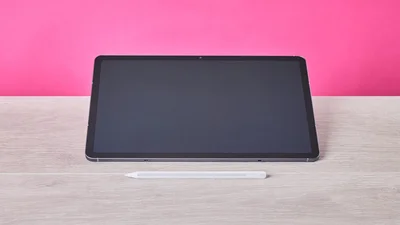
It certainly looks the part, taking cues from Apple with its sleek and minimalist aesthetic. It only comes in two colors — or rather shades, since it’s merely a choice between Grey and Silver. My review unit was the former, and I have to say that I enjoyed its classy appearance.
Beyond this, Samsung has also nailed the S11’s build quality. The one-piece metal chassis feels as expensive as they come, thanks to its incredibly smooth texture (so be careful when holding it) and supreme solidity. It easily ranks among the best tablets in terms of sheer construction.
Latest Videos From
The display, however, is less impressive. At 11 inches, content already feels squeezed, but the thick inner bezel only exacerbates the issue. What’s more, it's a magnet for dust and debris, while the grabby touchscreen is far from class-leading.
Thankfully, the included S Pen fairs better than fingers. There’s no dragging with the stylus, as it glides effortlessly across the screen. It’s also perfectly responsive and comfortable to grip, thanks to its ergonomic hexagonal form that provides extra security.
(Image credit: Future)
As with Samsung’s smartphones, the S11 features numerous first-party apps, which vary in their usefulness. Many fail to offer anything over and above Google’s suite of apps (which also come preinstalled), although I have to concede that some of the AI features, such as those for editing images, impressed me with their effectiveness. The One UI operating system is as clear and as stable as you could hope an Android fork to be, too.
The overall performance of the S11 is also impressive. Whether you're working, browsing, streaming content or even gaming, it can seemingly handle it all. What’s more, it does so while staying relatively cool; only parts of the rear heat up, and never to an uncomfortable degree.
Sign up for breaking news, reviews, opinion, top tech deals, and more.
The battery life of the S11 measures up well against its rivals. Samsung claims it can survive 18 hours of continuous streaming, whereas the iPad Air can only manage 10. Charging is quick, too, thanks to its 45W wired charging support.
There are certainly things to like about the S11, such as its premium design and excellent all-round performance. However, the touchscreen is somewhat disappointing. On balance it’s a little hard to recommend over the iPad Air given it it's slightly dearer, but if you want an Apple-inspired design while remaining in the Android realm, the S11 is far from a terrible choice.
(Image credit: Future)
Samsung Galaxy Tab S11 review: Price \& availability
- Starts from $899.99 / £869 / AU$1,399
- Available now in two colors
- Very expensive for a small tablet
The S11 starts from $899.99 / £869 / AU$1,399 and is available now in two colorways: Grey and Silver. The base model features 12GB of RAM and 128GB of storage. All models come with Samsung’s S Pen. If you want cellular capability, you’ll need to part with an additional £50 / AU$250. US customers only get the Wi-Fi-only model.
This is undeniably expensive for an 11-inch tablet, even one as premium as the S11. An equivalent iPad Air model bundled with the Apple Pencil currently costs slightly less. What’s more, it’s one of the best tablets we’ve reviewed, thanks to its excellent performance and display.
If you want to stick with Android, the OnePlus Pad Go 2 is a great budget alternative to the S11. It comes in at a mere $399.99 / £319 (around AU$570), yet still has a respectable spec and impressive performance. It may have less RAM (8GB), but we still found it capable enough for everyday use.
Samsung Galaxy Tab S11 review: Specs
Swipe to scroll horizontally
| | |
| --- | --- |
| Weight | 484g |
| Display | 11-inch, Dynamic AMOLED 2X (1600 x 2560), 120Hz |
| Operating system | One UI 8.5 |
| Chipset | MediaTek Dimensity 9400+ |
| Memory (RAM) | 12GB |
| Storage | 128GB / 256GB / 512GB |
| Battery | 8,400mAh |
| Charging | 45W wired |
| Cameras | 13MP rear, 12MP front |
| Connectivity | Wi-Fi 5, Bluetooth 5, USB-C |
| Colors | Grey, Silver |
(Image credit: Future)
Samsung Galaxy Tab S11 review: Display
- Slight lack of fidelity
- Thick bezel
- Grabby touchscreen
Despite the high 1600 x 2560 resolution of the S11, there’s a slight but noticeable softness and fuzziness to some elements of the UI, as if the resolution is stretched a little too thin for this size of display. This also means that Ultra HD content isn’t quite as pinpoint sharp as you might expect. Thankfully, there’s plenty of brightness and colors are vibrant, so it still makes for a pleasurable viewing experience.
The thickness of the bezel is also disappointing. At 11 inches the display is already small, so you’d think Samsung would want to maximize its real estate to its fullest potential, but instead a thick black border constricts the frame even more.
Perhaps the worst aspect of the display, though, is its touchscreen functionality. I found there was too much friction to perform gestures and swipes easily. What’s more, it’s also prone to attracting debris, more so than other tablets I’ve used. This is not only a visual impediment but no doubt affects the performance of the touchscreen, too.
(Image credit: Future)
Samsung Galaxy Tab S11 review: Design
- Fabulously premium design
- Compact and relatively light
- Slippery back panel
To say that the S11 takes inspiration from the iPad Air is an understatement. It’s virtually indistinguishable from Apple’s compact tablet, but this isn’t exactly a bad thing, given its stylish looks. However, the S11 lacks the same vibrant color options, with only grey and silver to choose from. My unit was the former and it still looked smart and sleek though.
But the resemblance is more than skin deep. The metal chassis feels just as high-grade as the iPad’s; in fact, it might actually be a cut above the best iPad constructions. The back panel folds around to form the edges, rather than being created from two separate pieces, which is very impressive. On the front, the join to the screen is also close to seamless.
It’s also reassuringly solid and durable, as well as being incredibly smooth. This latter aspect is a slight issue, though, since it can feel quite slippery, so you'll need to take care when holding it upright. At least it’s comfortable to hold, owing to its compact dimensions, minimal weight, and generously rounded corners.
The included S Pen is a fairly basic affair but I found its hexagonal design comfortable and secure. It features a well-placed and easy-to-use button, which is used like a ‘right-click’ to bring up context menus in apps and in the OS itself.
Both of the tablet’s long sides are magnetic, so can be used to attach the S Pen, which is convenient. It’s a shame that the top edge isn’t, though, since it can be awkward to hold the tablet in portrait mode when the stylus is attached to the side. The magnetic hold is strong without making it difficult to remove the stylus when needed.
(Image credit: Future)
Samsung Galaxy Tab S11 review: Software
- Numerous first-party apps
- Their usefulness varies
- OS is clear and fast
Plenty of Samsung apps are preinstalled on the S11. You’ll have to create a Samsung account to use them, which is a frustrating barrier for using any app. At least it’s easy to set one up if you already have a Google account, as you can use these credentials instead.
Although there’s a lot of them, the first-party apps are mercifully unintrusive. And since this is the year 2026, there are plenty of AI features, too. The most interesting of these is the photo assist mode, which allows you to effortlessly edit images to remove certain elements — such as photobombers and unwanted objects — and add others in based on text prompts.
I have to say I was impressed by this mode when I tested it on photos I shot. As with all things AI, its results aren’t perfect every time, but for rescuing images from unwanted aspects and adding all kinds of extra content, it’s a capable and easy-to-use tool. You can also stylize images by selecting presets, of which there are several, from Anime to Pop Art. Again, this is effective a lot of the time, but not always.
(Image credit: Future)
There’s also a drawing app with enough basic illustration features to please budding artists. It’s intuitive to use and it was fast and stable during my time with it, without any glaring bugs or slowdowns occurring.
More basic productivity apps are included as well, such as a note taker and a calendar. The main issue with these — and indeed any first-party Android apps that aren’t owned by Google — is that they fail to outperform Google’s counterparts. And given Google’s cloud platform is similarly superior, you’re much better off using its apps if you plan on working across multiple devices.
(Image credit: Future)
One UI 8.5 is an intuitive and amenable operating system. As you might expect, it’s very similar to its smartphone counterpart, which is part of the reason why the Galaxy models are some of the best phones around. The UI is clear and uncluttered, and it's quite easy to navigate and adjust settings.
It’s also easy to resize app windows and move them around on screen, since the options to toggle between fullscreen and pop-out windows, as well as minimize them altogether, are ever-present in the top-right corner of every app, just like a desktop app.
However, I found switching between windows in gesture mode too awkward and slow. After dragging from the bottom of the screen, you have to hold your finger in place for a long time until all your app windows are displayed for selecting. What’s more, that aforementioned grabbiness of the touchscreen makes the action even more difficult. I much preferred using the navigation bar, with its three buttons at the bottom much simpler and quicker to use.
(Image credit: Future)
Samsung Galaxy Tab S11 review: Performance
- Capable all-round performance
- Fluid and responsive S Pen
- Low-fidelity cameras
The S11 performs well at the kinds of tasks you’d expect from a tablet. It can handle web browsing, light productivity, and 4K streaming without any frustrating slowdowns and stutters.
I was pleasantly surprised with its gaming prowess, too. I managed to play Hitman: Blood Money — Reprisal, a fairly demanding mobile game, without issue. It looked great and ran very smoothly, while my controller worked flawlessly over Bluetooth.
What’s more impressive is that the S11 stays relatively cool during such intensive tasks. A few hotspots appear on the back, but these are far from alarming in my experience, with the tablet remaining comfortable to hold.
Despite the aforementioned touchscreen issues, I’m pleased to report that the S Pen fairs a lot better on the screen. Glides and gestures are frictionless and responsive, making it great for all kinds of scenarios, from basic navigation to drawing and note taking. The palm block feature works as intended, too.
Using the S Pen also gives you access to a handy shortcut menu with selectable functions such as screen drawing and AI search. You can also add your own app shortcuts to this menu, which is convenient.
Despite the impressive image editing capabilities, the cameras in the S11 are disappointing. The low megapixel count means photos lack fidelity, and the basic enhancements available in the camera app can’t fix the lackluster quality of the camera hardware.
(Image credit: Future)
Samsung Galaxy Tab S11 review: Battery
The battery life of the S11 is impressive. While its 8,400mAh battery has a lower capacity than the the 11,600mAh one in the Samsung Galaxy Tab S11 Ultra, the smaller tablet is less power-hungry.
After a couple of days, it drained to 30%. My use during this time wasn’t constant, but I did use it for a variety of tasks, from productivity and browsing to streaming and gaming. Samsung claims it can stream continuously for 18 hours, and the brand is usually accurate on such matters. This makes it significantly more enduring than the iPad Air, which can last about 10 hours under similar conditions.
Charging the S11 is a quick affair, too, thanks to its 45W wired charging capability, the same as the Ultra’s. It took about a couple of hours to fully replenish in my experience.
Should I buy the Samsung Galaxy Tab S11?
Scorecard
Swipe to scroll horizontally
| | | |
| --- | --- | --- |
| Attributes | Notes | Rating |
| Value | It’s about the same price as its main rival, the iPad Air, which is a hard act to follow. | 3 / 5 |
| Display | Fidelity isn’t as great as you might expect given its resolution, while the touchscreen functionality is a little too grabby. | 3.5 / 5 |
| Design | Exquisitely built, and it’s light and small enough to hold comfortably. | 4.5 / 5 |
| Software | Some apps are useful, while others are less so. The OS is slick and easy to use. | 4 / 5 |
| Performance | Very impressive on all fronts, although the cameras are poor. | 4 / 5 |
| Battery | Much more enduring than the iPad Air. | 4.5 / 5 |
Buy it if…
Don't buy it if…
Samsung Galaxy Tab S11 review: Also consider
(Image credit: Future)
How I tested the Samsung Galaxy Tab S11
- Tested for several days
- Used for a variety of task
- Tablet reviewing experience
I tested the S11 for several days. I used it for a variety of tasks, from general browsing and light productivity to streaming and gaming.
I also used the included S Pen for drawing, writing, and navigation. I tried its various first-party apps and AI features, and tested the cameras by taking photos and holding video calls. I wasn’t able to use the S11 with the optional Book Cover Keyboard, though.
I have experience reviewing tablets and other mobile devices, such as smartphones and laptops. I’ve also used such devices personally for decades.