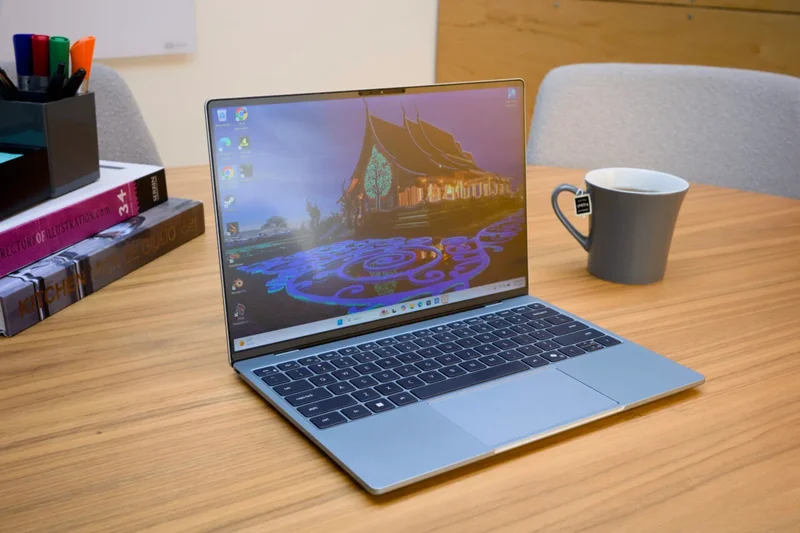
Dell, you mad geniuses, you actually did it.
The latest rendition of the XPS 13 is a wonderful little PC for the masses. Itâs the kind of notebook that once and for all proves laptop makers donât need to cheap out by creating flimsy pieces of silicon sandwiched between two Fisher-Price plastic covers to keep prices down. The $900 XPS 13 model ($800 with a student discount) with 16GB of RAM offers everything you need for basic browsing or light editing tasks. It would be the perfect PC for my typical daily grind if it weren’t for a bare few flaws. If thatâs all you needed to know, go ahead and skip the rest of this review.
Dell XPS 13 (2026)
Dell has boiled a laptop down to its basic parts and offers a slim, efficient machine that feels better than its price suggests.
Pros
- Bright touchscreen
- Solid aluminum build quality
- Quality keyboard
- Loud, quality speakers
- Enough performance for basic tasks
Cons
- Trackpad is less than premium
- GPU performance is subpar
- Lack of headphone jack
- $200 on top of 8GB model
Hereâs where things get complicated. I know that, for many of you, all you want to know is how the Dell XPS 13 compares to Appleâs landmark $700 MacBook Neo (it costs more than at launch after recent price hikes). Calm yourself, good sir or madam. The answer youâre looking for is way more complicated than can be put down in a single paragraph. Dellâs pint-sized PC is in some ways superior to Appleâs low-cost MacBookâsound quality, girth, and screen specs, to name a few. In other ways, the XPS 13 is an imitation that misses the mark in two key areas: the trackpad and in peak performance.
There are other factors at play. The most-affordable $700 model of the XPS 13 comes with only 8GB of RAM. There is enough evidence that shows 8GB is not enough to run Windows 11 with a bare minimum number of apps for a regular workday. The 16GB model and its base-level Intel Wildcat Lake chip don’t beat the performance of a MacBook Neo, either, despite the Appleâs cheap laptop making use of just 8GB of unified memory (this shares the memory pool on the laptop between the various components, normally making the PC run more efficiently).
I’ll soon be able to compare the 8GB and 16GB laptop models. Until then, the $900 XPSâ performance is strong enough that the laptop remains a contender for those who canât leave Windows behind (as much as some of us want to).
Thanks to the skyrocketing cost of memory, this is the worst age to buy a laptopâever. At the same time, weâre experiencing a renaissance of quality, low-cost laptops that will help the impending college students avoid buying a junky Windows 11 machine or resorting to a Chromebook. Thatâs enough reason to give the XPS 13 the attention it deserves.
This laptop doesnât feel cheap
Compared to a Dell XPS 14 or an XPS 16, their smallest sibling is built from the ground up as a minimum-spec device. That means it doesnât sport a large 3K OLED display option, but itâs also not beholden to Dellâs demand for a seamless keyboard and trackpad that can make typing feel more awkward than it needs to. This laptop is standard, but more importantly, it doesnât feel cheapâfor the most part.
Iâm going to be making many comparisons to the MacBook Neo in this review. That should be expected, since from the jump Dell has religiously compared its laptops to Appleâs designs. The first item to note is that this is a full CNC aluminum frame, from the laptop lid to the palm rest. It just doesn’t just aid durabilityâit makes the notebook feel more premium than its cost suggests.
Taking yet another page from Apple, the XPS 13 features sharp corners around each side of the keyboard. Iâve seen some Mac owners literally take files to these corners to round them off, but I personally never have an issue with my laptops cutting up my wrists as if they were surrounded by a fence of barbed wire.
Compared to the MacBook Neo, the XPS 13 is the same 0.5-inch thickness but weighs just 2.2 pounds compared to Appleâs 2.7 pounds. In the abstract, it makes little difference, but the slim size makes this laptop perfect company for a small backpack youâll be schlepping across town or campus. The XPS 13 is as light as the Asus Zenbook A14, another feather-light device that weighs as much as two bottles of water.
I was already fully aware of the laptop’s look and feel since I first went hands-on at Computex 2026 last month. What I didnât expect was how much I would enjoy typing on this slim laptop. Compared to the other 2026 XPS models, the traditional backlit chiclet keyboard design offers a clacky, bouncy typing experience. I wrote up this entire review on the XPS 13, and I found I didnât have any complaints save for the rare palm rejection failure that would leave me typing in the wrong place.
Similar to the keyboard, Dell opted for a traditional windowed trackpad rather than the seamless glass pad on the other XPS models. While the mechanical pad is perfectly serviceable, it will still fail to register a click more than an inch below the keyboard. The MacBook Neoâs mechanical pad will register a click no matter where you press.
The XPS 13 doesnât feature much I/O for its size. It maxes out at two USB-C ports, one on each flank. They support power delivery and DisplayPort 2.1 for external monitor connections. If you want Thunderbolt 4 for higher power delivery and faster data transfer speeds, youâll need to spend more money for a version of this laptop that uses a more powerful Intel Panther Lake chip.
Audiophiles should also note that the XPS 13 doesnât include a headphone jack. The MacBook Neo has one, and I know there are likely many would-be budget laptop buyers who prefer to use a good old 3.5mm jack for listening to their tunes.
A touchscreen, for less
One of Dell’s main reasons it says its laptop beats the MacBook Neo is because it sports a super-speedy screen. The 13.4-inch IPS LCD display and the XPS 13 can max out at 120Hz, but it can dip as low as 30Hz with the help of variable refresh rate. Thatâs better than the standard 60Hz on the MacBook Neo.
The XPSâ lower refresh rate means you can save on power when all youâre doing is watching streaming content on your PC. Anything more than 60Hz would require playing games, and thatâs a problem when the chip inside isnât actually strong enough to get anywhere close to 120 frames per second, even when playing small indie titles that arenât all that demanding. The fast screen has become the overriding expectation over the last several years on both phones and laptops. In the end, youâre paying for the idea that 120Hz is more premium, whether or not it makes a difference for the overall viewing experience.
Besides, Dellâs LCD screen is great for the price for other reasons. It sports minimal bezels along each side, with only the smallest outcropping along the top for the 1080p IR webcam. Itâs a sizable resolution as well at 2,560 x 1,600, and you donât sacrifice brightness, either, with a stated standard luminance of 500 nits. Not to mention, this is also a touch display, something you wonât get on the MacBook Neo. I personally have very little use for touchscreens on most non-2-in-1 laptops, but Iâm sure there will be a few prospective laptop owners who will appreciate it.
Another big surprise was this laptop’s sound quality. The MacBook Neo stands out for its clear side-firing speakers instead of typical lousy down-firing sound systems on other cheap laptops. The Dell XPS 13 is making use of a quad-speaker designâfeaturing dual 2W main speakers and two 2W tweetersâfiring diagonally out of two gullies in the bottom of the chassis. I initially feared this would create muffled sound, but in this sound setup, it can get boisterously loud; with enough bass, it will rumble your palms and lap if you decide to push the volume to its limit.
I wouldnât call the audio exactly âbalancedâ or supremely âclean.â Thereâs a slight metallic quality to the sound that doesnât sound premium. Still, the speakers on this $900 laptop are much better than other devices Iâve used that cost twice as much.
Powerful enough for your basic tasks
I already mentioned how the base-level Dell XPS 13 comes in with 8GB and 16GB RAM flavors. I have not had the chance to test the 8GB version of this laptop, though I plan to test that model in the near future. I hold significant doubts that Windows 11 can run well on 8GB of RAM.
For instance, simply running Slack and two Chrome browsers with around 20 tabs each will eat up close to 14.5GB of RAM. With task manager open and nothing else, the system idles at just above 40% memory usage. Windows 11 is a ridiculously RAM-intensive operating system, and until Microsoft changes that, you will be better off with at least 16GB of memory, especially in the long term.
Thereâs more to consider than just memory. The base-level XPS 13 makes use of an Intel Core 5 320, the mid-tier of the Intel Core Series 3 âWildcat Lakeâ chips. These are essentially cut-down Core Ultra Series 3 âPanther Lakeâ CPUs built for low-end laptops.
Iâve already had the chance to test a Wildcat Lake PC with the $900 Lenovo IdeaPad Slim 3i, though that packed the Intel Core 7 350, which packs a higher 4.8GHz max frequency compared to the Core 5âs 4.6 GHz. However, in my testing, the lower-end CPU in the Dell XPS occasionally beat its higher-end sibling in tests like 3DMark Wild Life Extreme DirectX 11 graphics benchmarks. In other tests, like the Cinebench 2026 CPU rendering tests, the XPS performed 13% worse.
What really matters is how the Dell XPS 13 compares to the MacBook Neo. In that case, itâs complicated. Overall, Appleâs A18 Pro chipâa processor first built for the iPhone 16 Proâperformed 3% better in mutli-core settings and 22% better in single-core tests. Single-thread tests will determine how effective a CPU is for straightforward tasks like loading a webpage, while the other test will relate more to processes that involve multiple things happening at once, such as video editing.
Again, things are not cut and dry. The Dell XPS 13 actually beat the MacBook Neo by around 15% in Cinebench tests. The Intel chip was nearly 30 seconds faster rendering a scene of a BMW in Blender when relying on the CPU. Basic processing is a mixed bag, but Intelâs Achilles heel is its GPU capabilities.
Itâs not a graphics powerhouse by any measure
This is not the laptop you want for complicated real-time graphics work, nor anything else that may involve rendering or anything beyond light video editing. In our GPU tests, where we render that same scene of a BMW in Blender, the Intel Core 5 320 took nearly three minutes running on the GPU. A MacBook Neo took less than 40 seconds.
Across our slate of 3DMark graphics benchmarks, the Neo was overwhelmingly superior, clocking in a 32% better score in Steel Nomad Light tests compared to the Dell XPS 13. This laptop is simply not built for gaming. I took the laptop into titles like Resident Evil 4, a title thatâs been optimized for Macs and low-end PCs as well. I could just barely make it to an average of 25 fps outdoors when dropping all my graphics settings as low as they would go, running at 1080p, and adding in FSR2 upscaling in performance mode. The Neo can run the same game at a stable 30 fps.
The most depressing test we run is in HandBrake, where we transcode a 4K movie to 1080p. The Dell XPS 13 took a whopping 10 minutes and 23 seconds. A MacBook Neo finished the task in four and a half minutes. The vast majority of Intelâs Core Ultra Series 3 processors, whether theyâre high-end on an HP OmniBook Ultra or mid-range CPUs on an Acer Swift 16 AI, can finish the same task in a little more than four minutes.
Intel stuck its Core Series 3 chips with two Xe3 GPU cores running at a sluggish 2.5GHz clock speed. It just doesn’t have the juice for these intensive tasks. I can still play certain games on this PC, like Tactical Breach Wizards, at a playable framerate. I still canât play other, graphically minimal titles, like Zero Parades: For Dead Spies at more than 30 fps. If you’re planning on doing any gaming, this laptop will be a Minecraft machine and not much more.
It still lasts a damn long time
If performance proved an overall disappointment compared to the competition, the battery life was a much better proposition. This laptop lasts for a long while, especially when youâre only doing the basic browsing and streaming (because you probably wonât be doing much more, anyway).
On average, running the laptop in balanced mode unplugged, I could get through around seven hours. I had my laptop set to a moderate brightness and worked constantly with few breaks in between. In power efficiency mode, I can easily meet the requirements of a workday and have enough time left over before I ever had to think about plugging it in.
Not to mention, this laptop has enough performance for all my basic needs. I plugged in an external monitor, keyboard, and mouse, and with the laptop plugged into an outlet, I was able to speedily live blog Samsungâs latest Unpacked conference without a single hiccup. This is the kind of laptop that was made for me, not just because Iâm regularly low on excess funds.
Dellâs XPS 13 almost passes the âBoots Theoryâ
There was a time, a little less than a year ago, that $900 would seem steep for a laptop billed as a âbudgetâ device. Nowadays, with the ongoing RAM pricing apocalypse, Iâm not sure when or where youâll be able to pick up a notebook for much less. If you do, youâll end up paying a premium for it. That $900 Lenovo IdeaPad Slim 3i I mentioned before feels like a thick chunk of a laptop compared to the XPS 13. Sure, Lenovoâs device has a 16-inch screen and a numpad, but in terms of build quality, Dellâs laptop is a cut above.
But I couldnât describe $900 as âcheap.â There are still speedy Chromebooks, like the Acer Chromebook Plus Spin 514, which you can find for around $750. You may still find other, less powerful and worse-quality Chromebooks and PCs for significantly less than that.
Whenever it relates to cheap products, I often think of author Terry Pratchettâs “Boots Theory of Socio-Economic Unfairness.â Simplified, it means that a poor man who buys cheap boots with cardboard soles will inevitably spend more on routine replacements than the wealthier classes that can buy a higher quality pair. I wish this theory got applied more to laptops. You need something that will last you for long enough time, and you shouldnât have to spend that much to get it.
Dell can nearly claim that itâs tackled the Boots Theory with its Dell XPS 13. If it werenât for the ravages of RAM prices caused by the obscene expansion of AI datacentersâprojects that practically nobody in the U.S. actually wantsâthen we may have finally found the perfect entry-level PC for the rest of us.