One UI 9 comes preloaded on the latest Samsung foldables.
These include the Samsung Galaxy Z Fold 8, the Samsung Galaxy Z Fold 8 Ultra, and the Samsung Galaxy Z Flip 8.
Samsung unveiled these devices during Galaxy Unpacked in July 2026.
While seeing One UI 9 finally materialize was all well and good, I still haven't gotten the update on my Samsung Galaxy S25+. However, I expect the stable release to reach my device sometime in the fall, after the Galaxy S26 series.
I've been eyeing One UI 9 since the beta started in May, and I've already picked out a feature or two that makes me excited about the eventual update.
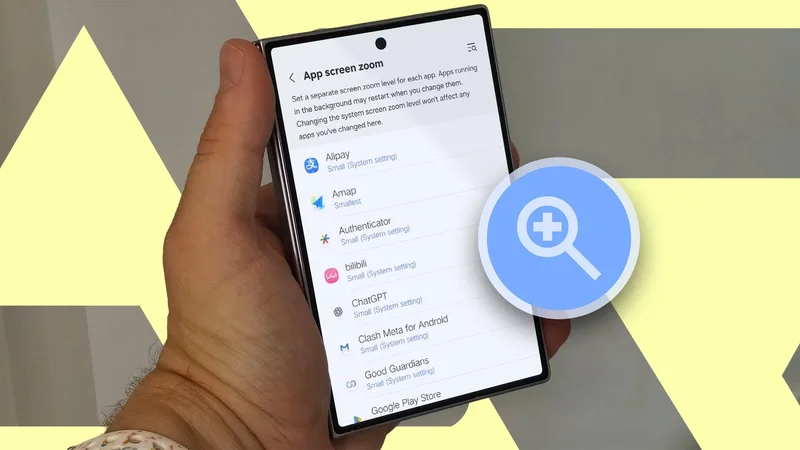
App screen zoom is the feature I am most excited about
My tired eyes might finally get a well-earned rest
I have recently been trying to look after my eye health because I knew it was likely linked to the chronic headaches I have been suffering.
I reduced my screen time and improved the quality by using more accessibility settings like Android reading mode.
I remembered why I didn't depend on reading mode as often as I should have. It doesn't work with all the apps I use.
This is what I hope the One UI 9 app screen zoom can fix.
It's not a global zoom-level setting, which means you can theoretically change the zoom level per app without the settings being overridden.
There should also be various default levels to pick from: large, largest, medium, small, and smallest.
Also, changing the zoom may affect the UI buttons differently, so be aware that changes will depend on the app you're using (the behavior doesn't seem consistent).
That's handy when I read a lot of discussions on Reddit, and I haven't been able to get reading mode working in the Reddit app.
To work around it, I use reading mode in my web browser. But that's not always ideal, since I have grown used to the app and all of its UI elements.
My only worry is that this feature is exclusive to the Galaxy Z Fold 8 (it is currently a Labs feature under active testing), which would make me sad since I likely will never buy this phone.
Still, I won't know until a more complete rollout — though SamMobile reports it isn't yet available on the Galaxy Z Fold 8 Ultra. But I am still crossing my fingers.
Honorable mention: Now Brief upgrade in One UI 9
Samsung app users keep getting rewarded with Now Brief improvements
When Now Brief came out in One UI 7, the feature felt incredibly underbaked.
You couldn't edit your news feeds, it gave generic recommendations, and the placement was awkward.
The feature improved in One UI 8, and 8.5 added more personalization with extra toggles to turn on the categories you wanted to see or include, connect them to apps you use, and gave you more access to context-aware cards.
It's one of those Samsung One UI features that keeps surprising you with how handy it is. If you disabled this Galaxy AI feature, you might want to re-enable it and check it out when One UI 9 launches.
As a result, there are a few notable changes with Now Brief that I am looking forward to (this isn't an exhaustive list, since Now Brief is supposed to get a major rework with new features like direct action trigger support and user-defined categories).
One is a small UI redesign, shifting to more colorful gradients — so it won't look as bland and sterile when you open it on your screen.
Two is the added priority alerts. This is what I am most excited about. Now Brief is supposed to give you a tailored summary based on your routine and Samsung app usage.
When you expand the widget, you can see weather reports, health stats, and sometimes schedule and calendar reminders.
I prefer more notification-style reminders, which apparently One UI 9 might support with Now Brief, based on analyzed strings found in the beta (source: AndroidAuthority).
So, this might suggest that Now Brief could finally have a space for reminding you about high-priority notifications you might have missed.
I continuously feel overwhelmed by the number of notifications I get daily, so this feels like a boon to have in my pocket.
Because the Now Brief widget can be accessed without unlocking your phone, this feature could show what I missed before I get overwhelmed by an onslaught of functions.
It could also help me prioritize what I need to address before getting lost in my daily routine.
The third interesting feature being added to Now Brief is a Pay Now function that adds bill reminders and a shortcut to pay by tapping the notifications through Samsung Wallet.
While I like the utility of staying on top of my e-bills, I am not holding my breath that this feature comes to North America — so far, it seems to have launched only in India.
Still, if it makes it over, I think it would add to the experience, especially if you already make good use of Samsung Wallet.
One UI 9.5 is also coming
It's rare for me to get a front-row seat to the next One UI update, so I tend to keep an eye out for upcoming features.
One UI 9 hasn't been released on most Galaxy phones yet.
But there are discussions and leaks about One UI 9.5, which could launch with the Samsung Galaxy S27 series in 2027.
So far, we only know pieces of what it might bring, like a new satellite connectivity hub, app lock, and a glassy redesign.
If you're curious about what's to come, opt in to the beta through the Samsung Members app if your device and region become eligible (beta may start in late 2026 or be delayed until 2027).