While your PC comes with Microsoft Defender out of the box, a dedicated solution can give you extra peace of mind. It can also protect other devices you own, from your Mac to your phone and tablet. Many antivirus packages also bundle in extra features such as identity theft protection and a VPN, so it’s worth investigating.
I’ve spent a lot of time with Bitdefender and Norton products, but for this comparison I signed up to Bitdefender Premium Security and Norton 360 Deluxe. Both companies offer a wider range of plans depending on your budget and needs. Bitdefender has been around since 2001, while Norton has been an established presence since 1982.
Below, I’ve compared the two plans based on my experience using both, looking at everything from features and ease of use to performance and value for money. I’ve also looked at the wider range of plans available from both companies to help you decide which is right for you.
Read more: **Best cheap VPNs for 2026, reviewed **
Bitdefender vs Norton: Pricing and plans
Bitdefender
Pros: Inexpensive entry-level plan; family plan includes five accounts
Cons: Price ramps up significantly after one year
Norton
Pros: Very good value for money during first year; excellent features
Cons: Gets very expensive after first year; no unlimited device support
As is seemingly the way with all antivirus software, Bitdefender and Norton start out cheap for the first year before increasing significantly for future years. For basic antivirus protection, Bitdefender starts at £17.99 for one device. Besides antivirus protection, you get a VPN but it only has 200MB of data per day.
Alternatively, Bitdefender Premium Security costs £59.99 for the first year and adds unlimited VPN usage, SecurePass, scam protection and email protection. If you just need antivirus protection and a password manager, Total Security is £49.99. If you need even more, there’s Ultimate Security for £69.98, which includes everything Premium provides along with dark web monitoring, breach notifications and identity protection features. If you want multiple accounts and support for up to 25 devices, you’ll need a family package, which costs more.
Norton’s cheapest plan is more expensive than Bitdefender’s entry-level option, but its more advanced packages work out as better value. For £24.99 for the first year, you can get Norton Antivirus Plus with antivirus protection for one device, a password manager and cloud backup storage. Right now, Norton 360 Standard is even cheaper at £19.99 for the first year and supports up to three devices, while also including a VPN and scam protection.
Another option is Norton 360 Deluxe, which currently costs £24.99 for the first year. It protects five devices and includes 50GB of cloud storage, a password manager, parental controls and dark web monitoring. Finally, there’s Norton 360 Advanced, which currently costs £29.99 for the first year and supports up to 10 devices, while adding more extensive identity protection features.
For straightforward antivirus protection, Bitdefender is the cheaper option, with plans starting from £17.99. However, Norton offers better value once you move beyond the basics, bundling features such as a VPN, password manager, parental controls and dark web monitoring into Norton 360 Deluxe for less than the equivalent feature-rich Bitdefender packages. Just bear in mind that prices rise significantly after the introductory period.
Winner: Norton
Bitdefender vs Norton: Features
Bitdefender
Pros: Almost all the tools you could need; SecurePass password manager included
Cons: Not the cheapest of options
Norton
Pros: All the tools you could need (and some you might not realise you need); novice friendly
Cons: You probably won’t use every feature
Whichever you go with, Bitdefender and Norton have you covered for most of your needs. I spent the bulk of my time using Bitdefender Premium Security and Norton 360 Deluxe, which are similarly positioned options in each company’s range.
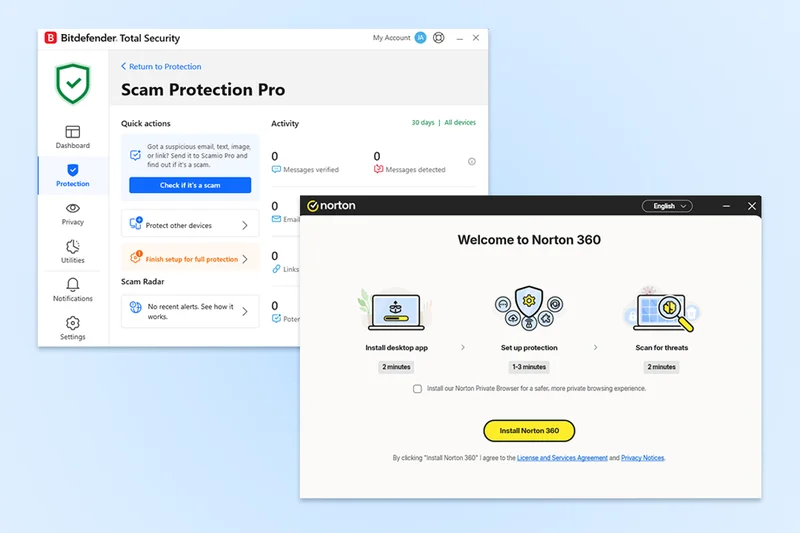
Bitdefender Premium Security offers all the features that the average family or household is likely to need. There’s antivirus protection supplemented by SecurePass password manager, scam protection, an unlimited VPN and some other useful extras. Its dashboard is clearly laid out, so there’s no need to install additional apps. At times, I would have liked a little less text explaining everything on the interface, but at heart, Bitdefender Premium Security does everything for you anyway, so you don’t need to poke around much.
It takes a few moments to set up scam protection, with the system scan taking longer but requiring no effort from you. Its dashboard divides things up according to areas such as protection and privacy, so it’s easy to work out where to look. Ultimately, Bitdefender Premium Security is user-friendly and doesn’t require advanced knowledge by any means.
Norton 360 Deluxe offers a similarly feature-packed lineup. Its core is its smart scan feature, which checks for viruses and malware, as well as security issues and performance or network problems. It only took a few minutes to complete a scan on my PC and gave me some useful suggestions along the way. There’s also a VPN, which takes a tap to set up, while 50GB of cloud backup storage is included as standard.
Other features include SafeCam, which monitors apps and services trying to access your webcam on a Windows PC, a password manager, parental controls and dark web monitoring. There are also performance tools such as file cleanup and Startup Manager, meaning you can keep your PC running a little smoother than before. It’s all well laid out and very welcoming.
It’s an incredibly close battle between the two, but I ever so slightly preferred Norton’s feature set, with things like SafeCam proving extra useful.
Winner: Norton
Bitdefender vs Norton: Ease of use
Bitdefender
Pros: Simple to use; well-laid-out extra features
Cons: Dashboard a little text heavy at times
Norton
Pros: Clearly laid-out dashboard; installation and setup are clearly explained
Cons: Older PC owners may notice slowdown
Bitdefender offers a clearly laid-out dashboard. Its opening interface is the simplest to understand, with other sections getting a little cluttered with text to describe each action. I found it a little cluttered once diving deeper and further away from the core part of the dashboard but, on the other hand, it does mean you always know what you’re doing.
One big highlight of Bitdefender is that it offers personalised recommendations. For instance, it recommended I disable autorunning USB drives, which could have led to security issues. Also, whenever I paid for anything online, it would recommend enabling its Safepay feature to enhance security when making a purchase. On the opening page of the dashboard, you can add Quick Actions for commonly used tasks. There’s also a notifications section to look up what has previously been performed on your PC. A plethora of toggles leaves you in control at all times too, right down to being able to disable promotional offers. Competitors, take note.
Norton 360 Deluxe is well designed, so it’s logical to use whether you know your way around a PC or not. Even setup is designed to be convenient, with an opening screen telling you how long it’ll take to install and run initial scans. From there, the dashboard shows you everything you can do and reminds you if there’s anything you forgot to set up. Besides security tools, there are also sections for performance, privacy and identity, so you always know where to look for each tool. An AI chatbot is there to answer any questions.
It’s the little things that soon add up for Norton 360 Deluxe. For instance, I looked at its Startup Manager tool to see if there were apps opening that I didn’t really need. Norton highlighted which impacted performance the most and also showed me if they were commonly used by other Norton users. It helped decipher what was necessary and what could be disabled.
It’s another close one but Norton just about pips Bitdefender to the post because it’s so well laid out.
Winner: Norton
Bitdefender vs Norton: Support
Bitdefender
Pros: Live chat and phone support are available 24/7; useful how-to guides and videos
Cons: Phone number isn’t freephone
Norton
Pros: Freephone support; extensive extra assistance if needed
Cons: Some advanced support costs extra
As all antivirus software should, Bitdefender and Norton both offer 24/7 support. Norton favours a freephone 0800 number, while Bitdefender uses London-based 020 numbers. For the majority of people, both will effectively be free if they have inclusive calls, but this could be worth acknowledging for landline owners with restrictive plans.
Both services also offer online support centres. Bitdefender adds how-to guides and video tutorials, as well as straightforward antivirus-related solutions. Similarly, Norton offers a respectable knowledge base and other support resources to help guide you through what you need.
The true highlight from Norton is its paid support. Norton Ultimate Help Desk costs either £59.99 for one service or £99.99 for a year’s support, offering remote assistance with everything from virus removal to device troubleshooting. If you know the basics of computer maintenance, you probably won’t need it, but I think it’s a good backup option if you don’t know where to begin or don’t have a nearby friend to assist you. Ultimately, more options are always good to see, making Norton edge ahead of the competition.
Winner: Norton
Should you get Bitdefender or Norton?
It’s a very tightly fought battle between Bitdefender and Norton. I appreciated what both companies offered and you genuinely can’t go wrong with either. Bitdefender Premium Security is the more expensive option, but it offers some useful recommendations, an attractive dashboard that will simplify your life and, in my testing, it was kinder on my PC’s resources.
However, Norton 360 Deluxe offers a few additional features wrapped up in an easy-to-use package. When it comes to core antivirus tools, both are excellent, but then you look further and appreciate Norton’s Startup Manager and its helpful AI chatbot, which provides further guidance. It’s also more appealing to look at and feels that touch easier to figure out if you’re not knowledgeable about PCs.
Of the two plans I tested, Norton 360 Deluxe is also considerably cheaper during the first year, while still protecting five devices and including extras such as a VPN, password manager, parental controls, dark web monitoring and 50GB of cloud backup.
Overall, Norton 360 Deluxe just edges it for me, thanks to its combination of features, ease of use and value for money. You’ll still be very happy with Bitdefender Premium Security, though.
How Bitdefender and Norton were tested
I’ve used both Bitdefender and Norton products in the past, but for the purposes of this comparison, I signed up to Bitdefender Premium Security and Norton 360 Deluxe to see how they compare today. I used both for over a week to look at all the features each offers, as well as how efficiently they work. I also looked at the sign-up process and how easy each was to cancel.
- Ease of use:Potentially the most important thing, I wanted both Bitdefender and Norton to be easy to use and therefore worth spending time with. I looked at how simple they were to set up, how easy they were to use on a daily basis and how generally user-friendly they are.
- Features:Most antivirus software offers more than just virus scanning, and Bitdefender and Norton are no different. I looked at what additional features were included, whether they worked well and whether they were genuinely useful. I also compared these tools with competitors to see if anything stood out.
- Value for money:Value for money isn’t just about finding the cheapest option, but whether something is worth the investment. I compared Bitdefender and Norton’s price plans with each other, as well as competitors, to see if each was competitively priced. I also looked at whether extra features could save you money elsewhere.
- Performance:Long gone are the days when antivirus software was bloated and slowed your PC down significantly, but it can still have an impact. I looked at whether this was the case with either Bitdefender or Norton and determined if it was a significant issue. I also looked at how quickly scans were completed and how efficiently each package worked during everyday use.
Why you can trust our reviews
Jennifer Allen is an expert in tech and websites and has reviewed everything from VPS options to web hosting services. She also writes gaming and console reviews for IndyBest. During her testing process, Jennifer evaluated everything from design and key features to ease of use and value for money.
Read more: **The best VPNs, recommended by a tech editor **