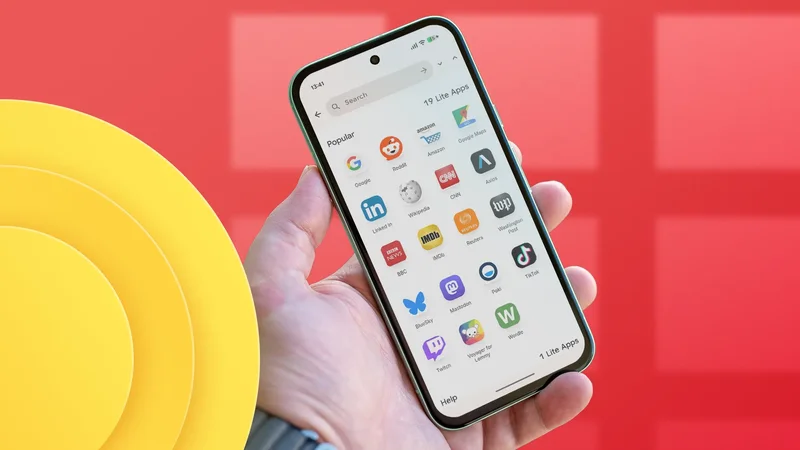
I have a Google Pixel 10 Pro with 128 GB of storage, and I'm running out. It's mostly thanks to the music downloaded to my phone (it currently stands at 74.39GB), but I'm not willing to give that up.
Instead, I've been uninstalling various apps and replacing them with lightweight web shortcuts.
Creating a home screen shortcut to a web page is nothing new; it's a standard feature of Android browser apps.
However, Hermit adds a few clever features that mean I now use it to replace all my web-based apps, in the process.
Why I replace native apps with web shortcuts
Smaller, faster, and easier to use
If I open the , I can create a shortcut to any web page and place it on my home screen. Tapping this shortcut opens the link in the Chrome app.
This can save a lot of space. For example, I need to open Facebook approximately once a week to check work messages and a business social media account.
If I delete Facebook and Messenger and replace them with a Chrome shortcut, I save a gigabyte of space.
On the surface, Hermit looks like a more complicated way of doing the same thing. I can open Hermit, create a shortcut, and place it on my home screen.
However, Hermit opens apps in a sandboxed browser that keeps browsing fast and private. Best of all, some controls let me remove all distractions.
Hermit's lightweight browser is packed with options
It's a fully-fledged browser
Let's say I want to create a Hermit app for the Guardian website, specifically the Technology section.
I open Hermit, tap Create, select Create Your Own, browse to the URL, and save the app. I then add it to my home screen like any other widget, and I'm off.
Here's the thing: when I'm scanning recent news posts, I don't want any distractions, popups, ads, or notifications.
Unlike Chrome shortcuts, which open another tab in the browser, Hermit opens each shortcut in a dedicated window. So if I make changes to one Hermit shortcut, they won't affect another one.
Take the Guardian example. I've set it to open in full-screen, frameless, with the smallest text size. I've blocked popups, third-party cookies, and ads. I've also set it to open in Reader mode.
The result is an easily scrollable web page where I can take in all the headlines in seconds with no distractions.
What about Facebook? Same thing, except I don't open the page in Reader mode and I keep the text size large.
I can go even deeper. Say I want a collection of web pages accessible from the same shortcut (for example, irregularly used social media apps like X and Facebook). I can create bookmarks within that shortcut to keep all my pages organized.
Each Hermit shortcut is a standalone browser
This ability unlocks a myriad of possibilities
Hermit clicked for me when I realized that each shortcut was essentially a standalone browser. However, I decided to opt in to the Premium version as it lets me create sandboxed shortcuts.
For example, I regularly juggle multiple Google accounts at once. While this is easy on a desktop browser, bouncing between accounts on mobile is frustrating and slow.
I therefore created two sandboxed shortcuts with Hermit, one that directs to my work Google account, and another to my personal account.
I can then switch between accounts like switching between apps. I can multitask by opening both accounts in split-screen mode.
If I'm worried about a suspicious website, I can create a new sandbox and browse it there.
There's also an option to create a sandbox that opens links into Incognito Mode.
Hermit makes sharing links easy
I still have control over how I browse
My biggest concern about using Hermit was opening and sharing links. However, I can set each shortcut to open all related links. So if I tap a Facebook link, it'll open it in the Hermit shortcut rather than my Chrome app.
I can also share links, copy URLs, and open links in my default browser. If I spot something in a sandbox that I want to reference from another device, I open it in Chrome and bookmark it.
The result is a sandbox browser that I have complete control over. Best of all? I've saved over 6GB of space by replacing apps with Hermit shortcuts.
Hermit is a solution to privacy, safety, and storage issues
I've replaced Reddit, Amazon, Facebook, LinkedIn, and many other apps with Hermit shortcuts. I've ensured my browsing is secure and fast, and I've on my phone in the process.
Now it's time to consider trimming down my music collection. But that's a hard decision to make when converting apps into Hermit shortcuts is so much easier.