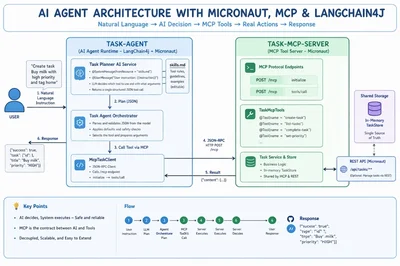
An AI agent is a system that uses a language model to understand instructions, decide on actions, and execute them using available tools.
In practice, what does this look like?
In this article, we build a simple task-management AI agent in Java using Micronaut, LangChain4j, and Model Context Protocol (MCP). It demonstrates how an agent interprets natural language, selects the right action, and executes it safely through a structured tool interface.
Full code for this project is available here:
What is an AI Agent?
An AI agent is a software system that uses a language model to interpret user input, reason about it, and take actions by invoking tools or APIs.
At a minimum, an AI agent consists of:
- A reasoning model – typically an LLM that understands user instructions
- A set of tools – functions or APIs the agent can invoke
- An execution loop – a cycle of:
→ understand → decide → act → return result
In this project, that loop is implemented cleanly and explicitly.
How the agent works in this repo
TaskPlannerAiService(LangChain4j) prompts the model to produce a single structured JSON tool callTaskAgentOrchestratorparses and validates that JSONMcpTaskClientexecutes the selected tool via MCP
This design enforces an important rule:
The model never directly modifies business data.
It only decides what should happen, while the system controls how it happens.
What is MCP (Model Context Protocol)?
Model Context Protocol (MCP) is a standardized protocol that defines how AI agents interact with external tools and services in a structured and reliable way.
Without MCP, applications often implement custom tool-calling formats, leading to inconsistent integrations and fragile systems.
MCP provides:
- A standard interface for exposing tools
- Structured schemas for tool arguments
- A JSON-RPC-based communication model
- A clean separation between AI decision-making and system execution
Why MCP matters
In this project, MCP provides:
- A stable tool interface (
create-task,list-tasks,complete-task, etc.) - Structured and validated arguments
- A predictable lifecycle (
initialize→tools/call) - Loose coupling between the agent and backend services
In simple terms:
MCP is the contract between AI reasoning and real-world actions.
Project Architecture
This project is split into two modules:
1. task-mcp-server — MCP Tool Server (Micronaut)
This module exposes task-related operations as MCP tools using Micronaut.
Tools are defined using annotations like:
@Tool(name = "create-task")@Tool(name = "list-tasks")@Tool(name = "complete-task")@Tool(name = "set-priority")
All tools operate on an in-memory TaskStore.
💡 Key detail:
Both REST APIs and MCP tools share the same store. So:
- Data created via REST is visible to MCP
- Data created via MCP is visible to REST
2. task-agent — AI Agent Runtime
This module contains the AI-driven decision-making layer.
Skills as configuration
Instead of hardcoding behavior, the agent uses a skills.md file:
@SystemMessage(fromResource = "skills.md")
@UserMessage("User instruction: {{instruction}}")
String plan(@V("instruction") String instruction);
Enter fullscreen mode
Exit fullscreen mode
This allows you to:
- Update agent behavior without recompiling
- Define tool usage rules in Markdown
Orchestration layer
TaskAgentOrchestrator is responsible for:
- Parsing model output
- Validating JSON structure
- Applying safe defaults
- Calling MCP tools via
McpTaskClient
MCP client
McpTaskClient communicates with the MCP server using JSON-RPC:
- Endpoint:
http://127.0.0.1:8080/mcp - Flow:
initialize→tools/call
End-to-End Flow
Example instruction
"Create task Buy milk with high priority and tag home"
Execution steps
- Agent sends instruction + skills definition to the model
- Model returns structured JSON:
{
  "tool": "create-task",
  "arguments": {
    "title": "Buy milk",
    "priority": "HIGH",
    "tags": "home"
  }
}
Enter fullscreen mode
Exit fullscreen mode
- Orchestrator parses and validates the JSON
- MCP client calls
create-task - MCP server executes and returns the result
Why This Pattern Works
This architecture is simple but powerful.
Benefits
- Add new tools without changing agent logic
- Update behavior via
skills.md - Swap LLM providers easily
- Keep execution deterministic and safe
- Avoid unpredictable model side effects
Instead of letting the model “do everything,” you:
- Let the model decide
- Let your system execute
Running the Project Locally
Start MCP server
cd task-mcp-server
mvn exec:java
Enter fullscreen mode
Exit fullscreen mode
Start agent
cd task-agent
OPENAI_API_KEY=<your-key> mvn exec:java
Enter fullscreen mode
Exit fullscreen mode
Call the agent
curl -sS -X POST http://127.0.0.1:8081/api/agent/run \
  -H 'content-type: application/json' \
  -d '{"instruction":"Create task Buy milk with high priority and tag home"}'
Enter fullscreen mode
Exit fullscreen mode
Inspect skills
curl -sS http://127.0.0.1:8081/api/agent/skills
Enter fullscreen mode
Exit fullscreen mode
Repositories
Here are the key modules used in this article and what they do:
task-mcp-server
https://github.com/jobinesh/java-ai-lab/tree/main/task-mcp-server
Micronaut-based MCP server that exposes task management tools (create-task, list-tasks, etc.) via MCP and REST. This is where all actual business logic executes.
task-agent
https://github.com/jobinesh/java-ai-lab/tree/main/task-agent
LangChain4j-based AI agent that interprets user instructions, decides which tool to call, and invokes MCP endpoints.
Final Takeaway
Think of the system in three layers:
- AI Agent (LangChain4j): decides what to do
- MCP Server (Micronaut): defines what can be done
- Business Logic: ensures how it is done safely
That separation is the key to building reliable AI systems.
It keeps your AI flexible, your APIs stable, and your business logic safe.
If you're exploring AI agents in Java, this pattern is a great starting point—and a solid foundation for production-grade systems.