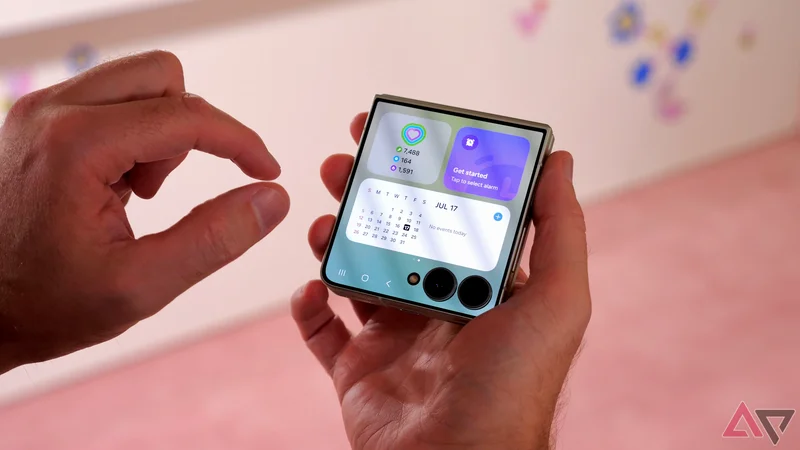
To me, the most important part of any flip phone I use is the cover screen. That's not just a stance I take with clamshell foldable phones, but an important principle I maintained for my original LG flip phone two decades ago.
Without a cover display, a flip phone is just ... a regular old phone. It's an important part of the device. Despite this, many pointed to the Samsung Galaxy Z Flip 7's cover screen as being its biggest weakness.
With the launch of the Samsung Galaxy Z Flip 8, the company had an opportunity to rethink this small outer display. This has resulted in my favorite upgrade of the new clamshell phone.
What's new in the Samsung Galaxy Z Flip 8?
A few minor tweaks
Before I claim something as my favorite upgrade, it's worth addressing what's actually new in the Samsung Galaxy Z Flip 8.
If you look at the specs list, your answer might be "not much." There's the same 50MP and 12MP camera combo, the same display size and pixel count, and the same battery size and charging speed.
The upgrade Samsung discussed most when briefing the press on the new phone was its size tweaks. The Z Flip 8 is smaller and lighter than the Z Flip 7, yet was designed to be more durable in a few areas.
A camera feature was featured heavily too: Horizon Lock, which we said was as impressive as Privacy Display in the Galaxy S26 Ultra. This is basically super stabilization when recording videos.
Upgrades to the Z Flip's divisive cover display
Extending the Android treatment
My favorite upgrade on the Samsung Galaxy Z Flip 8 is one I haven't addressed yet. It pertains to the Flex Window, which is the outer display that's visible when the clamshell is shut.
In the new foldable, Samsung has redesigned how this tool works to make it much more useful.
Now, you can use the Flex Window to access your phone's Quick Settings and App Tray, giving you quicker access to loads of the tools you may need.
Popular apps have also been optimized to work better on this smaller screen, with recents and automations displayed, which will speed up the way you use this display.
As an example, Samsung upgraded its Now Brief to better fit tools and information into a smaller space, and you can create new cards using the tool to fit however you use it.
All of these upgrades are just in time, with some on the Android Police team pledging not to buy the Galaxy Z Flip 8 if it didn't upgrade the cover screen.
Why these cover display upgrades are so helpful
Fulfilling the clamshell foldable promise
Galaxy Z Flip phones have had cover screen widgets for years now, but I've previously found these simplistic.
Your entire display might be covered by a single widget, like the media player above, or it might simply be a gateway to the main-display tool.
However, the Samsung Galaxy Z Flip 8's upgrades seem to fulfill the clamshell promise: They give you ways to use your smartphone for its usual tasks, without needing to open up the entire thing.
For me, the biggest draw of the changes is Quick Settings, which are the options you find when you swipe down from the upper-right corner of the display.
Now, you can easily use the cover display to disconnect a Bluetooth device, enable Do Not Disturb mode, or turn your mobile into a hotspot.
Opening the Z Flip's main display isn't particularly time-consuming, but if you change your settings frequently, this action will take up some of your time.
Plus, foldables don't last forever, and avoiding flexing the screen will keep it ticking for longer.
Turning the phone into a pocketable smartwatch
Without the wrist strain
One of the appeals of a smartwatch, especially among those who have no interest in fitness or health, is the quick access to a range of apps.
You can control your music, handle notifications, and see map information without needing your mobile.
I'm enjoying seeing the Galaxy Z Flip series learn further and further on this use case. As a mobile writer, I don't want smartphones to become redundant, but for smaller functions it's great to see other tools do the same job.
Plus, the best smartwatches for Android are quite expensive, so a smartphone that lets you skip the wearable will save you cash (and wrist strain).
A needed Z Flip upgrade, even if not a huge one
Perhaps the reason that I'm so pleased with the Samsung Galaxy Z Flip 8's cover screen improvements is that it was well past time. As I've mentioned throughout this article, fans have been demanding changes for a while.
With Apple's foldables on the horizon, Samsung needs to make sure its options are must-buys to withstand the competition. And with few spec upgrades in the new clamshell, the cover display is where improvements were needed.
If you'll remember, it was only recently that non-Samsung apps were made accessible on the cover display.
Samsung Galaxy Z Flip 8
-
**SoC** - Qualcomm Snapdragon 8 Elite Gen 5 for Galaxy
-
**RAM** - 12GB
-
**Storage** - 256GB / 512GB
-
**Battery** - 4,300mAh
-
**Operating System** - Android 17 / One UI 9
-
**Front camera** - 10MP
The Samsung Galaxy Z Flip 8 takes the long-established compact folding phone formula and refines it further, reducing the weight and thickness to make the phone even more convenient to hold and carry. The rest of the specification is not a huge jump over previous models though.