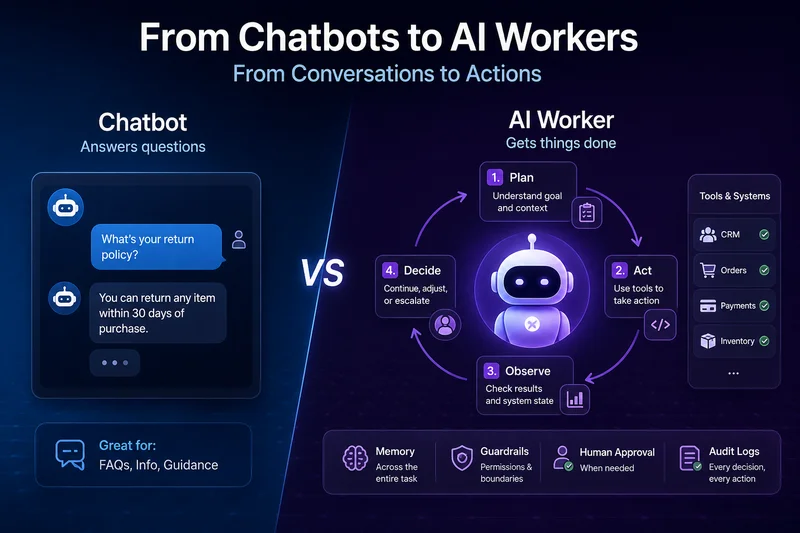
Take a look around any organisation today. There's probably a chatbot answering the same customer question
"What's your return policy?"
A hundred times a month. At the same time, somewhere else in the business, employees are still manually copying information between a CRM, a spreadsheet, and a ticketing system because the workflow hasn't been automated. Both are AI use cases, but only one of them should still rely on a chatbot.
I've worked on both kinds of systems, and the difference becomes obvious once you see them in production. A chatbot is great at having conversations and helping users find answers. An AI worker takes things further by completing tasks, making decisions within defined boundaries, and interacting with business systems to achieve a goal. That's the distinction that's reshaping how organisations think about AI.
The Chatbot Ceiling Is Real, and It's Lower Than People Think
Chatbots are incredibly useful when the job is straightforward. They can answer common questions, guide users to the right information, and stay available around the clock without missing a beat. For many customer support scenarios, that's exactly what's needed.
The challenge begins when the conversation needs to move beyond answering questions and actually get something done. Imagine checking information across multiple systems, deciding whether a refund should be approved, updating a CRM, notifying another team, and following up if something goes wrong. At that point, you're no longer asking AI to have a conversation. You're asking it to complete a workflow. That's where the traditional chatbot starts to reach its limits.
This is where many chatbot projects start to fall short. The chatbot provides a helpful answer, but someone still has to copy that information into another application, update a record, or complete the task manually. Instead of eliminating work, it simply shifts the work to a person.
In other words, the chatbot did its job by answering the question, but the actual task was never completed. That's the gap organisations are beginning to recognise as they move from conversational AI to AI systems that can take meaningful action.
You can often spot this limitation by looking at how success is measured. For chatbots, the focus is usually on metrics like how many customer queries were answered without being escalated to a human. Those numbers often improve quickly at first because chatbots are good at handling repetitive questions.
But answering questions isn't the same as completing work. As soon as organisations start measuring how many tasks were actually finished without human involvement, they realise a chatbot alone isn't enough. Solving that problem requires a different kind of system, one that's designed to plan, take action, interact with business tools, and see a task through to completion instead of simply generating another response.
What Actually Makes Something an "AI Worker"
The term AI worker is becoming increasingly common, but it's often used without clearly explaining what makes it different from a chatbot. The difference isn't just the technology behind it; it's the way the system is designed to operate.
A chatbot is built to have conversations. It listens to a request, retrieves relevant information, and generates a response. An AI worker has a different objective. Instead of simply answering a question, it works toward achieving a goal. It can plan the steps involved, interact with business systems, make decisions within defined boundaries, and continue working until the task is completed or it reaches a point where human input is genuinely required.
In practice, a few key characteristics separate an AI worker from a traditional chatbot.
- It focuses on outcomes, not conversations: A chatbot treats every interaction as a new request. Once it responds, its job is done. An AI worker starts with a goal, whether that's reconciling an invoice, onboarding a new vendor, or processing a refund, and keeps working until that goal is achieved or it genuinely needs human assistance.
- It can interact with the systems where work happens: Answering questions from a knowledge base is useful, but real work usually involves business applications. An AI worker can securely interact with CRMs, ticketing platforms, internal APIs, calendars, databases, and other enterprise tools. Instead of telling someone what to do next, it can perform the appropriate action within the permissions it's been given.
- It remembers context beyond a single conversation: Traditional chatbots often lose context once a conversation ends. AI workers maintain the information needed throughout an entire workflow and, in many cases, learn from previous tasks. That means they don't repeatedly ask for the same information and can handle similar requests more efficiently over time.
- It operates within well-defined boundaries: Giving an AI system more responsibility doesn't mean giving it unlimited freedom. Production AI workers are built with clear guardrails that define what actions they can take, what requires human approval, and what should never be done automatically. Those boundaries are enforced through the system itself, making the worker reliable as well as capable.
To understand the difference, it's easier to look at a real workflow than another architecture diagram. The following example shows how an AI worker can handle a customer refund request from start to finish by reasoning through the task, interacting with multiple business systems, and completing the work with minimal human involvement.
Screenshot: worker agent log — refund request handled autonomously
$ worker run "handle refund request #8842"
▸ Reading ticket #8842: customer requesting refund, order #55291
▸ Checking order status in OrderSystem... delivered 11 days ago
▸ Checking refund policy: 14-day window, item eligible
▸ Checking customer history in CRM... 2 prior orders, no refund history
▸ Checking payment record in Stripe... original charge found, $84.00
▸ Decision: refund approved, within policy, no flags
▸ Issuing refund via Stripe API... confirmed, ref #re_9f21a
▸ Updating CRM: refund logged, ticket status → resolved
▸ Sending customer confirmation email
▸ Escalation check: none needed, closing ticket
Done in 38s. 4 systems touched, 0 human interventions.
What's interesting is that nobody had to write a massive decision tree to cover every possible scenario, whether the order was returned after 11 days or 14 days, whether the customer had requested refunds before, or whether the order value crossed a certain threshold. Instead, the AI worker evaluated the available information, applied the company's refund policy, and used the right tools to complete the task, much like an experienced support representative would. Rather than following a rigid script, it adapted its decisions based on the context of each request.
Where Chatbots Still Belong
This doesn't mean chatbots are becoming obsolete. They still play an important role, especially when the goal is to answer common questions, guide users to the right resources, or provide support outside business hours. For many organisations, they're the first point of interaction and do that job remarkably well.
The difference is knowing where a chatbot's responsibility should end. Once a request requires information from multiple systems, business decisions, or actions that need to be carried out, an AI worker becomes a better fit. Whether it's qualifying a sales lead using data from several applications, preparing a compliance report from different sources, or resolving a support ticket from start to finish, these are tasks that go beyond conversation. They require a system that's designed to complete work, not just respond to it.
Many organisations are already combining both approaches. A chatbot handles the initial conversation, answers straightforward questions, and understands what the user needs. When the request becomes more complex or requires real action, it hands the task over to an AI worker instead of immediately escalating it to a human. This creates a smoother experience for users while allowing automation to go much further.
What doesn't work is expecting a chatbot to become an AI worker simply by replacing the underlying language model with a newer or more capable one. The limitation isn't the intelligence of the model itself. It's the architecture around it. AI workers rely on capabilities such as secure access to business tools, persistent memory, planning, decision-making, and well-defined permissions. Without those components, even the most advanced language model is still limited to generating responses rather than completing meaningful work.
Building the Worker: What's Actually Different in the Code
The difference becomes even more apparent once you start building these systems. A traditional chatbot follows a fairly simple flow. It receives a user's message, gathers the relevant context, and generates a response. That's enough when the objective is to have a conversation.
An AI worker operates very differently. Instead of responding to individual messages, it starts with a goal, creates a plan, takes action using the appropriate tools, evaluates the outcome, and decides what to do next. It continues this cycle until the task is completed or it reaches a point where human assistance is genuinely needed.
Supporting that kind of workflow requires capabilities that most chatbot applications were never designed to provide. Planning, tool execution, state management, approval mechanisms, and error handling become essential parts of the system rather than optional features.
Screenshot: minimal worker loop, pseudocode
def run_worker(goal, tools, max_steps=20):
    state = {"goal": goal, "history": []}
    for step in range(max_steps):
        plan = model.decide_next_action(state, tools)
        if plan.action == "done":
            return state["history"]
        if plan.action == "needs_approval":
            approved = request_human_approval(plan)
            if not approved:
                state["history"].append("action denied, replanning")
                continue
        result = tools[plan.tool].execute(plan.args)
        state["history"].append({"action": plan, "result": result})
    return escalate_to_human(state)
Two parts of this workflow deserve special attention: needs_approval and escalate_to_human. They're often overlooked in early implementations because teams are focused on making the AI complete tasks on its own. In reality, these two steps are what make a production system trustworthy.
An AI worker shouldn't be expected to handle every situation independently. There will always be decisions that require human judgment, whether it's approving a high-value refund, modifying sensitive customer data, or performing an action with significant business impact. A well-designed AI worker knows when to proceed and, just as importantly, when to stop and ask for help.
The most reliable production systems aren't the ones that automate everything. They're the ones built with clear boundaries from the beginning, defining which actions can be completed autonomously and which require human approval. Establishing those guardrails early makes AI workers far more dependable than trying to add them after problems appear in production.
The way tools are designed also becomes much more important. Unlike a chatbot, an AI worker isn't just reading information. It can take real actions that affect business systems. Because of that, every tool should have a clearly defined purpose and operate within strict limits.
For example, instead of giving an AI worker unrestricted access to a database, it's far safer to expose a dedicated cancel_order tool that only allows cancellations below a certain order value and automatically requires human approval for anything beyond that. Designing tools with clear permissions and well-defined boundaries reduces risk, makes the system easier to audit, and helps ensure that a single incorrect decision cannot have widespread consequences.
The Part Everyone Underestimates: Observability
When a chatbot gives an incorrect answer, it usually leads to a poor user experience. When an AI worker performs the wrong action in a live business system, the impact can be much more serious. It could trigger an incorrect refund, update the wrong customer record, or make changes that affect business operations.
That's why observability and auditability are essential parts of an AI worker, not optional additions. Every decision, tool invocation, and system action should be recorded in a way that allows teams to understand exactly what happened, why the decision was made, and what the outcome was. A simple conversation history isn't enough when AI is performing actions that have real business consequences.
Screenshot: audit log entry for a worker action
{
  "task_id": "refund-8842",
  "step": 6,
  "action": "issue_refund",
  "tool": "stripe.refund",
  "args": { "charge_id": "ch_7a12", "amount": 8400 },
  "reasoning": "Order delivered 11 days ago, within 14-day
    policy window. No prior refund history on account.",
  "approval_required": false,
  "result": "success",
  "timestamp": "2026-07-16T09:14:02Z"
}
The reasoning behind each decision isn't there for the AI worker. It's there for the people responsible for operating and improving the system. If something goes wrong weeks or even months later, teams need to understand why a particular decision was made.
Simply saying, "the model decided to do it," doesn't provide any useful insight. A production-ready AI system should record the context it received, the information it used, the actions it took, and the reasoning behind those actions. That level of transparency makes it much easier to investigate issues, improve the system over time, and build confidence in AI-driven workflows.
Where This Goes Wrong
As more organisations begin deploying AI workers in production, a few common mistakes appear again and again. Recognising these early can save teams a significant amount of time, effort, and unnecessary complexity.
Starting Too Big
One of the most common mistakes is trying to automate everything at once. It's tempting to connect an AI worker to every business system and expect it to handle multiple workflows from day one. In practice, the teams that see the best results start much smaller. They choose a single, high-volume workflow with clear business rules, make it reliable, measure the impact, and then expand gradually. Trying to automate too many processes at the same time usually creates more complexity than value.
Leaving Guardrails for Later
Guardrails aren't something that should be added after the system is already in production. From the very beginning, an AI worker needs clearly defined boundaries around what it can do, what requires human approval, and which actions should never be performed automatically. This is especially important in industries where compliance, privacy, or financial risk are involved.
Not Planning for Failure
No AI system is perfect. There will always be situations it hasn't encountered before or decisions it isn't confident enough to make. A production-ready AI worker should recognise those moments, preserve all the context collected so far, and hand the task over to a human. A smooth escalation process is far more valuable than forcing the system to guess its way through an unfamiliar scenario.
Giving Too Much Access
Connecting an AI worker to more systems doesn't automatically make it more capable. What matters is giving it the right tools with the right permissions. A small set of carefully designed and thoroughly tested tools is often far more effective than broad access to multiple business systems. Limiting permissions also reduces risk and makes the worker easier to secure, audit, and maintain.
Choosing the Right Solution
The decision ultimately comes down to the problem you're trying to solve.
If your goal is to answer customer questions quickly, provide information, or reduce the workload on a support team, a chatbot is often the simplest and most cost-effective solution.
If your goal is to complete business processes without someone manually taking over afterwards, then you're solving a different problem. That requires an AI worker with access to business tools, clearly defined permissions, observability, and governance built into the system from the beginning.
Perhaps the biggest shift happening in AI today isn't that language models have become more capable. It's that organisations are changing the questions they ask. Instead of focusing on what an AI model can say, they're focusing on what an AI system can reliably accomplish. That shift in mindset is what separates conversational AI from AI that creates real business value.