Even if you aren’t an athlete or someone who plays regular sport and, like me, enjoys a long walk, a jog, or occasional sports, finding the right health-tracking wearable can be confusing.
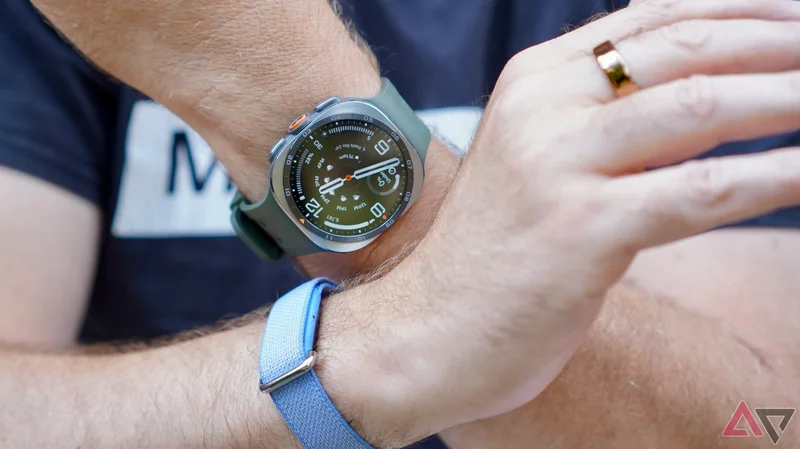
I’m wearing the new Samsung Galaxy Watch Ultra 2 along with the Google Fitbit Air and the Oura Ring 5. I tracked a single 40-minute walk to see the differences between the apps, the data recorded, and the usefulness of each.
Here’s what I discovered, and which wearable is the best for casual exercisers.
Design differences
Built for purpose
The Galaxy Watch Ultra 2 and Fitbit Air are worn on your wrist, and the Oura Ring 5 is a smart ring on your finger, but other differences impact daily use.
The biggest is the Galaxy Watch Ultra 2’s screen. It’s large and really bright (5,000 nits, making it the brightest screen on a smartwatch) and shows live tracking data as you exercise.
Regardless of whether you want to understand heart rate zones or see your distance traveled all the time, having the data there on your wrist is motivational.
For example, Samsung Health’s live and clear heart rate zone indicator pushes you to work a little harder.
The Oura Ring 5 and Fitbit Air don’t have a screen, so you have to look at your phone to see live data. This is fine when you’re walking, but less so when you’re running, and not possible if you’re playing football or swimming.
The Galaxy Watch Ultra 2’s Trail Run tracking and its overall toughness and ability mean it’s overkill for me. However, the experience will be almost identical on the thinner, lighter, and less extreme Galaxy Watch 9.
The Oura Ring 5 is a lifestyle tracker. It can track different activities live, and the list is longer than it used to be, but it’s not the wearable’s focus.
It’s the opposite end of the scale to the Galaxy Watch Ultra 2, which is reflected in its design. You won’t want to grip big metal dumbbells while wearing it for fear of ruining the finish.
The Fitbit Air is somewhere in between. The app prioritizes the Google AI Health Coach. However, there’s a host of activities to track, and the wearable’s simple design and hard-wearing materials make it ideal for wearing during any sport, from running to swimming.
Tracking my walk
Getting the simple stuff right
Why did I track a walk and not a marathon? It’s a basic exercise, and getting in 150 minutes of brisk walking per week is often listed as the easiest way to stay active and healthy.
It’s a cornerstone of activity tracking, and a standard health-tracking feature. If a product gets it wrong, it indicates there are greater problems. I’ve tracked several 40-minute walks using the three devices.
The Galaxy Watch Ultra 2’s screen once again proves how it elevates activity tracking, as it’s a press of the central side button to open the feature, and for me, walking is the first option presented. There’s no need to touch your phone.
The Fitbit Air and the Oura Ring 5 require you to use the app. It’s simple in both, but it is an extra step beyond the Galaxy Watch Ultra 2.
If you left your phone somewhere safe but forgot to start tracking, you’ll have to go back to it, unlike with the smartwatch.
How does the data compare?
Surprisingly similar across the devices
The Oura app gives you all the basic information you need, and presents it on a single page. It shows a GPS map of your route, heart rate zones on a graph, and data including active calorie burn, average pace, average heart rate, steps, distance, and duration.
Samsung Health goes a step further, with the same data and GPS map along with an estimated V02 Max, an estimate of where your body took its energy (carbs or fat), an estimated sweat loss, and an average speed.
Post workout, Samsung Health suggests how much water to drink to replenish your body, and there’s more data when you dig into the graphs.
The Fitbit app is similar to the Oura app, but adds a cardio load metric, which it uses to illustrate how hard you’ve worked toward your weekly goal.
Where the Fitbit app differs is through the AI Health Coach. After it has analyzed the data, it gives an overview on the main screen that compares your performance to previously tracked exercises, and adds motivational encouragement.
The chart below shows the basic data collected by each device. I wore the Galaxy Watch Ultra 2 on the wrist of my non-dominant hand, and the Fitbit Air and Oura Ring 5 on the other.
|
|
|
|
|
|
|
|
| 2.1 miles | 4315 | 352 kcal | 108 bpm | 35 mins |
|
| 2.14 miles | 4280 | 225 kcal | 109 bpm | 35 mins |
|
| 2.08 miles | 4292 | 219 kcal | 108 bpm | 36 mins |
Aside from the Fitbit Air’s considerably higher calorie burn, all broadly agree on my heart rate, steps, and time spent in the Zone 2 heart rate zone. It’s an encouraging result.
Why is the Fitbit Air’s calorie burn so much higher? It appears to be a recognized issue with the activity tracker. There are reports of it overestimating calorie burn, including those submitted to Google’s Help page. The issue may be fixed in a future software update.
What about the AI features?
Commit to chatting, and they’re helpful
Both the Oura Ring 5 and the Fitbit Air have AI chatbots in the app. The Samsung Health app provides AI overviews of your performance and metrics.
The AI chatbots are surprisingly informative, provided you spend time interacting with them. If you don’t want to talk to AI, you won’t get the most from the Fitbit Air in particular.
I asked Google’s AI Health Coach how I could improve my walking performance, and maybe aim for more time in heart rate zone three, and asked it to take into account my existing records.
I love the response. Not only did it recall that I don’t like to be pushed too hard, but it made sensible suggestions, such as interval walking, that I would never have thought of. The more you chat with and tell the AI Health Coach, the more useful it is.
I asked Oura Advisor the same question, and although it suggested basically the same things, because I’ve worn the Oura Ring for years, it was able to look more closely at my long-term activity.
This broader view helped me identify other areas that will help me improve before I make larger changes.
AI is good at interpreting and summarizing data, which both chatbots demonstrate here.
Despite the Oura Ring knowing me better, I’d be more inclined to talk to the Google AI Health Coach due to its conversational style and willingness to build exercise plans as we chat.
How much does each device cost?
Prepare for a subscription
There are big differences in the costs of using each device I’ve tested, and it may end up affecting your buying decision.
The Oura Ring 5 and the Fitbit Air have subscriptions attached. It’s an essential part of the Oura Ring 5. The smart ring starts at $400 and requires a $6-per-month subscription. If you don’t pay the subscription, you only see daily scores.
The Google Fitbit Air’s Premium subscription is an option. It costs $10 per month. If you don’t pay, you don’t have access to the AI Health Coach, but most of the data remains. The Fitbit Air is $100.
The Samsung Galaxy Watch Ultra 2 doesn’t have a subscription package. The smartwatch costs $700, and the Samsung Health app is free to use. The $380 Galaxy Watch 9 is a good alternative for anyone who wants a lighter, thinner smartwatch.
Which fitness tracker should you buy?
All three wearables are great buys if you want to track your daily activity, sleep, and exercise. The consistency of data shows none will guide you in the wrong direction, despite not being medical devices.
Fitbit Air
-
**Battery Life** - 7 days
-
**Health sensors** - Optical heart rate, 3-axis accelerometer, temperature sensor
-
**Dimensions** - 35 x 17 x 8.3mm (Module)
-
**Water Resistance** -
50 meters
-
**Connectivity** - Bluetooth 5.0
-
**Materials and finishes** - Polycarbonate module
I like the Fitbit Air’s design and materials, and Google’s AI Health Coach can be genuinely useful. Its informative, conversational tone can be fun and motivational. It adds value to the reasonably priced Fitbit Air, despite requiring a subscription.
Oura Ring 5
-
**Heart rate monitor** - Y
-
**Notification support** - N
-
**Battery life** - six-to-nine days
-
**Sensors** - Red/Green/Infrared LEDs, temperature sensor, accelerometer
-
**Water Resistance** - 100 meters
-
**Ring sizing** - Size 6 to 12
The Oura Ring 5 is the least intrusive device to wear, and doesn’t make a statement about your sportiness or otherwise. The data it collects is sufficient, and when you take into account its sleep-tracking prowess, it’s a fantastic option for the averagely active.
Samsung Galaxy Watch Ultra 2
-
**RAM** - 2GB
-
**Storage** - 64GB
-
**Bluetooth** - v6.0
-
**Weight** - 61.5g
-
**IP Rating** - IP69K
However, the Galaxy Watch Ultra 2 (and its cheaper sibling, the Galaxy Watch 9) is our recommendation. The screen makes starting workout tracking faster.
You can see all the data as you exercise. The app provides more in-depth data even when tracking simple workouts, and there’s no subscription required.
All are great choices, but the Samsung Health app and your choice of Samsung smartwatch are best for most people.