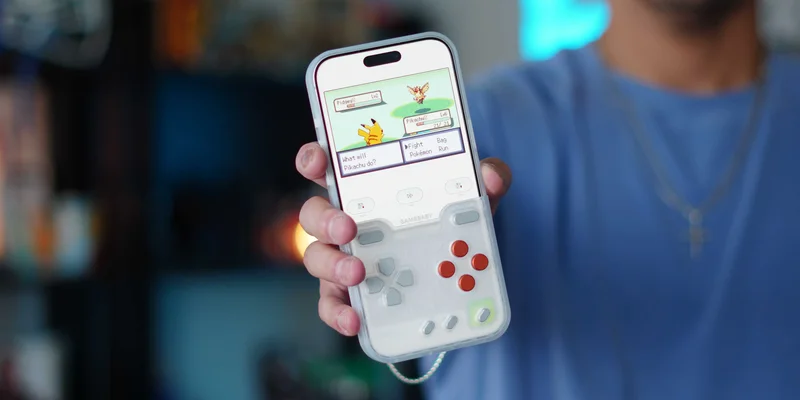
One of my favorite iPhone cases is back with a new look. I have used the previous generations of BitmoLab’s GAMEBABY case and immediately loved it. It felt like an accessory purpose-built to tug at my nostalgia strings. The superpower of this case is that it is not a secondary accessory you need to bring and make sure is charged; it’s a regular iPhone case that is smartly designed to also serve as a set of tactile, physical buttons for playing your favorite Game Boy ROMs (among others). It’s the perfect summation of work smarter, not harder. It uses no batteries or Bluetooth and requires little setup. If you are into any sort of retro game emulation, you have to check this out.
Be sure to check out our hands-on video of the case in action!
The design of this case is so simple, yet genius. It uses a two-piece design, with the bottom half serving as the controller. During normal, non-gaming use, it just feels like a normal case. You get:
- Tactile side buttons for the lock button, volume rocker, and the action button
- Cutouts for the USB-C port, speakers, buttons, and Camera Control
- Protective lip surrounding the display and camera plateau
- Hardshell plastic protection
But the bottom half is where the magic lives. That is where you find the game’s control buttons, and they are very well-made, tactile, and satisfying to press. But how does it all work?
How it works
Again, what makes this so clever is that there are no electronics in it. So there is no pairing process. The way this works is that each physical game control button has a small capacitive contact that simulates the touch of your finger on the display. So it makes your iPhone believe you are tapping on screen controls, while you feel like you are pressing real buttons. It is the same tech as the soft capacitive tip on those inexpensive touchscreen styluses.
There is a quick setup step to ensure the tactile buttons line up with the onscreen controls. BitmoLabs includes all the instructions needed via a QR code in the packaging. But it works by using the Delta Emulator app from the App Store. The App is 100% free to use with zero in-app purchases. Once you download the app, GAMEBABY provides a downloadable custom skin that places the emulator’s digital controls directly underneath the physical buttons. This is also free (even if you do not have the case).
Once the skin is installed in the Delta emulator app, you are ready to start playing. All you do is remove the bottom half of the case, flip it around, and place it back onto the iPhone. This places the control buttons on the iPhone screen, giving you the feel of real physical buttons when playing your retro games. Then, when you are done playing, you slide the controller half off, flip it back over, and snap it back into place. You are then back to having a normal case on.
My experience
As I mentioned in the intro, I am a sucker for anything retro gaming, it triggers something in me that makes me want to play my old Pokémon games from years past. This not only makes it easier to play but also gives you a nearly frictionless experience. There was nothing I had to remember to bring, nothing I had to charge, and no pairing needed. Having to remember to bring additional items is always the biggest friction point for me with any tech accessory, so this case removes that barrier.
It also feels that with this case, BitmoLabs really tightened up the build quality. The buttons give you some great feedback, which bounce back up after you lift your finger, and there are no button misses when playing. I mostly used this to play all of my classic Pokémon titles, so it’s more of a passive game and doesn’t require much fast-twitch reaction. Even in games that do require that, this case does the job.
There is one compromise to note: the lack of MagSafe connectivity. Because the case is in two parts and the bottom half already has stuff on it, there was no real way to add magasfe to this. So if you absolutely need MagSafe on your case, then this might not be what you want. That being said, if you do have MagSafe accessories, which I have a lot of, it’s very easy to just remove the case and use your accessories. There is also no camera control cover on this, which is not a big deal at all, but worth considering.
Pricing and availability
The GAMEBABY is available on BitmoLab’s website and on Amazon, starting at $24.99. They come in three versions: GameBaby Color, GameBaby Retro, and the newest GameBaby transparent (which is the one I have been showing off). The Gamebaby Transparent is only available for the iPhone 17 Pro Max, and it’s a limited run of just 500 units, which can only be purchased on BitmoLab’s site. The others are available for the iPhone 15 Pro and newer on both Amazon and their site. Again, since there are no electronics, batteries, or Bluetooth, they can keep the price down to $25 for a case that should be much more!
Final thoughts
If you are anything like me and like to play and relive your retro games on your iPhone, then this case is a no-brainer. It is inexpensive, lightweight, simple to set up, and actually improves the experience of playing retro emulated games on an iPhone. If you combine the physical buttons with the iPhone’s amazing haptic engine, it really feels as if you are playing a retro console. And now with this insane wave of retro Pokémon game mods hitting my timeline, this is the perfect time to just relax and enjoy these games on your iPhone with some tactile controls.
What do you think of this case? Is it something you would consider? Have you tried them before? Let’s discuss below!
Best Apple deals
- AirPods Pro 3 (limited time under $200)
- Best Studio Display Alternative
- Best 3-in-1 Apple Charger, Kuxiu D5
- My favorite travel battery bank, HyperTower 170W
- Thinnest MagSafe battery, SolidSafe Air 5K
- Best HomePod alternative, Denon Home 200