I came across a video on social media of someone explaining how a Life Calendar had helped them stay focused on their goals.
It was a sheet of paper filled with boxes, each representing one week of their life. The idea was surprisingly powerful: When your estimated remaining time becomes visible, it's harder to ignore.
I knew a digital implementation could be more useful. It could appear on the home screen of the most distracting device I have.
Instead of showing boxes, it could calculate how much of the year was left, track my goals, and remind me before another season slipped by.
I wasn’t trying to recreate a Life Calendar, but to turn a powerful idea into something I’d interact with every day.
I turned a static Life Calendar into a living tool
From a sheet of paper to something rich with stats
This digital Life Calendar pairs the usual grid of tiny boxes with two other tabs: This Year and Goals. Inside the This Year tab, I check the boxes as weeks pass. I can visualize the year slipping away.
Stats such as Days Left and % of the Year Gone make it difficult to delay my plans without a valid reason.
Since I wanted the boxes on the This Year tab to represent only what’s left of this year, I asked for a bar at the bottom of the page that visualizes how much of the year is already gone.
The lifetime view makes every week count
The tool checks the boxes automatically
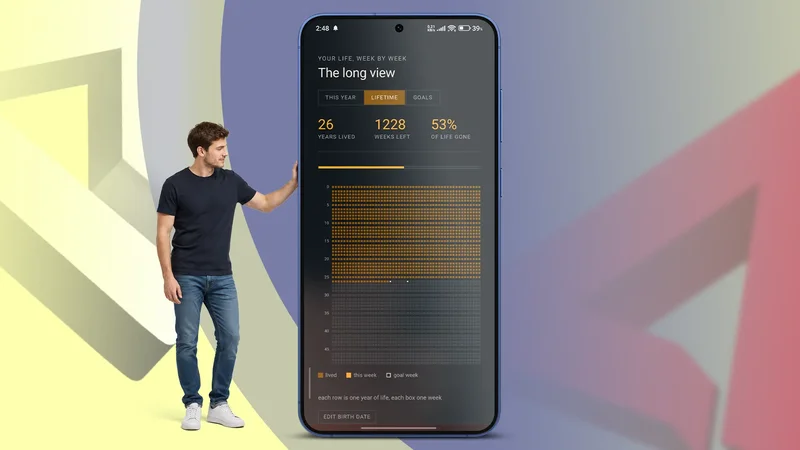
Inside the lifetime view, each row represents one year of life, and each box represents one week.
When I opened the tool for the first time, it asked for my date of birth. I could also customize the life expectancy.
It automatically filled in the “lived” boxes based on that information and keeps checking the rest as weeks pass.
It also shows the percentage of my life I’ve already lived as part of the stats.
Goals turn the calendar into a planning tool
The tool does more than count weeks
I can set both short-term and long-term goals inside the dedicated tab and can be notified in time.
Clicking the Enable Notification button triggered the usual pop-up asking for permission, and it's interesting how it works behind the scenes.
The notification feature doesn’t work the same way as it does in Google Calendar, but more on that later.
I can type a goal, set a date, and it highlights the respective week with a bright outline. Like the stats, it wouldn’t appear automatically on a sheet of paper.
The tool is working its magic on my phone!
Going from concept to a working tool
Building it with AI made the idea possible
I turned to Gemini with a simple prompt explaining the features, and it returned a single HTML file I could download and open with a browser. All the features in this first version (except notifications) worked perfectly.
Then I asked for a few minor tweaks, such as changing the font and color scheme, and adding swipe gestures for convenient navigation between the tabs. Gemini implemented the changes perfectly.
But I still needed some more assistance to install this tool as a WebAPK. This is a small native wrapper that makes the site appear as an app on the home screen. You only need to tell AI what you want.
It created custom icons, a manifest file (an informational document that contains metadata describing a set of accompanying files), and a service worker (necessary for notifications).
I hosted all the files in one place on an HTTPS server, which is all Google Chrome needs to create the WebAPK file.
I don’t have to worry about data privacy
No data leaves my phone unless I share a screenshot
When I opened this file through the HTTPS site, Chrome allocated a part of my phone’s storage to it. Every site gets its own sealed-off storage. No other site I visit can access this data.
But what about the host, the server the files are sitting on? It never sees any of this. There’s no code in the tool that sends data to it after the initial load.
To be clear on one thing: “Installed as an app” is a bit of an illusion. The rendering and storage are still handled by Chrome’s engine, just wrapped to look and feel like a standalone app on the home screen.
Not everything about this Life Calendar tool is perfect
The limitation of building by asking
The first limitation of building by asking and doing the bare minimum setup is that I’ll lose all data if I uninstall Chrome.
The second (and more important) is that it cannot sync my data between multiple devices or notify the way Google Calendar does. The reason behind this is worth explaining.
Your Google Calendar is registered to a server. Every event you add is uploaded to the server immediately. Your phone and laptop are not talking to each other, but to the server.
The server is also what triggers a real push notification: It keeps track of what’s coming up. At the right moment, it reaches out through Google’s notification system to wake up your phone and show you the alert.
None of that requires you to have the app open or running in the background.
Google Calendar can also talk to the OS (using a local OS scheduling API) and trigger a notification when you’re offline.
When I add an event while offline, the app skips the server and hands the OS a future wake-up call. This way, you never miss a notification.
The tool I built with Gemini doesn’t have access to Google’s notification system or the local OS scheduling API (yet).
Instead, it relies on a different mechanism for notifications. It’s a small script that keeps running semi-independently and is the only way Chrome will allow displaying a notification on Android.
The check only runs when I open the app, or every 60 seconds while it’s open.
What using it every day taught me
It changed how I think about time
I have this Life Calendar tool next to a social media app on my home screen that accounts for a big chunk of my daily screen time.
Now, thanks to this tool, I can see the % of Year Gone ticking up by 1% every few days. My goals for each week are also outlined on the same page.
A printed Life Calendar inspired me through the way it made time visible.
Building a digital version transformed that idea from something I’d occasionally look at to something that can remember my goals and notify me when it’s running in the background.