TechRadar Verdict
The Turtle Beach Command Series KB5 is a large mechanical gaming keyboard with an unimpressive plastic construction. The included wrist rest is a welcome and comfort-increasing addition, though, and the ultra-low profile keycaps are easy to navigate. However, they require a relatively heavy touch to actuate, and the sheer width of the board can interfere with mouse swipes. These flaws are hard to swallow at this price point, as there are better made and better value alternatives out there.
Pros
- +Useful touchscreen display
- +Nicely damped switches
- +Comfortable wrist rest
Cons
- -Deep actuation point
- -Very wide
- -Cheap-feeling build
Why you can trust TechRadar
Turtle Beach Command Series KB5: One-minute review
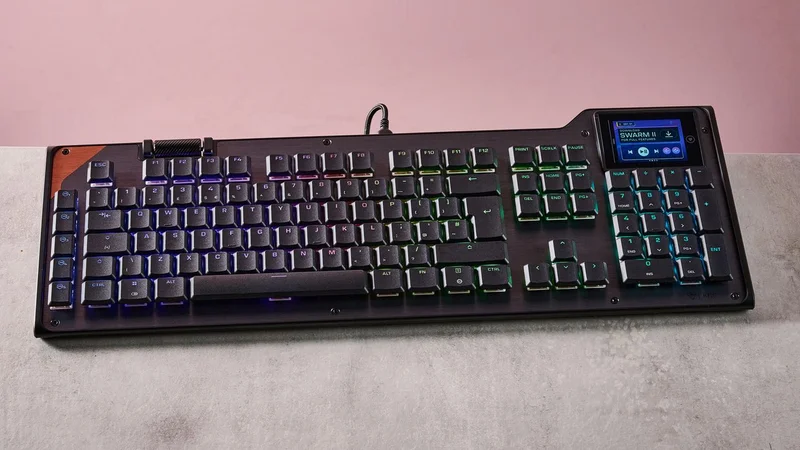
The Turtle Beach Command Series KB5 is a full-size keyboard with an interesting display module that has more functionality than many others.
However, the board fails to make a great first impression. It looks dated with its unnecessary angles, while the plastic materials feel cheap. The brushed metal face plate is a nice touch, though, as are the floating double-shot PBT keycaps. It’s also quite a light unit, especially so for a keyboard this size.
The included wrist rest also feels like a low-grade plastic, and doesn’t attach magnetically like those bundled with some of the best gaming keyboards. Instead, it relies on a somewhat fiddly — but ultimately secure — mechanical attachment. And despite its lack of padding, its ergonomic contours offer sufficient levels of comfort. The rest also helps to make up for the KB5’s shallow tilt angle, even with the two-stage feet propping it up.
The standout feature of the KB5, though, is its interactive touchscreen in the top-right corner of the unit. It lacks the responsiveness we’ve come to expect of modern touchscreens, taking multiple swipes and taps for it to register them. However, it has a lot of useful functions and features, with plenty of settings for the KB5 itself, as well as a wealth of customizable shortcuts and readouts for Windows and various apps.
These shortcuts can be customized using Turtle Beach’s Swarm 2 software. There are a wide variety of templates to choose from, but you can also create your own shortcut clusters from a wide selection of widgets. The software also has a generous selection of remapping and macro options, although there aren’t any performance-related adjustments. I wish it provided more explanations for its features, too.
In action, the KB5 performs reasonably well. The keycaps have a very low profile, which makes them easy to glide over, while the switches are satisfyingly damped. However, presses are a little heavier than you might expect, sometimes resulting in taps failing to register, especially if you have a light touch. This is more of an issue when typing than gaming.
The WASD position is comfortable and the keys are well spaced, making it easy to reach them. I could easily hit the space bar flush, thanks to its low profile and generous slant. However, the sheer width of the board can result in collisions when swiping your mouse vigorously.
Sign up for breaking news, reviews, opinion, top tech deals, and more.
At $150 / £140, the KB5 isn’t exactly a budget-friendly board, and is especially dear for one with no wireless connectivity and a less-than premium construction. The integrated touchscreen and large layout make up for this somewhat, but the fact remains there are better value rivals if you don’t need all those keys and a sophisticated display.
Turtle Beach Command Series KB5 review: Price & availability
- $149.99 / £139.99 (about AU$210)
- Available now in one colorway
- Reasonably expensive for a wired mechanical keyboard.
The KB5 costs $149.99 / £139.99 (about AU$210) and is available now in one colorway. It comes with a braided USB cable, an attachable wrist rest, and extra WASD keys with a grippier texture. You can remove the stock ones using the included keycap puller.
This is quite expensive for a wired mechanical keyboard. Granted, it’s a full-size board with plenty of keys, but it lacks the premium build of some of its cheaper rivals, such as the MonsGeek FUN60 Ultra. This is an extremely solid unit, and its gaming performance is as good if not better than the KB5’s, with its analog switches providing more adjustability. It also has multiple wireless connectivity modes.
Then there’s the Razer BlackWidow V4 Pro. This is vastly more expensive than the KB5, but it’s one of the best performing mechanical keyboards I’ve ever used, and its software and build quality are superior. What’s more, its included wrist rest is far more plush, and it also has multiple wireless modes.
- Value score: 3.5 / 5
Turtle Beach Command Series KB5 review: Specs
| Layout | Full-size |
| Switch | Mechanical (Titan Low-Profile Linear) |
| Programmable keys | Yes |
| Dimensions | 18.8 x 6.9 x 1.1 inches (477 x 175 x 27mm) |
| RGB or backlighting | Yes (customizable) |
Turtle Beach Command Series KB5 review: Design & features
- Gamer-ish design
- Cheap-feeling plastics
- Useful integrated display
The KB5 leans into the gamer aesthetic, with its odd contours along the top edge and flashes of brown. Personally, I found this look a little garish and quite dated, although I did like the brushed metal front plate and its countersunk screws, which are prominently displayed. These are also quite practical since they’re easily accessible.
Overall, the build quality is less impressive. The plastic of the chassis feels cheap, although in fairness it’s also quite light, which means this large keyboard isn’t a chore to move around. Another plus is the keycaps are made from double-shot PBT, the gold standard keycap material, and they’re solidly fitted.
The notching on the cylindrical volume wheel feels good too, making for easy flicks while at the same time offering fine control. However, it can be hard to press inwards to mute without accidentally triggering a scroll.
A wrist rest is included with the KB5, which is always a welcome addition in my view. However, it appears to be made from the same cut-price plastic as the keyboard itself. And while it actually attaches to the keyboard, it requires snapping latches in place, which is certainly less elegant than the magnetic method utilized by many others.
On a more positive note, the display in the top-right corner is larger, sharper, and more interactive than many others I’ve seen integrated in keyboards. It also has touchscreen functionality, although this is fairly rudimentary and gestures often require repeating two or three times before the display responds. Also, the texture of the screen itself is a little grippy, which can hamper swipes.
Nonetheless, it offers a lot of features. By tapping the left side of the screen, you can access three pages of settings for the KB5, with options to toggle ReacTap (Turtle Beach's Rapid Trigger function), remap keys, and alter the RGB backlighting, to name a few.
There are also three pages of widgets, with each page containing a cluster of six. These can be customized using Swarm 2, Turtle Beach’s peripheral software. You’ll find a large selection of template clusters to choose from, catering to various use cases. For instance, there’s a gaming one that features a shortcut widget for opening Steam, while the other widgets display CPU and GPU loads and temperatures. There’s also a template for general productivity, with widgets for copying and pasting and opening Windows’ Calculator app.
You can also edit and create your own templates by selecting each individual widget. In addition to common Windows commands and multimedia controls, there are app-specific widgets for Steam, OBS, Steamlabs, and Discord. There are also those under a section labelled ‘CS’, although it’s unclear what game or games in the Counter-Strike series these widgets are compatible with. All I can say is that they failed to work with Counter-Strike 2 when I played it.
Swarm 2 features other customizations, including key reassignment. There is a generous selection of shortcuts you can assign, and four mapping layers to choose from: primary, Fn, Game Mode, and Easy Shift. You can also remap the scrolls and button of the volume wheel, which isn’t always possible on gaming keyboards. More impressively, the wheel has the same four layers of assignments available to it.
There are a wealth of preset macros to choose from as well, not only across a broad selection of games, but also for other software such as Photoshop. However, a lot of the other macros are quite basic, merely boiling down to simple inputs and system commands.
During my time with Swarm 2, it performed well without any major bugs or glitches occurring. There were times when the RGB backlighting failed to turn on, but whether this was an issue with the app or the keyboard’s own firmware, I can’t say. Regardless, I managed to get it working again by unplugging and replugging the USB cable, or by turning the lighting off then on again in the app.
Swarm 2 is easy to use and navigate, although it could do with more explanations for some of its features. For instance, I couldn’t find any explanation as to how to access the Easy Shift and Game Mode layers, and the ReacTap feature isn’t toggleable anywhere in the app, only via the integrated screen. Neither location explains what it does or how it works; I had to gather this information from Turtle Beach's website.
- Design and features score: 3.5 / 5
Turtle Beach Command Series KB5 review: Performance
- Very low-profile keys
- Deep actuation point detrimental to typing
- Board width can hamper mouse movement
In general, the KB5 is a capable gaming keyboard. Its Titan mechanical switches are damped to a large degree, making them tactile and relatively quiet, although a certain clickiness emanates from key presses.
The keys also have a very low profile, perhaps the lowest I’ve ever come across. I appreciated this when typing, since I could glide between them easily, but their actuation point is deeper than you might expect, resulting in hits often failing to register when I typed quickly.
Thankfully, this is less of an issue when gaming. Also, the indents on the keycaps offer a secure hold, while the WASD position is comfortable thanks to the spacing of the keys, which is large enough to avoid feeling cramped, yet all the peripheral keys are still easy to reach. What’s more, the space bar slopes downwards slightly, making flush hits easier to achieve.
However, the KB5’s lack of tilt is slightly disappointing. Despite having two stages, the feet don’t create much of an angle, which is something I often lament in gaming keyboards. The included wrist rest does make up for this somewhat, thanks to its sloping design, and it’s comfortable to use. Despite the lack of padding, a bigger issue with the KB5 is its sheer width. If you like using a low DPI setting for your mouse and need to make large movements, you may find yourself slamming into the side of the board.
- Performance score: 3.5 / 5
Should I buy the Turtle Beach Command Series KB5?
Scorecard
|
|
|
|
| Value | It may be full-size and have mechanical switches, but its plasticky build and wired-only connectivity diminish its value. | 3.5 / 5 |
| Design and features | Fairly light for a full-size board, and the included wrist rest is comfortable, but the plastic-heavy construction and finicky touchscreen are downsides. | 3.5 / 5 |
| Performance | The low-profile keys are easy to glide around, but the actuation isn’t snappy enough and the wide layout can get in the way of mouse swipes. | 3.5 / 5 |
| Overall | The KB5 has some interesting features, but a few issues hamper its performance, and build quality lags behind others in the space. | 3.5 / 5 |
Buy it if…
You want an interactive screen
The KB5 has a unique touchscreen that gives you access to various settings and customizable widgets.
You want keys with a very low profile
This board has the lowest key profile I think I’ve ever seen, and they feel great.
Don't buy it if…
You have large mouse swipes
Given how wide the KB5 is, you need to take care with large mouse movements.
You have a light touch
The switches’ actuation point is deeper than their low profile might lead you to believe, which can result in taps failing to register.
Turtle Beach Command Series KB5 review: Also consider
Monsgeek FUN60 Ultra
For a lot less than the KB5, you could have the FUN60 Ultra. It has analog rather than mechanical switches, but I found them to be very tactile, and their actuation, along with a load of other parameters, can be adjusted to suit your preferences. Not only that, but it has a much more solid build than the KB5, and features 2.4GHz and Bluetooth connectivity modes. Read our full Monsgeek FUN60 Ultra review.
Razer BlackWidow V4 Pro 75
It may be a lot more expensive than the KB5, but the BlackWidow is just about the best mechanical keyboard I’ve ever used. The switches feel excellent, while there are plenty of customizations courtesy of Razer’s Synapse app. This too has both 2.4GHz and Bluetooth modes. Read our full Razer BlackWidow V4 Pro 75 review.
How I tested the Turtle Beach Command Series KB5
- Tested for a few days
- Performed various tasks
- Plentiful gaming keyboard experience
I tested the KB5 for a few days, during which time I used it for gaming, general browsing, and working.
I played various games, including Counter-Strike 2, a great title for revealing the true performance of peripherals, given the demands it places on the speed and accuracy of inputs.
I’ve been PC gaming for over a decade, and have used a great many keyboards in that time. I’ve also reviewed a large number of them, from small budget models to large premium offerings, across a wide range of brands.
- First reviewed: August 2026
- Read more about how we test
Lewis Maddison is a Reviews Writer for TechRadar. He previously worked as a Staff Writer for our business section, TechRadar Pro, where he gained experience with productivity-enhancing hardware, ranging from keyboards to standing desks. His area of expertise lies in computer peripherals and audio hardware, having spent over a decade exploring the murky depths of both PC building and music production. He also revels in picking up on the finest details and niggles that ultimately make a big difference to the user experience.