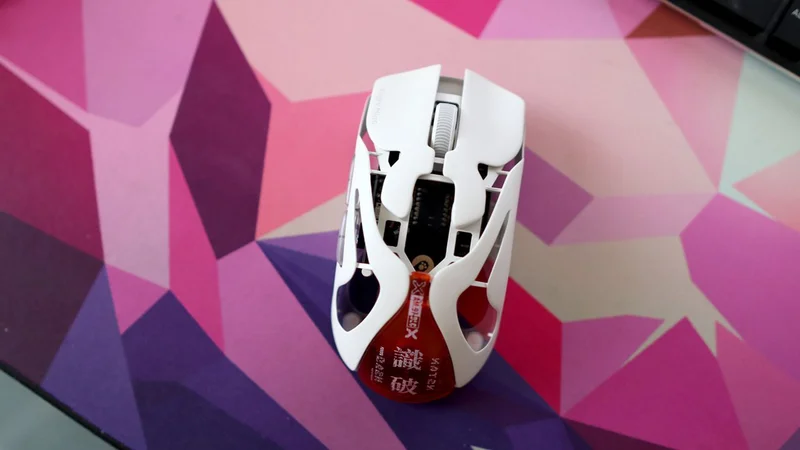
AngryMiao AM Infinity.97: two-minute review
It seems everyone and their dog is betting on where the high end gaming mouse market is going next, and the AngryMiao AM Infinity.97 is betting big on super light and powerful mice that nail the basics.
Okay, we've already seen this with the Razer Viper V4 Pro, but AngryMiao takes a different approach, with a heavily perforated chassis that looks like it's escaped from a sci-fi film rather than the gaming section of a branch of Currys or Best Buy.
Look past the aesthetics, though, and there's a genuinely accomplished mouse underneath. A sub-50g weight with or without a battery, a zippy 30,000 DPI PixArt PAW3950 sensor and true 8000Hz wireless polling put it right up there with the best ultralight mice I've tested this year, and its swappable battery system is a genuinely clever solution to the age-old wireless mouse problem of battery anxiety, with spares stashed inside the wireless receiver box for whenever you need them.
Latest Videos From
(Image credit: Future)
It's not a mouse without its flaws, though. The companion software is basic and has an annoying habit of running in the background, there's no dedicated DPI button or clutch anywhere on the chassis, and at $189 it's more expensive than its direct rivals. Whether that's a dealbreaker depends on how much you value standing out from the crowd.
That's ultimately what I feel you're paying for here. The AM Infinity.97 looks and feels like nothing else on the market, and backs that up with performance that goes toe-to-toe with mice from far bigger names. If you want a boutique ultralight mouse that doesn't sacrifice substance for style, this is one of the most compelling options I've tested all year.
AngryMiao AM Infinity.97 review: Price \& release date
- $189 (approx £141/AU$270)
- Released in January 2026
- Towards the top end of the market
The AM Infinity.97 costs $189, and that puts it right at the top of the ultralight gaming mouse market against some genuinely excellent competition. The Logitech G Pro X2 Superstrike costs $179.99, and the Razer Viper V4 Pro is $159.99 — meaning AngryMiao's boutique option is comfortably the priciest of the three.
It launched in January 2026 as the slightly smaller brother to the brand's original AM Infinity mouse, offering a different take on the highly competitive ultralight mouse sector from a brand better known for its keyboards than such potent mice.
Sign up for breaking news, reviews, opinion, top tech deals, and more.
For the price, it's competitive in features, too, with a flagship wireless sensor and polling rate specs, clever swappable batteries and a magnesium alloy chassis that's lighter than both Razer and Logitech's choices. In terms of features. It's perhaps closer to the Viper V4 Pro in that it seeeks to nail the basics of being a competitive ultralight mouse, rather than introducing new features such as rapid trigger, as the G Pro X2 Superstrike does.
AngryMiao AM Infinity.97 review: Specs
Swipe to scroll horizontally
| | |
| --- | --- |
| Sensor | PixArt PAW3950 |
| DPI | 100 - 30,000 |
| Polling Rate | 125 - 8,000Hz |
| Connectivity | Wired, Bluetooth, 2.4GHz Wireless |
| Switches | TTC Orange Dot Optical V2 |
| Weight | 39g (without battery), 47g (with battery) |
| Battery | 340mAh swappable (up to 165 hours at 1KHz) |
AngryMiao AM Infinity.97 review: Design
- Sci-fi-inspired looks
- Magnesium alloy chassis keeps things sturdy
- Software has very little frills
AngryMiao is a brand I associate more for its wacky keyboards than mice, but its house style is unmistakeable. As with the likes of Gravastar, it leans into a sci-fi aesthetic with a perforated chassis in keeping with the older guard of what ultralight gaming mice used to look like.
Intriguingly, it's slightly smaller than rivals, too, being only 97% of the size of a standard gaming mouse. That's because of AngryMiao's own market research that demonstrated this kind of size was what players preferred, not least for a mouse designed more for claw grippers than palm or fingertip users. Saying that, I had no issues using this high-power rodent with my usual palm grip, and the little orange piece on the rear of the chassis acts as a useful grip that does more of the heavy lifting than you might initially expect.
The AM Infinity.97 is available in three colors: black, white, and pink. I asked for my sample in the vivid pink, but ended up with a white one – no harm done, though, as it's a nice white that's almost got a creamy, off-white hue in some lighting environments.
(Image credit: Future)
At 47g with the battery in, it's one of the lightest mice I've used this year, and pulling out the battery for wired use drops that to a genuinely absurd 39g. That's a fair bit lighter than both Logitech and Razer's choices, although not quite as light as the Corsair Sabre V2 Pro, which weighs 36g with its internal battery.
That lightness doesn't feel flimsy, either. The AM Infinity.97's chassis is magnesium-aluminium alloy, and it's properly sturdy under the fingers, with gentle contouring to to sit well in the hand and a cool metallic touch that's oddly pleasant during longer sessions.
The button layout here is sensible, with two main clickers and a scroll wheel on top, side buttons within easy reach on the left, and a Bluetooth/2.4GHz toggle tucked underneath. What you don't get is a dedicated DPI button – an odd omission at this price, and the first real crack in an otherwise polished package. The main clicks use custom TTC Orange Dot Optical V2 switches, and I've become a big fan of these in my two weeks with this mouse. They're snappy and positive under finger, and because they're optical rather than mechanical, they're also noticeably quicker to register than more traditional gaming mice.
(Image credit: Future)
Okay, there isn't the rapid trigger or haptic feedback you'll get from the Logitech G Pro X2 Superstrike, but the short, sharp travel with ample tactility still feels pleasantly brisk and solid under finger.
If there's one area where things get less impressive for this AngryMiao mouse, it's th software. Being a web-based UI means things should be lightweight, although it's paired with a a downloadable executable that has an annoying habit of nibbling away at system resources you'd rather it left alone when running in the background.
(Image credit: Future)
When you do open it, it's easy enough to navigate, but there isn't much to it — DPI and polling rate, remapping, macros, profiles, lift-off distance and acceleration is about where the feature list ends. The bigger brand rivals offer much more complete software customisation.
AngryMiao AM Infinity.97 review: Performance
- Flagship 30,000 DPI sensor
- 8000Hz wireless polling
- Innovative swappable batteries
AngryMiao has fitted the AM Infinity.97 with a 30,000 DPI PixArt PAW3950 sensor, one I've put through its paces in plenty of other mice as a top-end flagship sensor, and it's every bit as sharp and responsive here either for general navigation or for getting stuck into Counter Strike 2 – my usual test for peripherals.
You won't get away for using the full 30,000 DPI all the time, as it turns this rodent into a jittery nightmare, hence why it can be moved down to a number of preset levels between 100 and 30,000 DPI in the mouse's software. Somewhere between 1600 DPI and 3200 DPI is where I ended up, preferring the former for more precise aiming in CS2, and the latter for navigating Windows and productivity workloads.
Alongside the beefy sensor, the AM Infinity.97 benefits from true 8000Hz polling across both wired and 2.4GHz connectivity, plus you get Bluetooth as an added bonus. In my testing, both wireless connectivity methods felt rock solid throughout testing, whether I was on Bluetooth with a MacBook Pro or the 2.4GHz receiver box on my Windows gaming PC.
(Image credit: Future)
As much as 8000Hz wireless polling isn't the standout feature it was a couple of years ago, and its efficacy for normal folks is debatable, it's still very nice to see for a competitive oriented rodent such as this AngryMiao choice. It's something competitive players will feel more than us normal folks, but is still handy for peace of mind your mouse is performing at its best.
The fact is that the high DPI sensor, fast wireless polling, superlight chassis and snappy optical switches combine to make the AM Infinity.97 one of the best gaming mice I've tested this year, and I've given both the G Pro X2 Superstrike and Viper V4 Pro a run for their money, too. I'd wager it's closer in philosophy to Razer, nailing the fundamentals rather than throwing haptics and rapid trigger into a light chassis the way Logitech does — but as a first impression, it's a knockout.
I found its low mass makes wrist flicks and sweeping CS2 movements almost effortless, while those optical switches give you brisk, satisfying clicks and its sensor felt dead accurate to boot.This is a mouse that nails the basics and turns that into something genuinely excellent.
The AM Infinity.97 also has one further trick up its sleeve with a feature I've only seen on a couple of other gaming mice – the Glorious Model O3 and D3 Wireless – with swappable batteries. In this instance, the batteries clip on magnetically to the underside of the mouse, and can be swapped out for a spare kept inside the 2.4GHz wireless receiver box that connects to your PC with the bundled USB-C to USB-A cable.
(Image credit: Future)
The mouse also works wired, so a dead battery is never really a crisis. What you don't get is an internal backup cell, meaning if both external batteries die, you're out of luck until you plug in – Glorious has a 'Guardian battery' inside the mouse chassis itself, which is the one area where I think they win.
This swappable battery system leads AngryMiao to claim 'infinite' battery life in its marketing bumf, although a little further down the product page, it's more reasonable. With 1,000Hz polling, you'll see up to 165 hours, while at the full 8,000Hz, this drops to up to 30 hours. For reference, I was getting between 25 or so hours on a charge on one battery with 8,000Hz enabled, demonstrating just how thirsty a higher polling rate continues to be.
- Performance score: 4.5 / 5
Should I buy the AngryMiao AM Infinity.97?
Swipe to scroll horizontally
AngryMiao AM Infinity.97 scorecard
| Attribute | Notes | Score |
| --- | --- | --- |
| Design | The AM Infinity.97 features adistinctive sci-fi-inspired magnesium alloy chassis that's remarkably light without sacrificing rigidity, plus sensible button placement and snappy optical switches. Basic software and the lack of a dedicated DPI button are the only real drawbacks in my book. | 4.5/5 |
| Performance | We've got flagship-grade sensor performance, true 8,000Hz wireless polling and excellent optical switches that combine to deliver one of the fastest, most responsive ultralight gaming mice I've tested, with clever swappable batteries adding genuine practicality. Just watch out for the drop-off if using 8,000Hz polling all the time. | 4.5/5 |
| Value | It's the most expensive of the other two rivals I've put the AM Infinity.97 against, but you can get it more affordably on sales, and it's still very competitive given the feature set. | 4/5 |
| Average Rating | The AM Infinity.97 is a striking mouse from a brand better known for its keyboards, and it backs up the looks with genuine substance. It's one of the most responsive, comfortable ultralight mice I've used all year, with a genuinely clever swappable battery system to boot. Basic software and a steeper price than its rivals stop it from being such an easy recommendation, but as a statement piece that also performs, it's a very compelling option. | 4.5/5 |
Buy it if…
Don’t buy it if…
Also consider
How I tested the AngryMiao AM Infinity.97
(Image credit: Future)
- Tested over two weeks of use
- Used across both Windows and macOS
- Extensive gaming mouse review experience
I used the AM Infinity.97 for a couple of weeks across both a Windows gaming PC and a MacBook Pro, testing it over Bluetooth, the bundled 2.4GHz receiver, and wired via USB-C.
Counter-Strike 2 formed the backbone of my performance testing, given how heavily it leans on quick, accurate mouse movement, alongside general everyday use for browsing and productivity to assess comfort and grip over longer sessions. I also used the web-based software extensively to test each of its functions.
I've been a tech journalist for the best part of a decade, and have reviewed plenty of gaming and productivity mice in that time from brands big and small from up and down the price ladder.