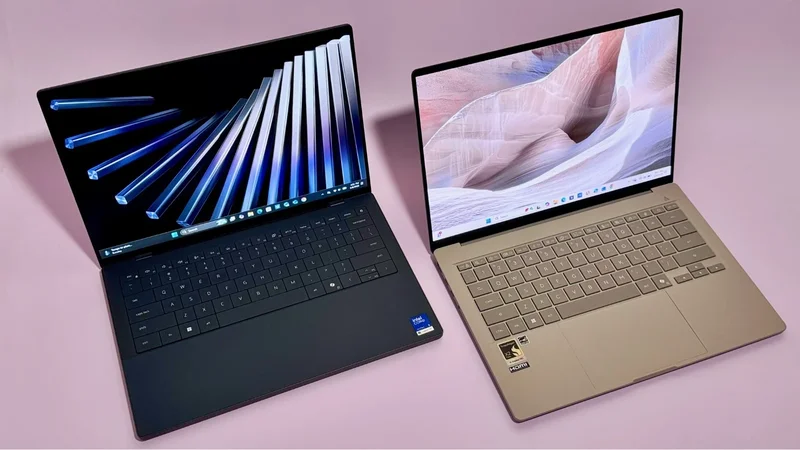
Apple MacBooks are some of the best laptops on the market, bar none. They're incredibly fast, they won't die on you mid-workday, and they're exceptionally well-made. Even after some price hikes this summer, Apple laptops still offer pretty good value for the money.
Still, not everyone wants a MacBook. Maybe you like having lots of customization options; Apple doesn't make laptops with 2-in-1 designs, OLED displays, or touchscreens (yet). Maybe you prefer Windows or ChromeOS over macOS, or the software you rely on forces your hand. MacBooks have gotten better for gaming, but Windows laptops still own that realm. And Android phones don't work as seamlessly with Macs as they do PCs. Whatever the reason, I put the best MacBook alternatives of 2026 to the test and landed on eight worthy rivals to the MacBook Air, Pro, and Neo.
Overview
These are the tech, tools, and products — from laptops to e-readers, from earbuds to robovacs, and more — that Mashable ranks best in class.
Table of Contents
Which Windows laptops can beat Apple?
We've added over 80 laptops to our testing database in the last two years, and a number of them can beat Apple in different ways. The HP OmniBook 3 16 with the Snapdragon X chip has a bonkers 40-hour battery life, far outpacing MacBooks. In the budget category, the Acer Chromebook Plus Spin 514 likewise beats the MacBook Neo in battery life.
And in terms of performance, while the MacBook Air (M5) and MacBook Pro (M5) have impressive single-core scores on Geekbench 6, Windows Ultrabooks like the Asus Zenbook A14 beat both devices in multi-core performance.
What I look for in the best MacBook alternatives
IMO, a Windows laptop or Chromebook is doing a good MacBook impression if it has above-average performance, long battery life, and a sleek, polished design. Basically, it's a very good Windows laptop or a top-tier Chromebook. I'll add some extra qualifiers depending on the exact Mac model:
- MacBook Air alternatives should be super lightweight and portable
- MacBook Neo alternatives should cost well under $1,000
- MacBook Pro alternatives should have a crisp, rich 120Hz display and enough power for intensive tasks like video editing
As of July 2026, I've found seven worthy alternatives from Asus, Acer, Dell, and HP, all of them rigorously tested. I believe these PCs are the top MacBook alternatives for buyers in 2026. I've also lined up a fallback option for those who want to stay within the Apple ecosystem.
The Good & The Bad
- Outperforms the M5 MacBook Air and Pro in multi-core tasks
- MacBook-beating battery life
- Lighter than a 13-inch MacBook Air, yet still durable
- Pretty OLED display
- Creamy keyboard
- Better mix of ports than a MacBook Air
-
A good value
-
Second-rate webcam and speakers
- Display isn't as crisp
- No haptic touchpad
- Some compatibility issues
Who it's for
The latest Zenbook A14 is a close-to-perfect pick for most Windows users who want an ultraportable that's just as snappy and fairly priced as a MacBook Air, but much longer-lasting. It's especially great for frequent travelers and commuters.
Why we picked this
The 2026 Zenbook A14 overachieves on performance and battery life. It runs on Qualcomm's peppy new Snapdragon X2 Elite chip, which I can't hype enough. It's just 10 percent slower than the M5 Air in single-core tasks like sending emails and web browsing (so they're effectively equals there). In multi-core workloads like video editing, it's 20 percent faster than the M5 Air — a difference you're more likely to feel in practice.
Stamina-wise, the Zenbook A14 is an endurance sprinter. It was able to loop a video for 27 hours and 36 minutes straight before dying, surpassing the M5 Pro, our reigning battery life champ among Apple computers, by 6.5 hours. (Compared to the latest Air, it offers 10 extra hours of battery life.) It's the fourth-longest-lasting laptop we've ever tested in our decade-plus of reviewing them.
The Zenbook A14's chassis is made from Asus' proprietary "Ceraluminum" material, which is smudge-proof and ultra-light yet rigid. It weighs only 2.4 pounds, which makes it 0.3 pounds lighter than the Air. It comes in a tan finish with gold accents and a matte texture that reminds me of pottery. (I think it's refreshing in a world of boring silver laptops — it looks unique without being obnoxious.) Its crown jewel is its bright 14-inch OLED screen, which is more colorful than a MacBook Air's display, if not quite as crisp. Its keyboard is another standout feature: It has a pleasantly smooth, "creamy" feel. It comes equipped with an HDMI port, two USB-C ports, a USB-A port, and an audio jack, so it offers way more connectivity options than the Air.
Details
The Good & The Bad
- Better battery life than the MacBook Neo
- More RAM than the Neo
- Sleek design; well-made for a Chromebook
- Fast for a Chromebook
- 120Hz touchscreen
- More ports than the Neo
-
Sharper webcam than the Neo
-
Pricey for a Chromebook; more expensive than the Neo
- Slower performance
- Slower storage
- Dimmer screen
- Plastic keyboard cover
- No fun colors
Who it's for
A Chromebook might make more sense than the MacBook Neo if you're a very casual user who mainly works in Google apps. The Acer Chromebook Plus Spin 514 is a premium hybrid model from late 2025 that's better-made and more power-efficient than most other options in its class. It can pull double duty as a tablet for those who like doodling or taking notes by hand.
Why we picked this
The 2-in-1 Chromebook Plus Spin 514 is one of the nicest (and most expensive) Chromebooks I've ever tried. Many of its kin have cheapo, all-plastic builds, but it only has a plastic keyboard deck — the rest is silvery aluminum. It's a very professional-looking machine. Additionally, its hinge is strong and doesn't creak when you rotate it. While its touchscreen display isn't as clear or bright as the Neo's Liquid Retina setup, it has an upscale 120Hz refresh rate. I'm also a fan of its clicky, comfortable keyboard.
Its MediaTek Kompanio Ultra 910 chip is one of the fastest processors you'll find in a modern Chromebook, but don't get your expectations too high. In multi-core scenarios, it's 18 percent slower than the Neo's A18 Pro chip. While we didn't record its single-core score, assume it's much worse — the Neo is a single-core speed demon. (Based on other publications' benchmarking, it looks like the Neo is about 40 percent faster in single-core workloads.) Still, the Chromebook Plus Spin 514 is a competent performer for what it is. It's particularly apt for cloud gaming when you factor in that 120Hz display.
The Chromebook Plus Spin 514 lasted 18 hours and 11 minutes in my testing, beating the Neo by three and a half hours. It's the longest-lasting Chromebook we've ever tried, leaving some fancier Windows laptops (and even the latest MacBook Air) in the dust. So, while it may not feel as zippy as a Neo, it won't die on you as fast.
Details
The Good & The Bad
- Impeccable build quality; sleeker than ever
- MacBook Pro-level multi-core performance
- iGPU is powerful enough for AAA gaming
- Luscious tandem OLED display option; refresh rate drops to 20Hz when you're viewing static content
-
Haptic touchpad
-
Scant on ports
- Battery life is mediocre (depending on the task)
- Worse single-core performance than the Pro
- Expensive; got a price hike because of RAMageddon
Who it's for
The 2026 Dell XPS 14 is a stylish investment for aesthetic-forward power users — I'm thinking content creators who might also be occasional gamers. You're probably wishing the 14-inch MacBook Pro was even sleeker and a little more portable, and you may be getting impatient waiting for Apple's touchscreen OLED upgrade. You're definitely open to carrying around dongles.
Why we picked this
I tested two configurations of the handsome XPS 14. The one I recommend as the best MacBook Pro alternative is an upper mid-tier model with an Intel Core Ultra X7 358H processor and a dazzling tandem OLED touchscreen (an optional upgrade). It's no battery life champ, but it keeps pace with the base Pro in multi-core workloads, and its integrated GPU is excellent for demanding creative software and casual gaming.
The XPS 14 is easily one of the most elegant laptops I've ever encountered. Dell trimmed down its all-aluminum design for 2026, making it a touch thinner and nearly half a pound lighter than a 14-inch Pro. It's available in two MacBook-y finishes: graphite and shimmer (coming later this year). Its lattice keyboard takes some adjusting to if you're used to regular island-style keyboards, but it translates to a modern, minimalist look. Its seamless glass haptic touchpad looks equally clean. Its speakers are above-average for a Windows laptop — they're just a little more echoey than a MacBook's.
The XPS 14's 2.8K OLED display is a $150 upcharge that I can endorse. It's not as bright or crisp as a MacBook Pro's Liquid Retina XDR display, but it's more vibrant and just as smooth. (The standard IPS version is much duller in comparison.) Keep in mind that OLED won't be a thing on a Mac until late 2026 at the soonest.
The Core Ultra X7 chip is a close rival of Apple's M5 chip when you work it hard. It doesn't feel as snappy in single-core scenarios, but trails the current MacBook Pro by only four percent when used for multi-core tasks. (That's nothing.) What's more, the Core Ultra X7's Intel Arc B390 iGPU is comparable to an entry-level discrete graphics card. It's perfectly capable of running graphically taxing titles like Cyberpunk 2077 with the help of games' AI upscaling tech.
The XPS 14's stamina is lacking compared to the M5 MacBook Pro, though it really depends on what you're using it for. It held out for 10 hours and 19 minutes in our video rundown test, which is a full workday at least, but not great. (Its Apple counterpart ran for over 21 hours in the same test.) That said, its 120Hz OLED display dips down to just 20Hz when you're viewing static content, so it should last much longer when it's not looping a video.
If you want an XPS 14 with MacBook-beating battery life in almost any scenario, look into the $1,999.99 base model with a Core Ultra 5 325 chip. It lasted 22 hours on the dot in our video rundown test, and its refresh rate can drop to a mere 1Hz for static content. Just know that you'll sacrifice a good chunk of power: It offers 35 percent worse multi-core performance than the Core Ultra X7 version. Speed-wise, it's most akin to an M2 MacBook Air from 2022. (The cheaper Dell 14S with the Core Ultra 7 355 chip performs slightly better and lasts even longer, FWIW.)
Details
The Good & The Bad
- Outperforms the M5 MacBook Air and Pro in multi-core tasks
- Sleek and sophisticated design with an anti-smudge finish
- Beautiful 2.8K 120Hz OLED touchscreen
- Pretty thin and light
- Nice mic
-
Haptic touchpad
-
Keyboard feels a little mushy (but is very quiet)
- Dull, blurry webcam
- Expensive
- Some compatibility issues
Who it's for
The new HP OmniBook Ultra 14 is my upgrade pick for MacBook Air coveters with more wiggle room in their budgets and an eye for style.
Why we picked this
HP's premium Windows laptop comes in Intel and Qualcomm configurations; I tested a model with the new Snapdragon X2 Elite chip. It performs just as well as the Asus Zenbook A14 (above), which has the exact same CPU. As a refresher, that means it nips the heels of the M5 MacBook Air and Pro in single-core tasks but blows past them in multi-core ones. It doesn't last quite as long as the Zenbook, but it has a better battery life than the MacBook Air with just over 20 hours per charge.
Why pick the OmniBook Ultra 14 over the Zenbook A14, then? I think its design is a bit more stylish and universally appealing — I can see some people disliking the Zenbook's slabby beige shtick. It's also equipped with some premium fixings than the Zenbook lacks.
HP redesigned the OmniBook Ultra 14 for 2026, making it significantly lighter and more streamlined than last year's model. It now weighs only 2.81 pounds and measures 0.42 inches thin, making it a tad heavier than a 13-inch MacBook Air but slightly slimmer. (Its tapered base makes it look even thinner than it actually is.) It gained a brushed metallic accent around its squared edges and nixed the odd corner cutouts that used to house its ports. IMO, it's such a good example of how to make a laptop look chic and modern and interesting without going overboard on flashiness.
As for those aforementioned premium features: The OmniBook Ultra 14 has a haptic touchpad and a gorgeous 2.8K OLED touchscreen with a 120Hz refresh rate and a maximum brightness of 1,100 nits. For what it's worth, I do like the Zenbook A14's keyboard and port setup better: The OmniBook's keyboard is a lattice-style one that's a little spongy, and it only has three Thunderbolt 4/USB-C ports with a headphone jack. (To be fair, that's one more Thunderbolt/USB-C port than the MacBook Air has itself.)
Details
The Good & The Bad
- Lighter than a 15-inch MacBook Air, yet still durable
- Outperforms the M5 MacBook Air and Pro in multi-core tasks (by a lot)
- Huge, gorgeous, ultra-bright OLED touchscreen
- Creamy keyboard
- Above-average speakers
-
A solid value (tons of RAM!)
-
Muted webcam
- No haptic touchpad
- Some compatibility issues
Who it's for
The Zenbook A14's newer, larger sibling is an impeccable buy for professionals (namely, remote workers) seeking a premium Windows laptop that outshines the 15-inch MacBook Air in many ways. You'll have a tough time finding a better option if you want a sturdy ultraportable with a big-and-bright OLED touchscreen at a great price.
Why we picked this
The Zenbook A16 is the first laptop to market with Qualcomm's top-of-the-line Snapdragon X2 Elite Extreme chip, and boy, does this thing cook. There's only a nine percent difference between it and Apple's M5 chip in single-core scenarios, which is negligible. It feels so snappy compared to most other Windows laptops I've tried. In multi-core tasks, it screams past the M5 MacBook Air and Pro by up to 38 percent. It's actually the second-fastest laptop we've ever reviewed when it comes to multi-core oomph. The only machine that beats it is the 16-inch, M4 Pro-powered MacBook Pro from late 2024, which costs $3,649 as tested. (We haven't tried the latest M5 Pro or M5 Max models, but they're almost certainly faster, too — and vastly pricier.)
The Zenbook A16 lasted 16 hours and 26 minutes in our battery life benchmark. It doesn't have as much stamina as the Zenbook A14, but that's a very good number for a mega-powerful laptop with a big, vivid display. It beats the 14-hour median for the Windows laptops in our current testing database. And compared to the MacBook Air, you only lose out on an hour and 20-ish minutes of usage.
The Zenbook A16's design is almost identical to that of the Zenbook A14, but it comes with a few upgrades that give it a more premium vibe. One is its OLED display: It's much crisper and brighter, and it has a 120Hz refresh rate plus touchscreen capabilities. Additionally, the Zenbook A16 has an extra SD card slot, and its speakers sound better. (They're not quite MacBook-tier, but they're good for a Windows laptop.) The Zenbook A16's Ceraluminum build also makes the Air feel heavy. At only 2.87 pounds, it's the lightest 16-inch laptop we've ever tried. It's lighter than a lot of 14-inch models I've tested, actually. For reference, the 15-inch MacBook Air weighs 3.3 pounds — almost half a pound more.
Details
The Good & The Bad
- Gorgeous OLED touchscreen display
- As fast as an M5 MacBook Pro in multi-core tasks
- Way better for gaming than a MacBook
- Clickety-clackety keyboard
- Haptic touchpad
- Plenty of ports
- Comes with a stylus that you can use to draw on the touchpad
-
A solid value; cheaper than a MacBook Pro with the same RAM/storage
-
Very boring design; not very sleek
- Screen is dim and overly glossy
- Worse single-core performance than the Pro
- Doesn't last as long as a MacBook (but good battery life for a laptop with dedicated graphics)
Who it's for
The 2026 Acer Swift X 14 is an excellent desktop replacement for professional creatives who need the oomph of dedicated graphics for especially intensive software (and proper AAA gaming). I specifically recommend it for those who care more about MacBook-esque power than MacBook-esque looks.
Why we picked this
After testing two configurations of the Swift X 14, I prefer the $1,999.99 model with an Intel Core Ultra 9 285H processor and Nvidia GeForce RTX 5070 graphics. It's a top-tier performer with gaming prowess and good battery life, relatively speaking. (The other model I tested was a Swift X 14 AI with an AMD Ryzen AI 7 350 processor and RTX 5060 graphics, which cost $1,699.99. It offered 21 percent worse multi-core performance and only lasted 6.5 hours.)
The Swift X 14 lags behind the M5 MacBook Pro in single-core workloads, but they're peers when it comes to multi-core tasks. Its discrete GPU makes it better for raw performance in the heaviest of workloads compared to the MacBook Pro, including 3D rendering and PC gaming. It can run graphically grueling titles like Cyberpunk 2077 at super high framerates at 1080p without any AI upscaling tech turned on.
The Swift X 14 lasted 10 hours and 10 minutes in our battery life rundown test. That wouldn't be a great result if it were a regular Windows laptop, but it's excellent for one with dedicated graphics. Still, it lasts about half as long as the MacBook Pro.
Aesthetically, this is a very utilitarian laptop. It weighs about the same as a MacBook Pro, but it's boxier and a bit thicker, and it comes in a single "iron" finish. It packs plenty of ports, including two USB-C ports, an HDMI port, two USB-A ports, a microSD card slot, and an audio jack. Its keyboard has a lovely clickety-clackety feel, and its haptic touchpad is very satisfying to use. You can actually draw on it with the included stylus. (It's tricky to get the hang of it, but it functions like a built-in drawing pad.) The flashiest thing about the Swift X 14 is its 2.8K OLED touchscreen display, which has remarkably punchy colors and a buttery 120Hz refresh rate.
Details
The Good & The Bad
- Ridiculously thin and lightweight
- MacBook Pro-level multi-core performance; runs very cool
- iGPU is powerful enough for AAA gaming
- Best-in-class 2.8K OLED touchscreen with matte finish
- Keyboard has a UV coating so its keys don't look greasy
- Plenty of ports (including double-sided charging ports)
-
Haptic touchpad
-
Very expensive
- Muddy webcam
- Worse single-core performance than the Air and Pro
Who it's for
The Asus ExpertBook Ultra is a worthy investment for uncompromising Windows users who want the premium features and horsepower of a MacBook Pro in an ultraportable, MacBook Air-like form factor. If you want a lot of laptop in a little laptop, so to speak, I think you'll be very happy with it.
Why we picked this
This luxe business laptop runs on the same Intel Core Ultra X7 385H chip as the Dell XPS 14, so it can also vie with the M5 MacBook Pro in multi-core scenarios. (A negligible seven-percent difference separates their scores there.) It doesn't have as much single-core oomph as a MacBook, but it's decently snappy for an x86-based Windows laptop. Like the XPS 14, it has the very capable Intel Arc B390 iGPU that gives it as much graphics power as an entry-level gaming laptop.
That's especially impressive when you consider the ExpertBook Ultra's leanness. It's 0.01 inches thinner than a 13-inch MacBook Air and 0.3 pounds lighter, yet I was able to play Cyberpunk 2077 on it above 100fps at 1080p with the game's AI upscaling tech turned on. It avoids thermal throttling with the help of a wind tunnel-shaped cooling system featuring big, slow-spinning (read: very quiet) fans — no small feat.
The ExpertBook Ultra beats the latest MacBook Air on battery life — and the XPS 14, for that matter — lasting 18 hours and 26 minutes in our video rundown test. The MacBook Pro has a slight edge over it there.
Asus managed to squeeze a bunch of premium features onto this ultraportable. It has a smooth haptic touchpad and a great mix of ports, even double-sided Thunderbolt/USB-C ports for easy charging. Its backlit island-style keyboard has a UV coating on it that prevents its keys from looking greasy (a common plight of MacBook users). It has a magnesium-aluminum body with a scratch-resistant "Nano Ceramic" finish and two color options: Jet Fog and Morn Gray. I especially love its display, a 2.8K OLED touchscreen with a 30 to 120Hz refresh rate, 1,400 nits of peak brightness, and a matte finish reminiscent of Apple's nano-texture option for the MacBook Pro. All of these features come standard on the ExpertBook Ultra, which explains its sky-high cost.
Details
The Good & The Bad
- Almost as fast as a last-gen MacBook Air
- Much more portable than a MacBook
- Touchscreen display with Apple Pencil support
- Same webcam as a MacBook Air
- Available in fun colors
- Optional cellular connectivity
-
Also comes in a 13-inch size
-
Keyboard costs extra
- Starts with less storage (and upgrades get pricey)
- Worse battery life than a MacBook
- Only one 12GB RAM option
- Only one measly USB-C port
- iPadOS versions of some apps are different than macOS versions
Who it's for
Get an iPad Air if you desperately want to stay within the Apple ecosystem, but don't necessarily need a full-fledged MacBook. It's a smarter pick if you really care about portability, or if you'd like a device that's optimized for drawing and note-taking.
Why we picked this
iPadOS 26 introduced a "windowing" feature that lets you resize and open multiple apps at once, making iPads work as laptops. The 11-inch iPad Air with the M4 chip is our current favorite iPad for most people because it's fast and beautiful, but not as expensive as the iPad Pro.
The current iPad Air has a pared-down version of the M4 chip that powered the 2025 MacBook Air, yet our testing showed that their performance differences are basically nonexistent. In basic single-core tasks, the 11-inch iPad Air is just one percent slower than last year's 15-inch MacBook Air. In more demanding multi-core workloads, it only scored 12 percent worse. There's a slightly bigger gap between the iPad Air and the latest MacBook Air, which makes sense because it has a newer chip. Compared to the Neo, though, the iPad offers 50 percent better multi-core performance. This is all to say that Apple's tablet can hold its own against its computers. It has more than enough power for the average user in almost any scenario.
The main thing separating the iPad Air and MacBook Air here is the type of software they support. Some iPadOS versions of apps have fewer features than their macOS counterparts.
While we haven't run the M4 iPad Air through our battery life benchmark, Apple has it rated for up to 10 hours of use per charge. It can't match any MacBook on stamina, but it'll get you through a full workday without an outlet.
Let's talk design. The iPad Air is basically one big Liquid Retina display. It's just as bright, smooth, and pretty as the screen on an Air or Neo, but it has bonus touchscreen capabilities. (You can draw or take notes on it using an Apple Pencil.) It has the same elite aluminum construction as any MacBook, and it's available in four colors, including two pretty pastel shades of blue and purple. It's incredibly lean, coming in at just 0.24 inches thin and 1.02 pounds. It's almost half as thick as a 13-inch MacBook Air and over half as light. You do forfeit some connectivity there — it only has a single USB-C port; there's not even a headphone jack. But it manages to squeeze in the same great 12MP FaceTime camera as the MacBook Air and Pro.
Know that this is not the most cost-effective MacBook alternative. The iPad Air starts at $749 as of mid-2026, and the base model only has 128GB of storage (or half of what you get with the cheapest MacBook Neo). Plus, its keyboard costs an extra $269, putting you at $1,018 before any storage upgrades you might need.
Details
What's new
I made several adjustments to this guide in July 2026 based on my latest round of testing, and after checking our current picks for price and availability changes.
- The Acer Chromebook Plus Spin 514 is now the best MacBook Neo alternative, replacing the sold-out Acer Aspire 16 AI. That said, I'll be testing a couple new budget laptops in the near future that could be even better options (see below).
- The Dell XPS 14 is now the best MacBook Pro alternative. It's still a splurge compared to the MacBook Pro, but now a little less so after Apple's price changes. The Acer Swift X 14 is now the best MacBook Pro alternative for users who need a laptop with discrete graphics.
- I added the Asus ExpertBook Ultra as a new top pick. I had some build quality concerns with the pre-production unit I originally tested, but Asus remedied them in mass production. (I tried a second updated unit to verify this.)
- I added the HP OmniBook Ultra 14 as another new top pick. I can only recommend the Snapdragon X2 Elite configuration because it's the only model I've tested, but I plan on trying an Intel Panther Lake variant down the road.
Other contenders to consider
The special-edition Asus ProArt GoPro Edition bundles MacBook Pro-rivaling multi-core performance and 128GB of RAM in a rugged convertible design. It's expensive at $2,999.99, but fairly priced for how much memory it has. (An identically configured MacBook Pro costs $6,139.) Still, I can't recommend it as a MacBook Pro alternative because it has a blurrier 60Hz display. That feels like a glaring omission on a premium creator laptop.
The Acer Swift Edge 14 AI is a shockingly thin-and-light ultraportable with a 2.8K OLED touchscreen. It only costs $1,499.99 with 32GB of RAM and 1TB of storage. It would make a very good MacBook Air alternative if it wasn't such a mediocre performer: It's 48 percent slower than the latest MacBook Air in single-core scenarios and 33 percent slower in multi-core tasks. It's a closer rival to the M2 MacBook Air from 2022 when it comes to processing power. I would only pick it over the Zenbook A14 if you can't use an ARM-based laptop (see below).
I haven't tested them yet, but the new Dell XPS 13 and Acer Swift Air 14 look like very promising MacBook Neo alternatives, and the Framework Laptop 13 Pro seems like a neat repairable MacBook Pro alternative. I'll update this story once I or one of my colleagues try them.
A note about ARM-based Windows laptops
The Asus Zenbook A14, Zenbook A16, and HP OmniBook Ultra 14 run on Qualcomm Snapdragon X2 series chips. These are ARM-based chips, which are built differently than traditional x86-based Intel and AMD chips. As such, they're not compatible with as many video games and certain specialty software. This isn't an issue for most users, but if you do a lot of PC gaming or you're a college student, you should avoid them. You can read more about this in my dedicated guide to the best Windows laptops.
Mashable has been writing about laptops for over a decade, and I've personally been covering them since 2023. I also helped develop the rigorous hands-on testing process we currently use to review them. This methodology revolves around four criteria:
The laptops we review get put to work as our primary computers. This includes trying any unique software or use cases they support. We also subject all of our loaners to a multi-app/tab stress test and Primate Labs' Geekbench 6 benchmark, which measures CPU performance in common tasks. Gaming laptops get put through additional graphical benchmarking.
To gauge a laptop's stamina, we conduct a battery rundown test that involves playing a looped 1080p version of "Tears of Steel," a short open-source Blender movie, at 50 percent brightness and 50 percent volume. Ideally, we hope to get at least 19 hours of battery life from MacBooks, 14 hours from Windows laptops, and 10 hours from Chromebooks.
As we're using a laptop, we zero in on certain components to evaluate its build quality. These include the display, keyboard, touchpad, webcam, speakers, and ports. We also assess its overall aesthetic and portability.
We determine the ultimate value of a laptop by comparing its performance, design/build quality, and battery life to other laptops with similar pricing, specs, release dates, and use cases. We consider any accessories it comes with, any upgrades from its predecessor(s), and its future-proofing.
Haley Henschel is a Chicago-based Senior Shopping Reporter at Mashable who reviews and finds deals on popular tech, from laptops to gaming consoles and VPNs. She has years of experience covering shopping holidays and can tell you what’s actually worth buying on Black Friday and Amazon Prime Day. Her work has also explored the driving forces behind digital trends within the shopping sphere, from dupes to 12-foot skeletons.