I've seen those piano visualizer videos on YouTube — the ones where the keys light up in sync with what the pianist is playing. I always liked that kind of visual feedback.
So I asked myself a simple question: why doesn't this exist for flute players?
It doesn’t. Not for flute in general, and definitely not for the Indian bansuri, played and read through sargam — the Indian classical notation system, not Western sheet music.
So I decided to build it myself.
The three problems I actually wanted to solve
Before any prompting happened, I sat with what I actually wanted. Not "a visualizer" — three specific things:
- How should flute players see what they play?Sound is invisible. I wanted some kind of visual language for it — the same instant feedback a piano player gets from lit-up keys.
- How do you know when your breath is under control — or breaking?Breath is the entire game on a wind instrument. A flute player can hit the right note and still be losing control of their air support, and most players don't get any real-time signal telling them that.
- How do you turn playing into notation without the tedium?The old way to write down a song you'd learned by ear was to play it, stop, work out the note, write it, and repeat — for every single note, for an entire song. MIDI software solved this decades ago for piano: press a key, the software knows what you played. I wanted the same thing for flute — play the song once, and get sargam notation out the other end, ready for another beginner to practice from.
Nobody had built this for flute. So that became the brief I gave Antigravity.
What I asked for, and what came back
I described the three problems above almost exactly as I've written them here — real-time pitch detection mapped to sargam relative to a chosen tonic (Sa), a visual layer that responds to pitch and breath stability, and a recording mode that captures played notes as notation.
Antigravity built the scaffolding fast — pitch detection off the Web Audio API, a Canvas-based visual layer, the sargam mapping logic. But there was one bug that only showed up once I actually started playing into it.
The Sa calibration bug
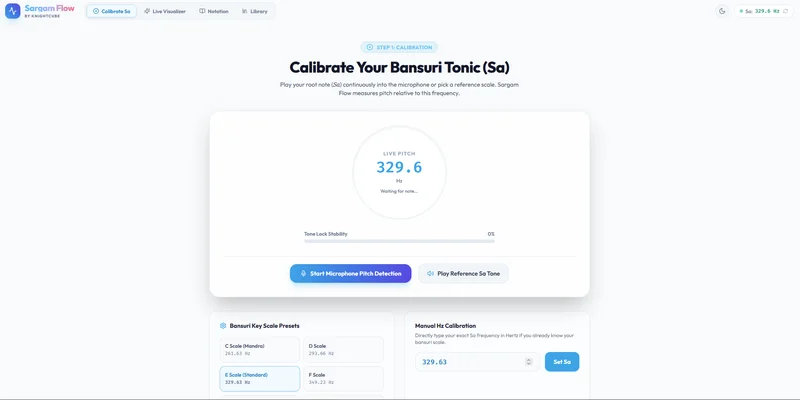
The whole system is tonic-relative — every note is sargam relative to whatever Sa (the tonic) you set. That calibration is the foundation everything else sits on. And it wasn't working. I'd calibrate Sa, and the visualizer just wouldn't reflect it — the notes coming out were mapped wrong.
I didn't touch the code. I explained the bug the way I'd explain it to a person: here's what I did, here's what I expected to happen, here's what actually happened instead. Antigravity traced it back through the pitch-mapping logic, found where the calibration value wasn't propagating correctly, and fixed it.
That's the part I think gets missed when people hear "I just prompted it." I still had to know what "correct" looked like. If I didn't understand what Sa calibration was supposed to do musically, I couldn't have told Antigravity what was actually broken — I'd have just said "it's not working," which isn't a bug report.
Chasing the right visualizer, through a lot of wrong ones
The Sa calibration bug wasn't the only thing I prompted my way through — it was just the first. Getting the visuals themselves right took far longer.
I tried several 3D visualizers at one point. They looked cool. They were genuinely fun to watch. But they seemed useless — they didn't actually help a flute player understand what they were playing, which was the entire point. Looking impressive and being informative turned out to be two different design problems, and I kept building toward the first one by accident before I caught myself.
Rather than picking one "correct" visualizer and forcing every player into it, I ended up keeping several in the app — the ones that survived the "does this actually help" test — and let players switch between them freely. Different players seem to respond to different visual languages, so instead of solving that with more debate, I just solved it with a switcher.
Adding a recording studio, because it's 2026
Somewhere in this process I realized: people don't just want to practice privately anymore. It's 2026 — most players who'd use something like this also want to post themselves playing on social media. So the visualizer needed a way out of the app, not just something to look at while practicing alone.
I added a built-in recorder that captures the webcam feed and whatever comes in through the microphone at the same time. It exports in both vertical and landscape formats, so it's ready for Reels/Shorts or YouTube without needing a separate edit.
And if the combined export isn't what someone wants, they're not stuck with it — they can download the individual pieces separately: just the webcam feed, just the audio, just the visualizer, or any mix of those. The webcam feed itself is draggable and resizable within the frame, so players can compose their own layout instead of being locked into mine.
Where it stands now
SargamFlow does everything I set out to build, and then some:
- Real-time visual feedback— multiple visualizer styles, switchable, all built to actually reflect pitch and breath rather than just look good.
- Breath-responsive visuals— light trails that shake when your breath shakes, so unsteady air support is something you see, not just hear.
- Live notation recording— play a song once, and it captures the sargam as you go. No more stopping every four notes to work out what you just played by ear. And for players who just want the notation without any visual on screen, the visualizer isn't mandatory — they can record notations distraction-free.
- Built-in recording studio— webcam + mic capture, vertical and landscape export, individual track downloads, and a draggable/resizable webcam frame for social-ready output.
It's running on localhost right now, and I'm moving it to Vercel shortly — by the time this is live, SargamFlow will be too.
The app is live now - https://sargamflow.knightcube.com/
What I'd tell another Vibe Coder
The instinct to say "AI built this" undersells what actually happened. Antigravity wrote the code. But it wrote my code — the sargam mapping, the breath-driven visuals, the tonic calibration — because I was the one who knew what those things needed to do. The prompting wasn't the hard part. Knowing what "right" looked like, musically, was.
I am going to publish a step by step tutorial on how to use the Sargam Flow App with a real instrument.